
A storage unit gate system is the integrated combination of physical gate hardware, access control software, and entry logging that governs who enters and exits a self-storage facility. It is not simply a motorized gate. The system manages credentials, records every access event with a timestamp, and connects to cloud platforms that let you update permissions, review audit trails, and automate tenant lockouts without setting foot on-site. For operators running one facility or ten, understanding how these systems work is the foundation of every security and efficiency decision you make.
What is a storage unit gate system and how does it work?
A storage unit gate system combines gate hardware, access control software, and logging into a single operational platform. The hardware side includes the gate itself, a motor operator, a control board, and safety sensors. The software side manages who has access, when they have it, and what happens when credentials are presented at the gate.
The sequence works like this:
- A tenant presents a credential at the entry point. This could be a PIN entered on a keypad, a key fob tap, a QR code scan, or a tap through a smartphone app.
- The control board receives the signal and cross-references it against the active credential database.
- If the credential is valid, the board sends a signal to the motor operator to open the gate.
- Safety sensors confirm no obstruction is present before and during movement.
- After a configured hold time, the gate closes automatically and the event is logged with a timestamp and user ID.
Cloud-based gate software connects this entire sequence to a remote management dashboard. You can update permissions in real time, push access schedule changes, and pull entry reports from any device. That scalability matters when you manage multiple locations and cannot physically be at each one.
Pro Tip: Set your gate hold time to the minimum that allows a single vehicle to clear the opening. Longer hold times are the most common cause of tailgating at self-storage facilities.

Gate types and access methods compared
Gate geometry directly affects your facility's throughput, maintenance costs, and available space. Selecting the right gate type reduces vehicle bottlenecks and long-term repair costs. The three gate styles used in self-storage are slide gates, swing gates, and vertical pivot gates.
- Slide gates roll along a track parallel to the fence line. They work well in tight spaces where a swing arc is not possible, but the track requires regular cleaning to prevent debris buildup and motor strain.
- Swing gates open on a hinge and need a clear arc in front of or behind the gate. They are mechanically simpler and less expensive to install, but they demand more physical clearance and can be problematic on sloped driveways.
- Vertical pivot gates lift upward rather than swinging or sliding. They handle debris better than slide gates and require no side clearance, making them a strong choice for high-traffic facilities with limited lateral space.
Access methods layer on top of any gate type. Each method carries different tradeoffs in cost, security, and tenant experience:
| Access method | Security level | Hardware required | Maintenance burden |
|---|---|---|---|
| PIN keypad | Moderate | Keypad unit | Low |
| Key fob | Moderate to high | Reader + fobs | Medium (fob replacement) |
| Mobile app | High | None or minimal | Low |
| QR code | High | Scanner or camera | Low |
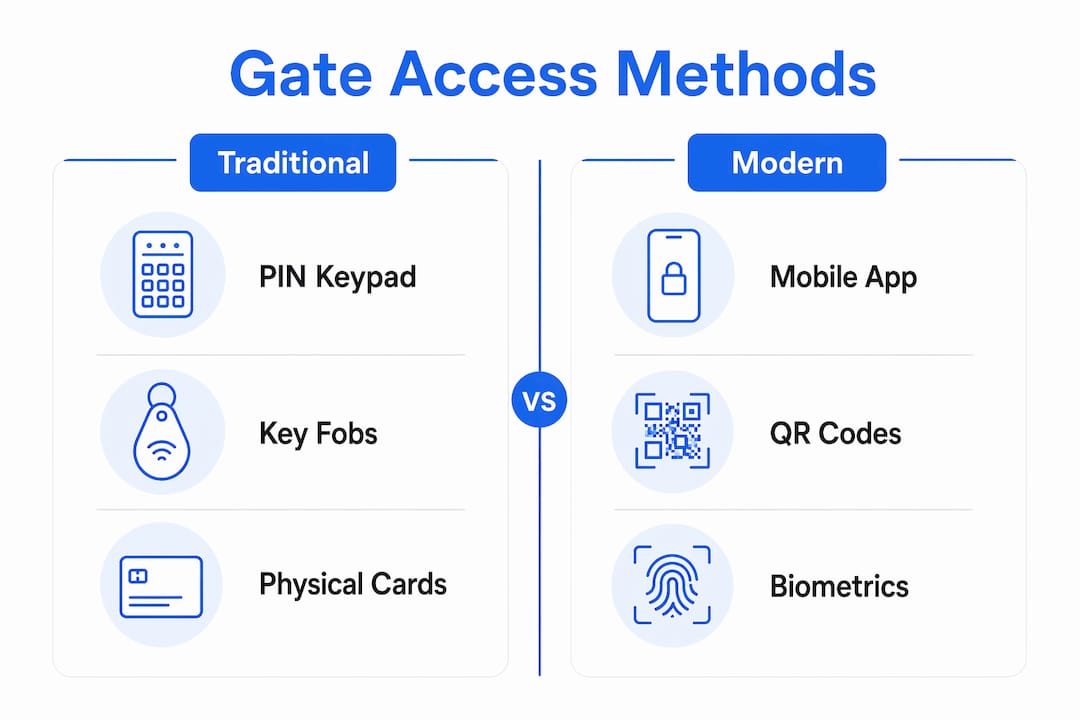
Mobile-first access eliminates hardware maintenance entirely for the tenant-facing side of the system. Tenants use a smartphone app to trigger the gate, and visitors receive time-limited QR codes that expire automatically. No shared codes, no lost fobs, and no rekeying after a tenant moves out.
Pro Tip: If your facility serves a demographic with lower smartphone adoption, deploy a hybrid setup. Keep a keypad as a backup while defaulting new tenants to app-based access.
Security and safety features in modern gate systems
Security in a gate system is not just about keeping the gate closed. It is about controlling credentials with precision and meeting the legal safety standards that protect your tenants and limit your liability.
On the credential side, every tenant should have a unique access code or digital credential. Shared codes are a security failure because you cannot trace who entered when a code is used by multiple people. Automated tenant lockouts tied to billing solve the delinquency problem without manual intervention. When a tenant's payment fails, the system revokes access automatically. When payment clears, access restores. No phone calls, no staff time, no awkward confrontations at the gate.
On the physical safety side, two federal standards govern automated gate operation:
- UL 325 covers the gate operator and controller. It requires that the motor, control board, and wiring meet specific safety thresholds to prevent electrical hazards and unintended operation.
- ASTM F2200 covers the physical gate structure itself, focusing on entrapment hazard mitigation through design requirements for gate geometry and edge protection.
UL 325 and ASTM F2200 require at least two independent entrapment protection devices on every automated gate. These typically include a photo eye beam across the gate opening and a contact-sensitive edge on the gate itself. If either detects an obstruction, the gate stops or reverses immediately.
Compliance with UL 325 and ASTM F2200 is not optional. A gate that injures a tenant or visitor due to missing entrapment protection exposes your facility to significant legal liability. Verify your installer's compliance documentation before accepting any new gate installation.
Visitor and delivery access deserves its own protocol. Temporary QR codes issued through your access control platform give couriers or prospective tenants time-limited entry without creating a permanent credential in your system. The code logs the visit and expires on schedule, leaving a clean audit trail.
Operational best practices for managing gate systems
The biggest mistake operators make is treating gate security as a hardware problem. Security effectiveness comes from software workflows managing credential issuance, expiration, and revocation. A gate that is physically impenetrable but running on a poorly managed credential database is still a security risk. Former tenants whose access was never revoked represent exactly that risk.
Here are the operational practices that separate well-run facilities from vulnerable ones:
- Integrate gate access with your property management software. Platforms like Storable connect billing status directly to access permissions. When a tenant pays, access activates. When they are delinquent, access suspends. This removes the human error factor entirely.
- Audit your credential database quarterly. Pull a report of all active credentials and cross-reference against current tenants. Any credential without a matching active lease should be revoked immediately.
- Set access schedules by unit type or tenant tier. Climate-controlled units or premium spaces may warrant restricted access hours. Your gate software should support time-based rules at the credential level.
- Monitor entry logs for anomalies. Repeated failed access attempts, entries at unusual hours, or multiple entries in a short window are signals worth investigating. Most cloud platforms support alert rules that notify you automatically.
- Test safety sensors monthly. Walk the gate through a full open and close cycle with a test object in the sensor path. Document the test. This protects you legally and catches sensor drift before it becomes a liability.
Pro Tip: Never rely on a single entrapment protection device even if your gate passed installation inspection. Sensors degrade over time. A redundant photo eye and a contact edge together cost less than one legal claim.
Cloud-based management also needs a contingency plan for hardware downtime. Your software should log failed verification attempts and flag them for review. An auto-close timer that functions independently of the cloud connection prevents the gate from staying open during an internet outage.
Key takeaways
A storage unit gate system's security depends more on disciplined software management than on the physical gate hardware itself.
| Point | Details |
|---|---|
| Software drives security | Credential issuance, expiration, and revocation determine real access control, not gate hardware alone. |
| Gate type affects operations | Slide, swing, and vertical pivot gates each carry distinct maintenance and throughput tradeoffs for your facility layout. |
| Safety compliance is mandatory | UL 325 and ASTM F2200 require two independent entrapment protection devices on every automated gate installation. |
| Billing integration reduces workload | Connecting gate access to tenant billing automates lockouts and restores access on payment without staff involvement. |
| Mobile access raises the security floor | App-based and QR code entry eliminate shared codes and hardware failures while maintaining full audit trails. |
Why operators underestimate the software side
I have worked with enough self-storage operators to know the pattern. A new gate goes in, the installer hands over a keypad code, and the operator considers the security problem solved. It is not. The gate is the visible part of the system, but the credential database running behind it is where access control actually lives.
The facilities I see with the most security incidents are not the ones with old gates. They are the ones with current hardware and neglected software. Former tenants still in the system. Shared codes that have circulated for years. No audit trail because nobody configured the logging. The gate opens fine. The wrong people walk through it.
The shift toward mobile-first access is the most meaningful change in self-storage gate technology right now. Not because smartphones are novel, but because they force a one-to-one relationship between a credential and a verified identity. You cannot share a biometric-linked app the way you share a four-digit PIN. That structural change in how credentials work is what actually raises the security floor for your facility.
The compliance side is where I see operators take the most risk. UL 325 and ASTM F2200 exist because automated gates have injured and killed people. Two independent entrapment devices are not a suggestion. If your gate installer did not provide compliance documentation, get it before that gate opens to tenants. The safety compliance requirements are clear, and the liability exposure for non-compliance is not worth the savings on a cheaper installation.
The future of gate management is fully cloud-native, with access tied to billing, identity verified through mobile, and operators managing everything remotely. Facilities that build that infrastructure now will spend less time on access disputes and more time on occupancy.
— Mike
How Corvanesystems helps your facility get found and stay full
A well-run gate system keeps your facility secure. A well-run digital presence keeps it full. Corvanesystems is built specifically for self-storage operators who want their facility to surface when potential tenants search on Google or ask an AI assistant like ChatGPT or Perplexity where to rent a unit. Most storage facilities are invisible to the AI tools that now drive booking decisions. Corvanesystems closes that gap with technical SEO, local search positioning, and AI-optimized content published at scale. One flat monthly rate, no contracts, no tiers. When someone searches "storage near me," your facility should be the answer they get.
FAQ
What does a storage unit gate system include?
A storage unit gate system includes a physical gate, a motor operator, a control board, safety sensors, and access control software that manages credentials and logs every entry event. The software connects to cloud platforms for remote management and billing integration.
How do tenants access a self-storage gate?
Tenants access self-storage gates using PINs, key fobs, smartphone apps, or QR codes. Mobile app access is the most secure option because it ties each credential to a verified individual identity and eliminates shared codes.
What safety standards apply to automated storage gates?
UL 325 governs the gate operator and controller, while ASTM F2200 covers the physical gate structure. Both standards require at least two independent entrapment protection devices to prevent injury during gate operation.
Can a gate system automatically lock out delinquent tenants?
Yes. Gate access control software integrated with tenant billing platforms like Storable automatically suspends access when a payment fails and restores it when the account is brought current, removing the need for manual staff intervention.
What is the most secure access method for self-storage gates?
Mobile app and QR code access are the most secure methods because they issue unique, time-limited credentials that cannot be shared and generate a full digital audit trail for every entry event.