Yes, you can track calls from your Google Business Profile, and the fastest reliable route is a dedicated tracking number placed in the primary phone field, forwarding to your real line. You have two workable paths: a static number you swap in yourself, or a call-tracking provider that hands you recording, tagging, and reporting on top of the forwarding setup.
Here's the quick breakdown:
- Fastest to implement: A single static tracking number from any VoIP provider, pointed at your GBP listing today.
- Best for accuracy: A dedicated GBP tracking number through a call-tracking platform, since it logs source, duration, and caller ID automatically.
- Best for scale: A provider with per-location numbers and centralized dashboards if you run more than one facility or manage several client accounts.
If you do nothing else after reading this, do this: provision a number, drop it into your GBP listing's primary phone field, and make one test call from your cell phone within the next hour to confirm it logs correctly.
Key Takeaways
Reliable GBP call tracking requires a dedicated tracking number in the primary phone field, your permanent number preserved in the additional field, and integration with GA4, Ads, and your CRM.
| Point | Details |
|---|---|
| Use a tracking number, not a static one | A dedicated call-tracking number captures source, caller ID, and duration automatically. |
| Preserve NAP with the additional phone field | Keep your permanent number listed there to avoid local SEO disruption. |
| Test before you trust the data | Run multi-device test calls and confirm GA4, Ads, and CRM events fire correctly. |
| Track outcomes, not just call counts | Tag every call as booked, quoted, or no-interest to measure real conversion rate. |
| Storage operators need location-level data | Corvane Systems ties GBP management and call attribution together for self-storage facilities managing multiple locations. |
Table of Contents
- What Is GBP Call Tracking and How Does It Work
- Which Method Should You Use to Track GBP Calls
- How Do You Set Up a Tracking Number on Your GBP Listing
- What Are the Risks of Putting a Tracking Number in GBP
- What Metrics Should You Track and How Do You Report On Them
- How Much Does GBP Call Tracking Cost
- Real Scenarios and How to Handle Each One
- Why Storage Operators Should Treat GBP Calls Differently
- What to Do Next
- Where to Go for Setup Help and Troubleshooting
- How Corvane Systems Supports Storage Operators on Attribution
- Sources
What Is GBP Call Tracking and How Does It Work
GBP call tracking means assigning a unique phone number to your Google Business Profile so every call that comes through the listing gets logged with a source, a timestamp, and often a recording. That's distinct from what Google itself used to offer. Google previously showed call history data directly inside the Business Profile dashboard, but that reporting is gone. Google removed call history reports from Business Profiles as of July 31, 2024, which means any business still relying on native GBP metrics is flying blind on phone leads.
There are two attribution vectors worth understanding. The first is Google's own click-to-call data, which used to populate the profile's call history but no longer does in any meaningful way. The second, and now the only reliable option, is a call-tracking number that forwards to your business line while a third-party platform records the metadata behind the scenes.
The call path looks like this: a searcher finds your listing, taps the phone number or dials the visible number directly, the call routes through your tracking provider, and that provider logs the call before forwarding it to your actual phone. Nothing changes for the caller. They dial one number and reach you exactly as they would have otherwise. The difference lives entirely in what happens between the tap and the ring.
A decent tracking setup captures more than just "a call happened." Here's what you should expect from any provider worth paying for:
- Caller ID, preserved and passed through to your phone so you know who's calling before you answer.
- Call timestamp and duration, useful for staffing decisions and peak-hour analysis.
- Source tag confirming the call originated from your GBP listing specifically, not your website or a paid ad.
- Answered versus missed status, which matters more than most businesses realize.
- Optional recording or transcription, where local consent laws allow it.
The real payoff comes from integration. Most tracking platforms push call events into Google Ads as conversions, sync with Google Analytics 4 to fold phone leads into your broader funnel data, and tag contacts in your CRM with a source label. Without that connective tissue, you're just collecting call logs in a vacuum.
Which Method Should You Use to Track GBP Calls
You have three realistic options, and the right one depends almost entirely on how many locations you manage and how much reporting depth you actually need.
A static tracking number placed directly in GBP is the simplest route. You get one number, from any provider, that forwards to your business line. It's fast to set up and costs almost nothing beyond the number itself. The tradeoff: you get basic call logs at best, and you're on your own for tying that data to marketing performance.
A tracking-provider number with forwarding and built-in features gives you recording, tags, and keyword-level attribution when paired with paid search campaigns. This is the path most agencies and growing businesses land on, since a dedicated call-tracking number unlocks caller-level attribution that a plain forwarding number never will.
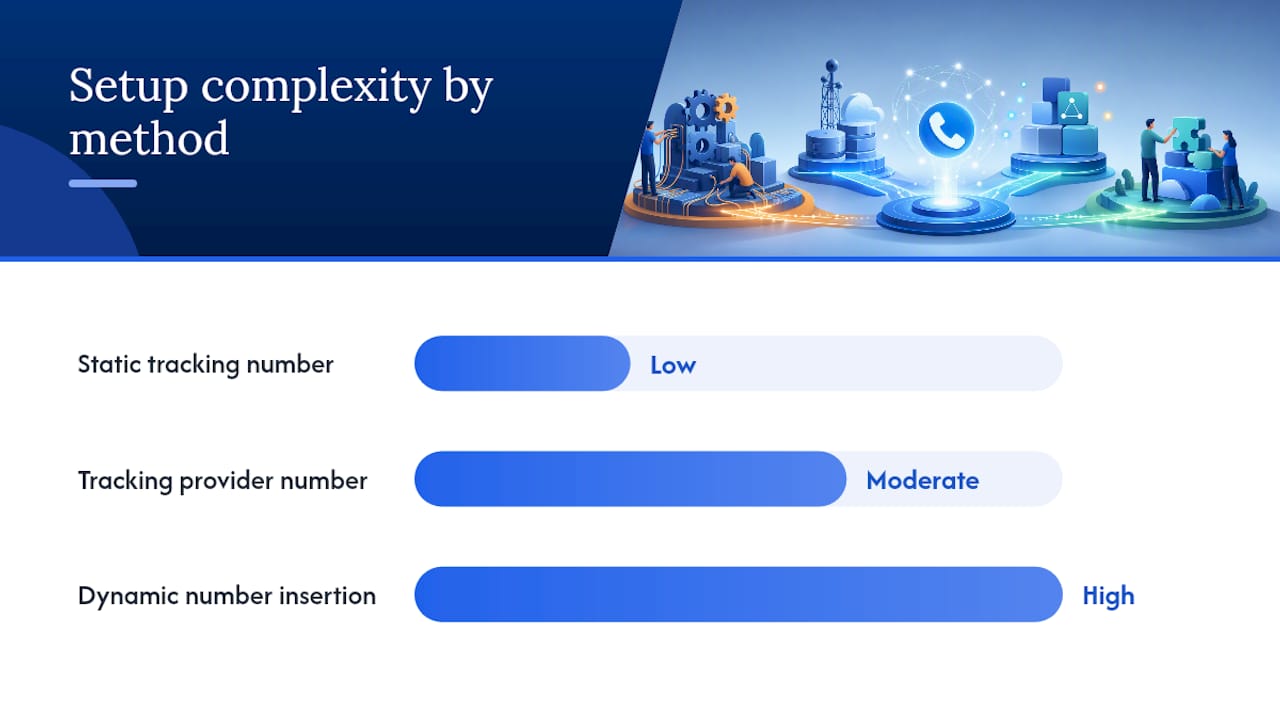
Dynamic number insertion swaps the visible phone number based on where a visitor came from, which lets you separate a website call from a GBP call from a paid-ad call using the same underlying tracking infrastructure. It's genuinely useful when you're running multiple channels simultaneously and need clean separation between them, but it adds setup complexity most single-location businesses don't need. Save it for when your marketing mix is actually complicated enough to justify it.
| Method | How it applies to GBP | Key features | Integrations | Setup complexity | Pricing shape | Best for |
|---|---|---|---|---|---|---|
| Static tracking number | One number swapped into the phone field | Basic call log, no recording | Minimal to none | Low | Flat monthly number fee | Single-location businesses testing the waters |
| Tracking provider number | Dedicated number with forwarding | Recording, tags, caller ID, source data | Google Ads, GA4, CRM | Moderate | Monthly base plus per-minute | Agencies, growing multi-service businesses |
| Dynamic number insertion | Number changes by traffic source | Full channel-level separation | Ads, GA4, CRM, website | High | Higher tier, often add-on pricing | Businesses running website, ads, and GBP simultaneously |
If you're not sure where you fall, start with the tracking-provider number. It's the sweet spot for most owners: enough data to actually act on, without the engineering overhead of dynamic insertion.
How Do You Set Up a Tracking Number on Your GBP Listing
Before you touch your GBP listing, decide on a number type. Local numbers tend to build more trust with searchers than toll-free numbers, and they're usually cheaper to run. If your state or the caller's state requires a recording disclosure, get that consent language sorted before your first live call, not after.
- Provision your tracking number. Sign up with a call-tracking platform or a VoIP service and generate a new local number tied to your account.
- Configure forwarding. Point that number at your actual business line so calls ring through exactly as they always have.
- Update your GBP primary phone field. Swap in the tracking number as the main listed number, but keep your permanent business number on file elsewhere (more on that in the next section).
- Verify the listing if prompted. Changing your primary phone sometimes triggers a re-verification step in Google Business Profile; follow the prompt if it appears.
- Run test calls from multiple devices. Call the number from your cell phone, a landline if you have access to one, and ask a colleague to do the same from a different network.
- Confirm the logs. Check your tracking dashboard to make sure each test call shows GBP as the source, caller ID came through intact, and duration recorded accurately.
- Verify downstream events fired. Look at GA4, your Google Ads conversion actions, and your CRM to confirm the call created a record in each system you connected.
Pro Tip: Don't just make one test call and call it done. Test from at least two carriers and at two different times of day. Some VoIP forwarding setups introduce a delay or drop calls during high-traffic windows, and you want to catch that during testing, not during a real customer's call.
If a test call doesn't show up in your dashboard, check three things first: the forwarding configuration on the provider side, whether the number actually saved in your GBP listing (Google sometimes reverts changes if verification is pending), and whether your CRM integration has a valid API key. Those three account for the vast majority of setup failures.
What Are the Risks of Putting a Tracking Number in GBP
The biggest structural risk isn't really about tracking numbers at all. It's that Google eliminated the native call-reporting feature that many businesses used to rely on, leaving a real attribution gap for anyone who hasn't set up their own tracking. If you're still checking your GBP dashboard expecting call data, you're looking at an empty shelf.
The second risk is more practical: swapping your primary phone number can create NAP (name, address, phone) inconsistency across the web if your business is listed on other directories with your old number. That inconsistency can quietly hurt local search rankings if search engines start seeing conflicting phone data for the same business.
Watch for these specific issues:
- Temporary reporting gaps while a new number propagates through Google's system.
- Misrouted calls if forwarding is misconfigured during setup.
- NAP inconsistency across Yelp, Bing Places, and other directories still showing your old number.
- Legal exposure if you record calls without the disclosure your state or the caller's state requires.
- Caller confusion if the visible number changes without warning on a business people call repeatedly.
The fix that avoids most of this: keep your permanent business number in GBP's additional phone field while your tracking number sits in the primary slot. Other directories and citation sources keep referencing your real number, your NAP stays clean, and you still capture attribution on every GBP-originated call. It's a small technical move that solves a problem most businesses don't realize they're about to create.
Pro Tip: Pick a tracking number you intend to keep for years, not months. Switching numbers repeatedly is what actually damages caller trust and search consistency, not the act of using a tracking number in the first place.
What Metrics Should You Track and How Do You Report On Them
Raw call counts tell you almost nothing on their own. What matters is the shape of the data underneath: how many calls got answered, how long they lasted, and what happened after the call ended.
Track these five metrics at minimum:
- Total calls from GBP — your baseline volume metric, tracked weekly or monthly.
- Answered versus missed rate — a low answer rate usually points to staffing gaps, not a marketing problem.
- Average call duration — short calls (under 30 seconds) often signal wrong numbers or spam; longer calls tend to correlate with real interest.
- Conversion rate — the percentage of calls that turn into a booking, sale, or appointment.
- Revenue per call — ties phone leads directly to dollars, which is the number that actually justifies the tracking spend.
Integration is what turns these numbers into something you can act on. Push call events into GA4 so phone leads sit alongside your web conversions in one report. Sync call conversions to Google Ads if you're running paid search, since that data lets the algorithm optimize toward calls, not just clicks. Tag every contact in your CRM with a source label so sales and marketing are looking at the same picture. Connecting GBP to GA4 with UTM-tagged links and keeping a manual call log running in parallel for the first month gives you a sanity check against whatever the automated system reports.
| Metric | How to measure it | What to watch for |
|---|---|---|
| Total calls | Count logged in tracking dashboard | Sudden drops may signal a broken forward |
| Answer rate | Answered calls divided by total calls | Below 80% usually means a staffing issue |
| Average duration | Automatic from call logs | Under 30 seconds often means low intent |
| Conversion rate | Calls tagged "booked" or "sold" divided by total | Should trend upward as scripts improve |
| Revenue per call | Total revenue tied to calls divided by call count | Use to justify tracking spend |
Tagging call outcomes matters as much as tracking the calls themselves. Label each call as no-interest, quote requested, booked, or closed, and review recordings or transcripts periodically for quality, where your state's consent laws allow it. Businesses that actually use this data to coach staff and adjust ad spend see meaningfully better results. CallTrackingMetrics reports conversion gains among businesses that feed call data back into campaign optimization and staff training rather than just archiving it.
How Much Does GBP Call Tracking Cost
Pricing breaks down into a few predictable pieces: a monthly rental fee per number, per-minute charges for call volume, and tiered add-ons for recording, transcription, and AI-driven call analysis.
The baseline is cheap. Twilio-based number provisioning typically runs a low monthly fee per number, and many call-tracking vendors pass that cost through close to at-cost. Where the bill climbs is volume and features: multi-location businesses running a dozen tracking numbers, transcription add-ons, and AI call-quality scoring all stack on top of that base rate.
A few decision rules to budget by:
- If you're a single-location business testing the concept, a low-cost static number is the right starting point. Don't overspend on features you won't use yet.
- If you're running paid search alongside your GBP listing, a full-featured provider with Ads integration pays for itself through better bid optimization.
- If you manage multiple locations or client accounts, per-location numbers with centralized dashboards cost more per month but save far more time in reporting.
Vendors offering AI-tier analysis often position it around a bigger claim, stating that without any call tracking at all, businesses may fail to attribute a substantial portion of their actual conversions, since phone-driven sales never make it into standard web analytics. That's a vendor estimate, worth treating as directional rather than gospel, but the underlying point holds regardless of the exact number: phone leads that never get logged are phone leads you can't optimize around.
Real Scenarios and How to Handle Each One
Your GBP already lists your permanent business number. This is the most common starting point, and the fix is straightforward. Provision a tracking number, move your current number into the additional phone field, and put the tracking number in the primary slot. You preserve your NAP consistency across other directories while gaining attribution on every call that comes through the listing going forward. Track: percentage of calls now showing a confirmed GBP source tag within the first 30 days.

You run a multi-location business and need per-location attribution. One shared number tells you nothing about which facility is generating calls. Assign a unique tracking number to each location's GBP listing, then roll all of them up into one centralized dashboard. It costs more per month than a single-number setup, but the alternative is guessing which location's marketing is actually working. Track: calls per location as a percentage of that location's total lead volume.
You're an agency managing tracking for several client accounts. Build one standard provisioning template you reuse for every client: same number type, same forwarding logic, same QA test sequence before handoff. This cuts setup time dramatically and reduces the odds of a client going live with a broken forward. Track: time from client onboarding to a verified working test call, aiming to shrink that window with each new client you onboard.
Why Storage Operators Should Treat GBP Calls Differently
Storage businesses live and die by phone leads in a way a lot of other local businesses don't. A caller asking about unit availability has already decided they need storage; they're not browsing. That's a fundamentally higher-intent lead than a click on a "sizes and pricing" page, and it typically converts at a much better rate once someone actually picks up the phone.

Storage operators should track a slightly different set of numbers than a generic local business would: booked tours or reservations resulting from calls, actual unit rentals traced back to a specific call, and average first-month revenue per rental. Tag every call outcome in your CRM the moment the front desk hangs up. A five-second habit (mark the call as "toured," "reserved," or "no availability match") turns into a month of data you can actually act on.
Here's a checklist worth running at any facility:
- Use local numbers tied to each facility rather than one central toll-free line, since local numbers tend to convert better for how customers search for and choose storage facilities near them.
- Train front-desk staff to tag every call outcome before moving to the next task, not at the end of the shift.
- Review call volume, booked-tour rate, and revenue per call monthly, not quarterly. Storage occupancy shifts fast enough that quarterly reviews miss the window to act.
- Decide whether you need per-location dashboards and CRM sync now, or whether a simpler setup will do until you scale past two or three facilities.
Storage operators generally need three things from a tracking provider that a generic small business might not prioritize as heavily: local numbers per location, dashboards that roll up cleanly across multiple facilities, and CRM integration that captures the full path from a call outcome tagged as a qualified lead through to an actual signed rental agreement. Skimping on any of these three tends to show up later as a reporting headache nobody wants to untangle by hand.
What to Do Next
The single most important action right now is provisioning a tracking number and putting it live on your GBP listing this week, since every day without it is a day of unattributed calls.
- This week: Provision a tracking number, configure forwarding, and update your GBP primary phone field.
- Within 48 hours of going live: Run test calls from at least two devices and confirm logs, caller ID, and integration events all fire correctly.
- Before the end of the month: Connect GA4, Google Ads, and your CRM so call data feeds every system that needs it.
- Ongoing: Review answer rate, conversion rate, and revenue per call monthly, and tag every call outcome at the front desk in real time.
If you're a single-location business, start with a tracking-provider number rather than a bare static number. The extra few dollars a month buys you caller ID retention, source tagging, and the ability to actually see what's working. If you manage multiple locations or a portfolio of client accounts, invest in per-location numbers with centralized reporting from day one, because retrofitting that structure later means re-provisioning numbers you've already built citation history around.
- Provision tracking number
- Configure forwarding to permanent line
- Update GBP primary phone field, move permanent number to additional field
- Run multi-device test calls
- Confirm GA4, Ads, and CRM integration events
- Set monthly review cadence for call metrics
Where to Go for Setup Help and Troubleshooting
A handful of sources cover the technical details better than any summary can, and they're worth bookmarking before you run into a snag.
- Call Tracking and Missed Call Text Back Through Google Business Profile walks through the additional-phone-field technique in detail, straight from the vendor's own support documentation.
- Yes, You Can Use a Call Tracking Number on a Google Business Profile. Here's How covers the setup process and the attribution benefits from a call-tracking platform's perspective.
- Google Removed Call Tracking from Business Profiles. Here's What Marketers Can Do explains the timeline of Google's change and what it means for anyone still relying on native reporting.
- How to Track Calls and Enquiries from Your Google Business Profile is the most useful resource for the GA4 and manual-logging side of measurement.
A publisher's take on getting this right
Most of the setup mistakes that trip up business owners aren't about the technology. They're about sequencing. Someone swaps their GBP phone number, forgets to update citations elsewhere, and spends the next three months wondering why local rankings softened slightly. The fix (additional phone field, permanent number preserved) takes ten minutes and solves a problem that otherwise takes months to notice and longer to fully repair.
The operational value of actually tracking these calls tends to get underestimated too. It's not just about knowing volume. That's the kind of insight that changes staffing, not just marketing.
Handle this in-house if you're a single location with modest call volume and no CRM to integrate. Bring in a specialist once you're managing multiple locations, need centralized dashboards, or want call data feeding directly into a CRM and an ad account without someone manually reconciling spreadsheets every week. Corvane Systems specializes in exactly that layer for self-storage operators, tying GBP management and call attribution into the broader visibility work a facility needs to actually get found.
How Corvane Systems Supports Storage Operators on Attribution
Corvane Systems is the alternative to piecing together your own tracking, reporting, and GBP optimization from three different vendors. For storage operators specifically, that means one flat-rate service handling your Google Business Profile setup, your call-tracking configuration, and the reporting that ties both back to actual unit rentals, instead of you stitching together a CRM plugin, a tracking platform, and a separate SEO contractor.

The outcomes that matter most: clearer attribution on which calls turn into signed rentals, and a straightforward monthly view of revenue per lead instead of a pile of disconnected call logs. That's the gap most facilities are stuck in right now, especially since Google's native call reporting disappeared and nobody replaced it with anything internally. Corvane Systems builds that replacement as part of a broader storage facility visibility audit, so your GBP setup, your call tracking, and your search visibility all get evaluated together rather than as three separate problems.
If you're ready to see where your facility currently stands, visit Corvane Systems and request a visibility audit to find out exactly what's missing from your current setup.
Sources
- Call Tracking and Missed Call Text Back Through Google Business Profile
- Yes, You Can Use a Call Tracking Number on a Google Business Profile. Here’s How.
- Google Removed Call Tracking from Business Profiles. Here’s What Marketers Can Do.
- CallTrack — Know Which Marketing Makes Your Phone Ring