Location page SEO means building a dedicated page for each physical or service location that gives search engines and AI systems enough unique, verifiable detail to recommend it. A page that earns rankings and citations needs five things at minimum: unique local content, Google Business Profile alignment, LocalBusiness schema, an embedded map with directions, and visible reviews. This guide covers the checklist, templates, scaling rules, and the metrics that tell you it's working.
TL;DR:
- Location pages should include unique local content, real photos, and reviews, and align with Google Business Profiles to avoid duplicate or placeholder content.
- Building a full location page is necessary only when a physical address exists or the region has meaningful search volume and distinct service details.
- A high-performing location page must meet a 10-point checklist, including structured data, embed maps, local FAQs, and mobile optimization.
- Regular audits should track organic traffic, map impressions, and conversions, with full content refreshes scheduled quarterly or annually when performance declines.
- For storage operators, unit-specific landing pages, review management, and schema are crucial, and working with specialized SEO services can optimize AI discovery and local ranking.
Table of Contents
- What Is a Location Page, and When Should It Exist?
- Why Location Pages Matter for Local SEO and AI Discovery
- Location Pages vs. Service-Area Pages: Which One Do You Need?
- The 10-Point Checklist for a High-Performing Location Page
- Location Page Templates and Examples That Convert
- Scaling and Governing Location Pages Across Many Sites
- Technical SEO and Structured Data Requirements
- Writing Location-Specific Content at Scale Without Burning Out Your Team
- How to Measure and Refresh Location Pages Over Time
- How Corvane Systems Applies This for Self-Storage Operators
- Where to Start If You're Overwhelmed by Your Own Location Pages
- Get Location Page SEO Built Right for Your Storage Facilities
- Sources
What Is a Location Page, and When Should It Exist?
A location page has one job: prove to a searcher, and to a search engine, that a real, specific place serves a real, specific area. It's not a landing page decorated with a city name. Every location page should answer "can I get what I need here, and how do I get there" without forcing a click elsewhere.
A page earns the right to exist as its own URL when it can support genuine evidence of a distinct operation. That means an address or defined service radius, hours, a way to contact that specific site, and at least one detail no other page on the domain repeats.
Common anti-patterns to avoid:
- Doorway pages that swap only the city name in an otherwise identical template
- Pages with no unique photos, staff information, or local reference points
- Duplicate service lists copied word for word across ten or more locations
- Pages built purely to rank, with no phone number or map a customer would actually use
A location page built without unique content, a working map, real photos, and reviews reads to both algorithms and AI models as a placeholder rather than a real-world service location.
Why Location Pages Matter for Local SEO and AI Discovery
Location pages are the connective tissue between your Google Business Profile and your website. Google cross-references what's on the page against what's in your profile, and mismatches quietly erode trust in both.
They also feed the newer discovery layer. AI systems pulling together an answer about "storage near me" or "closest [service] in [city]" favor sources with scannable facts: short answer blocks, structured FAQs, clear service lists. Structured Q&A content and scannable data make it easier for AI models to extract and cite a page rather than paraphrase a vague paragraph.
The payoff shows up in three places at once:
- Higher eligibility for map pack placement and rich results
- Better ad relevance scores when the landing page matches the search intent exactly
- More organic conversions, because a page with real directions and hours removes friction before the click even happens
Pro Tip: If your location pages currently duplicate most of their copy, don't rewrite all of it. Start with the small portion that's actually unique: staff, parking, nearby landmarks, and one honest sentence about what makes that site different.
Location Pages vs. Service-Area Pages: Which One Do You Need?
Not every place you serve deserves its own indexed page, and treating them identically is how sites end up with duplicate-content problems. Use this decision order:
- Do you have a physical address customers visit? If yes, build a full location page with a map, hours, and directions. If no, you likely need a service-area page instead.
- Do you offer meaningfully different services or pricing in this area? A branch with unique inventory, regulatory permissions, or unit types justifies a unique URL. Identical offerings everywhere don't.
- Is there real search volume or business logic behind the geography? A neighborhood with three years of bookings deserves a page. A zip code you've served twice doesn't.
- Can you fill in unique fields without padding? If you can't populate a distinct description, staff note, or local detail, the page will read as thin no matter how it's templated.
Service-area pages should describe the region you cover, list the specific services delivered there, and skip the fake address or embedded map pointing at an empty lot. Mixing the two formats, or duplicating one city's copy across five surrounding towns, is the fastest way to trigger duplicate-content flags at scale.
The 10-Point Checklist for a High-Performing Location Page
Run every existing page against this list before building new ones. Skipping steps here is what turns a location page into digital wallpaper.
- Keyword placement in the title tag, URL slug, H1, and meta description, phrased the way a local searcher actually types it.
- A unique 150 to 300+ word description referencing something real about that location: a neighborhood, a landmark, a specific access point.
- An embedded map with turn-by-turn directions and parking or access notes, not just a static image.
- Google Business Profile alignment, with matching name, address, and phone, plus recent reviews pulled onto the page and a visible pattern of owner responses.
- LocalBusiness schema with complete, valid fields, tested before publishing.
- Original photos taken at that specific site, with descriptive alt text, not stock imagery reused across every page.
- A clear, local call to action, such as "Call this location" or "Check availability at [address]," not a generic "Contact Us."
- A services or amenities list specific to that site, with pricing or availability shown when you can support it.
- Mobile performance basics: tap-to-call buttons, short forms, and fast load times.
- An FAQ module answering questions specific to that location, like parking, access hours, or nearby cross streets.
Bullet-level details worth double-checking:
- Reviews should be recent, not frozen from three years ago.
- Photos need real alt text describing the actual scene, not "storage facility image 1."
- Schema fields should validate cleanly, not just "look right" in the raw code.
Pro Tip: Run your top five location pages through a rich results test before touching the other fifty. Fixing one schema mistake across a shared template saves you from repeating it fifty times.
Location Page Templates and Examples That Convert
A location page doesn't need to be creative. It needs to be complete. Two templates cover almost every use case.
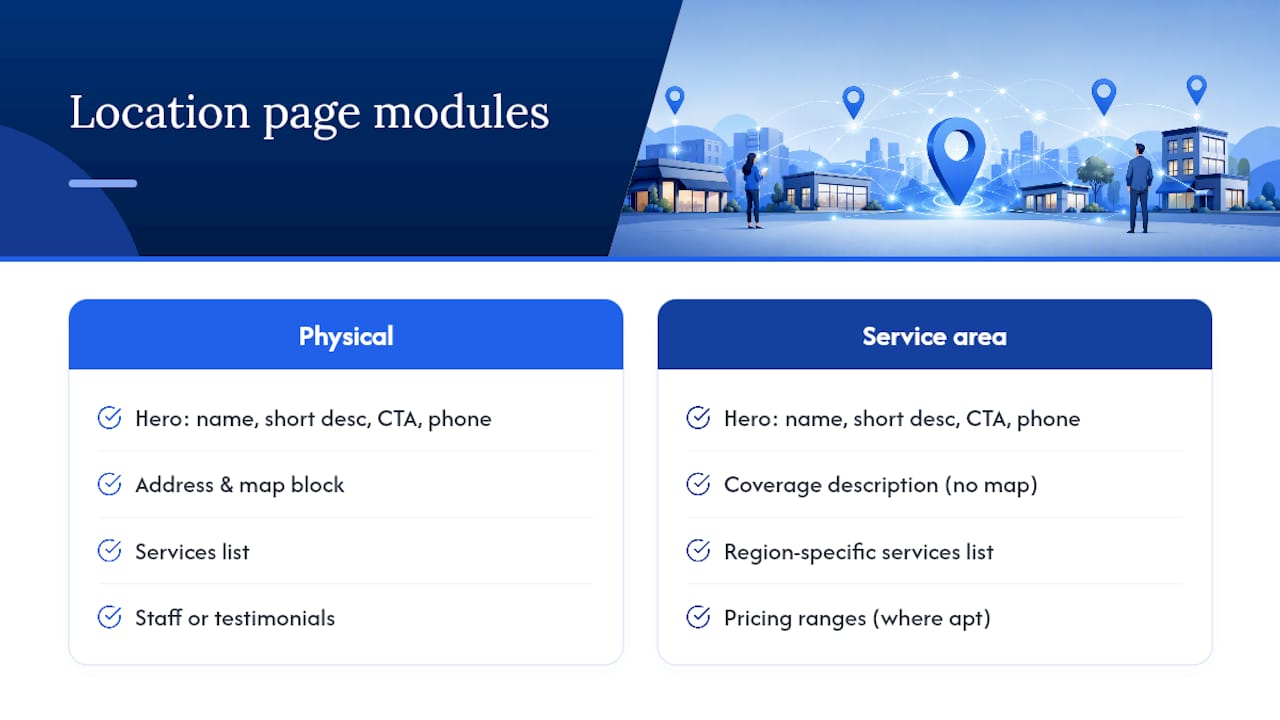
The physical location template starts with a hero module: business name, one-line description, primary call to action, and a phone number that's tappable on mobile. Below that sits an address and map block, then a services block, a staff or testimonial block, and an FAQ block closing out the page.
The service-area module drops the map and address in favor of a coverage description, a service list specific to that region, and pricing ranges where applicable. It keeps the FAQ block, since that's where AI systems and searchers alike look for quick answers.
Here's what genuinely unique copy looks like against a generic template:
That beats a generic paragraph because it names a real cross street, a real access detail, and a real amenity. Pair it with a direct CTA: "Reserve a unit at our Riverside Avenue location today" outperforms "Contact us for more information" because it names the place and the action in the same breath.
Scaling and Governing Location Pages Across Many Sites
The instinct at scale is to build more pages. The better instinct is to build fewer, stronger ones. Adding geographic URLs without adding real authority or clarity creates duplicate content and a maintenance burden that outweighs any ranking gain.
The architecture that holds up best is hub, then region, then location: a national or brand hub links down to regional pages, which link down to individual location pages, with canonical tags pointing each page to itself, not to a shared parent. When two locations sit close together geographically, resist merging them. Explicit internal linking and a shared regional hub signal that both are distinct operations without triggering cannibalization between them.
Before building anything new, inventory what you already have:
- Which pages get organic traffic, and which get none
- Which pages duplicate each other almost word for word
- Which locations have closed, moved, or never had enough content to justify a standalone URL
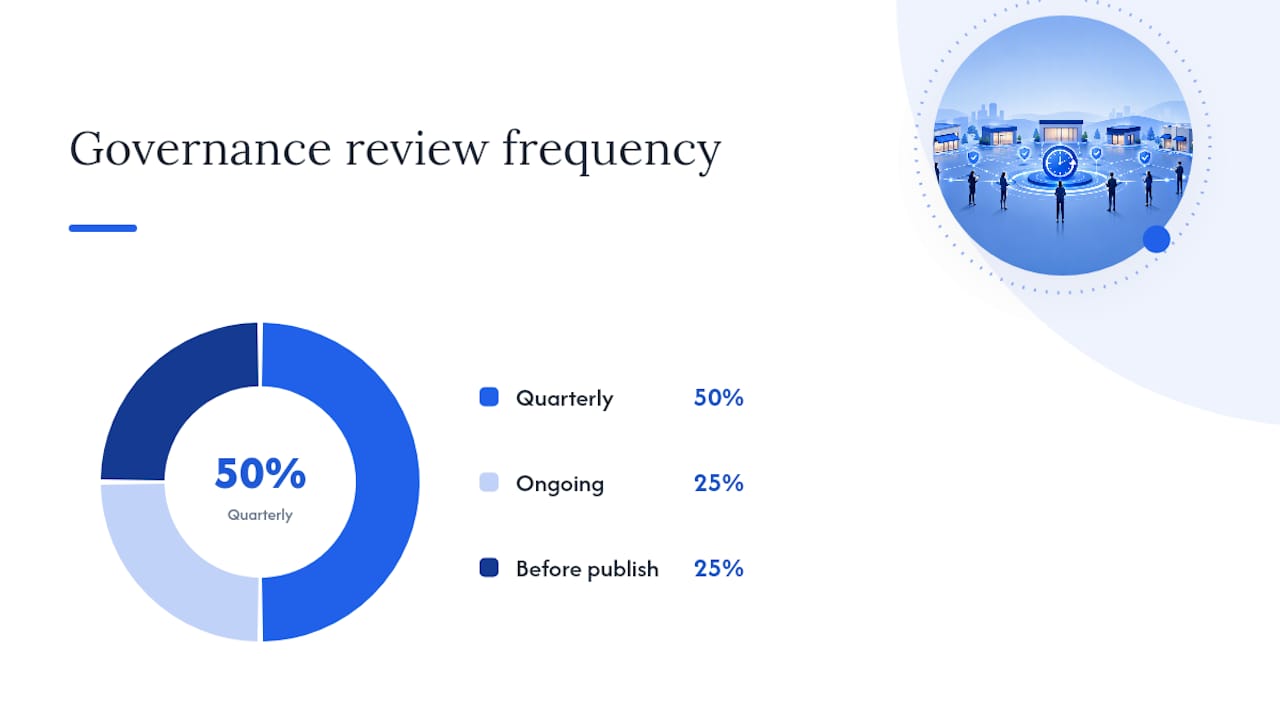
A workable governance model runs on four steps, repeated quarterly: inventory every page, categorize it as hub, region, location, or service area, assign a named owner, and set a minimum bar for unique fields before a page goes live.
| Governance element | What to check | Frequency |
|---|---|---|
| Page inventory | Every live location and service-area URL | Quarterly |
| Ownership | One named person per region or franchise group | Ongoing |
| Minimum unique fields | Description, staff note, local detail, photos | Before publish |
| Consolidation review | Low-traffic or near-duplicate pages | Quarterly |
Governance is a checklist a real person owns: someone assigns templates, someone enforces the minimum unique-content bar, and someone runs the multi-location architecture review on a fixed calendar instead of whenever traffic drops.
Technical SEO and Structured Data Requirements
Structured data is what turns a location page from a page a person can read into a page a machine can parse and trust. LocalBusiness JSON-LD should include name, address, phone, geo coordinates, opening hours, and a services list at minimum, with aggregateRating and review markup added where you have real reviews to back it.
Performance matters just as much as markup. Aim for a Largest Contentful Paint under 2.5 seconds, low Interaction to Next Paint, and a Cumulative Layout Shift under 0.1. Heavy hero images and JavaScript-rendered maps are the two most common reasons location pages fail these targets.
A few implementation rules worth locking in before launch:
- Never render your address, hours, or services in JavaScript only. Crawlers and AI parsers both need that text present in the raw HTML.
- Always provide a static fallback or crawlable text block alongside any interactive map embed.
- Use self-canonicalizing URLs for every location page, and keep them all listed in a dedicated location sitemap.
- Compress and properly size location photos so they don't single-handedly blow your load time budget.
Get the schema and performance basics right once, in the template, and every location page inherits the fix instead of needing individual patches.
Writing Location-Specific Content at Scale Without Burning Out Your Team
The fastest way to kill a location-page project is to ask writers for 300 original words per city with no structure. Give them a field model instead: hero blurb, services, one staff highlight, a directions or local tip, and an FAQ. Five fields, five short prompts, repeatable across a hundred locations.
- Hero blurb prompt: "Name one landmark or cross street near this location and one thing customers say about visiting it."
- Local tip prompt: "What's one parking, access, or transit detail unique to this address?"
- Staff highlight prompt: "Name one team member at this site and one thing they're known for helping with."
- FAQ prompt: "What's the one question this location's front desk answers most often?"
Collecting the raw material, photos, staff bios, and recent local reviews, takes longer than writing the copy itself, so build that collection step into onboarding for every new site rather than chasing it after the page is already live.
Pro Tip: Run a "find and replace" test on your own drafts: if swapping the city name in another page's paragraph would still make grammatical sense, the copy isn't unique enough yet.
Before publishing, scan for the tell that reveals a templated page anyway: two locations with nearly identical sentence structure, just the proper nouns swapped.
How to Measure and Refresh Location Pages Over Time
Track five numbers per location: organic clicks, map pack impressions, Google Business Profile actions (calls, direction requests), phone clicks from the page itself, and completed local conversions. Everything else is secondary.
Set an audit cadence rather than waiting for a complaint. A reasonable rhythm:
- Monthly: scan for traffic drops greater than 20% and inconsistent NAP data across GBP, the website, and directories.
- Quarterly: full content refresh review, plus a check for new negative reviews left unanswered.
- Annually: full schema validation and site architecture review across every location.
If a page has shown flat or declining traffic for two consecutive quarters and its unique-content fields are still thin, that's the trigger to consolidate it into a regional hub rather than let it linger as dead weight. Standard analytics tools paired with your GBP insights dashboard cover most of this without needing anything specialized.
How Corvane Systems Applies This for Self-Storage Operators
Storage renters search by unit size, availability, and distance, which is why GBP completeness and review volume are decisive local signals for map-pack placement in this industry specifically. Corvanesystems builds its storage-focused workflow around that reality.
- GBP alignment and review cadence tracked alongside organic visibility, not as a separate afterthought
- Unit-specific landing pages instead of one generic "facility" page per site
- LocalBusiness schema and photo requirements built into every self-storage SEO template from day one
- AI visibility scoring across ChatGPT, Claude, Perplexity, and Google's AI Overviews, so pages are built for citation, not just clicks
Pro Tip: If you're evaluating any provider's claims for a storage location page rebuild, ask for the before-and-after map pack ranking and review count over a defined window, not just a traffic screenshot.
Where to Start If You're Overwhelmed by Your Own Location Pages
Three things matter more than the other seven: get your Google Business Profile genuinely aligned with your site, write one honest, unique paragraph per location, and add valid schema with a working map. Everything else compounds from there.
Handle this in-house if you're managing under ten locations and have one person who can own the template. Bring in an agency once you're past that, once NAP consistency starts slipping, or once you need AI visibility tracking you don't have the tooling for internally. Start with the checklist above, apply it to your worst-performing page first, and measure before you scale it to the rest.
— Mike
Get Location Page SEO Built Right for Your Storage Facilities
An alternative to hiring a generalist agency or building this in-house one page at a time is a flat monthly rate service that covers technical SEO, Google Business Profile optimization, and AI-optimized articles each month, built specifically around how storage renters search and how AI tools answer them.

A storage-only focus makes a difference. While a generalist agency treats location pages like any other local business's, some services build unit-specific pages, schema, and review workflows around the signals that move storage renters from search to booked unit. Such services may offer a single flat-rate price with monthly reporting on rankings, traffic, and AI visibility across ChatGPT, Claude, Perplexity, and Google's AI Overviews, without contracts or tiered pricing to decode.
If your facility's location pages are still running on a generic template, start with a look at Corvane Systems' AI visibility service and see where your current pages stand before you spend another quarter guessing.
Sources
- Multi-location SEO: How to structure geographic pages at scale
- Multi-location SEO: How to structure geographic pages at scale
- How to Build Location Pages That Rank, Convert, and Get Cited