
Place a plain Markdown file at /llms.txt on your storage or documentation site, and AI systems like ChatGPT, Claude, and Perplexity gain a clean, curated map of your most important content. The result: more accurate citations, better AI-generated answers about your facility, and faster context assembly when a language model processes your site.
Here is a minimal working template to get you started:
# Acme Storage

> Acme Storage offers climate-controlled and drive-up units in Austin, TX.
> Pricing, availability, and facility details are listed below.

## Docs
- Unit Types and Sizes
- Pricing and Availability
- Facility Location and Hours
- FAQ
Four steps get this live:
- Save the file as
llms.txt(UTF-8, no BOM) and place it at your domain root so it resolves athttps://yourdomain.com/llms.txt - Confirm the server returns HTTP 200 with
Content-Type: text/plainortext/markdown - Purge any CDN cache so the new file is immediately accessible
- Verify with
curl -I https://yourdomain.com/llms.txtand check the status line and content-type header
The official llms.txt spec defines the format, and GitBook's how-to covers placement and validation in depth for documentation sites.
Key Takeaways
A correctly served llms.txt at your domain root is the single fastest technical change a storage or documentation site can make to improve how AI systems understand and cite its content.
| Point | Details |
|---|---|
| File placement is non-negotiable | Place llms.txt at the domain root; a subdirectory path will not be discovered by AI systems. |
| MIME type determines success | The server must return Content-Type: text/plain or text/markdown; an HTML response breaks AI parsing entirely. |
| Curation beats completeness | Link your five to ten most important pages, not every URL; a focused file gives AI systems cleaner context than an exhaustive list. |
| Verify after every deploy | Run curl -I to confirm HTTP 200 and correct content-type; add the check to your monthly SEO audit cadence. |
| Corvanesystems audits AI readiness | Corvanesystems includes llms.txt verification and AI visibility scoring across ChatGPT, Claude, Perplexity, and Google AI in its flat-rate service for storage operators. |
Table of Contents
- What is llms.txt and how does it relate to robots.txt?
- What does a valid llms.txt file look like?
- Why does llms.txt matter for storage and documentation sites?
- How to create and host llms.txt on common platforms
- Best practices and common mistakes to avoid
- How to test and verify your llms.txt deployment
- Ready-to-copy llms.txt templates
- Docs
- Support
- Facility Overview
- Units and Pricing
- Moving and Storage Resources
- Corvanesystems audit checklist for storage operators
- Why most storage operators are getting this wrong
- Corvanesystems handles llms.txt and AI visibility for storage operators
- Sources
What is llms.txt and how does it relate to robots.txt?
The llms.txt proposal defines a root-level Markdown file that site owners use to curate content specifically for large language models. Think of it as a human-readable index you write for AI systems rather than for crawlers or browsers.
It is worth being precise about what it is not:
- robots.txt controls crawler access. It tells bots which URLs they may or may not fetch.
llms.txthas no access-control function at all. - sitemap.xml lists every URL on a site for search-engine indexing.
llms.txtis not exhaustive; it is selective, pointing AI systems to the pages that matter most. - llms.txt is a curation layer. You choose which pages to surface, write a short summary of your site, and group links by topic so an LLM can quickly assemble context without crawling hundreds of pages.
The file targets AI systems that process web content during inference or training, including conversational assistants and agentic browsers. Chrome Lighthouse now flags missing llms.txt in agentic-browsing audits and frames it as part of Generative Engine Optimization (GEO). That signal alone tells you the standard is moving from optional to expected.
The core idea: robots.txt keeps bots out of places they should not go. llms.txt guides AI systems toward the content that best represents your site. They solve different problems and belong on the same server together.
What does a valid llms.txt file look like?
The spec is strict on a few points and flexible on everything else. Get the required properties right first, then customize the structure.
Required serving properties
| Property | Required value | Why it matters |
|---|---|---|
| File path | /llms.txt at domain root | AI systems look for the file at this exact path |
| HTTP status | 200 OK | Any redirect or 404 breaks discovery |
| Content-Type | text/plain or text/markdown | Prevents AI parsers from receiving HTML wrappers |
| Encoding | UTF-8 (no BOM) | Ensures consistent parsing across all LLM clients |
| H1 heading | Exactly one | Names the site; required by the spec |
File structure rules
- Open with a single
# H1that names your site or product - Follow immediately with a
>blockquote summary (two to four sentences describing what the site covers) - Use
## H2headings to group links by category (Docs, Pricing, API, Locations) - All URLs must be absolute (
https://) not relative paths - Keep the file concise; the spec recommends staying well under the context-window limits of common models
A full minimal example appears in the opening section above. For sites with large documentation corpora, the community convention is to also publish llms-full.txt at the domain root. That file concatenates the full Markdown content of your key pages into one document, giving AI systems a single large-context bundle when they need it. Most storage sites do not need llms-full.txt unless they maintain extensive technical documentation. The DEV Community implementation guide covers both patterns with real examples.
Why does llms.txt matter for storage and documentation sites?
The practical upside is straightforward: when an AI assistant is asked "Where can I find affordable climate-controlled storage in Denver?", it pulls context from whatever it can access about your site. Without llms.txt, the model guesses at your structure, may surface outdated pages, or misses your pricing entirely. With it, you hand the model exactly what you want it to know.

For documentation sites, the benefits are immediate. API docs, changelogs, and getting-started guides are the pages developers ask AI assistants about most. A well-structured llms.txt means the model cites your current docs rather than a cached version from six months ago.
For self-storage websites, the use case is just as concrete:
- Unit type and size pages (5x5, 10x10, 10x20) are the most queried content when someone asks an AI for storage options
- Pricing and availability pages give the model the data it needs to answer "how much does a storage unit cost near me?"
- Location and hours pages feed address, access hours, and contact details into AI-generated local answers
- FAQ pages reduce hallucination by giving the model accurate answers to common questions about your facility
Chrome Lighthouse now audits for llms.txt as part of agentic-browsing checks, which means the file is becoming a measurable factor in how well-prepared your site is for AI-driven discovery. Storage operators who are already investing in AI search optimization will find llms.txt a natural next step in that strategy.
For storage sites with many similar facility pages, a curated storage-specific section in llms.txt improves the signal-to-noise ratio for AI context assembly considerably. The model gets the five pages that actually answer customer questions, not a crawl of 200 near-identical unit-listing pages.
How to create and host llms.txt on common platforms
The creation process is the same everywhere: write the file, save it as UTF-8, and place it at the domain root. The hosting step varies by platform.
Step-by-step for any platform
- Create
llms.txtusing the template structure above (H1, blockquote summary, H2 sections with absolute URLs) - Save as UTF-8 plain text with no BOM
- Upload or deploy to the root of your domain (not a subdirectory)
- Confirm the file resolves at
https://yourdomain.com/llms.txtwith HTTP 200 - Check the
Content-Typeheader returnstext/plainortext/markdown - Purge your CDN cache if one sits in front of the origin
Platform-specific recipes
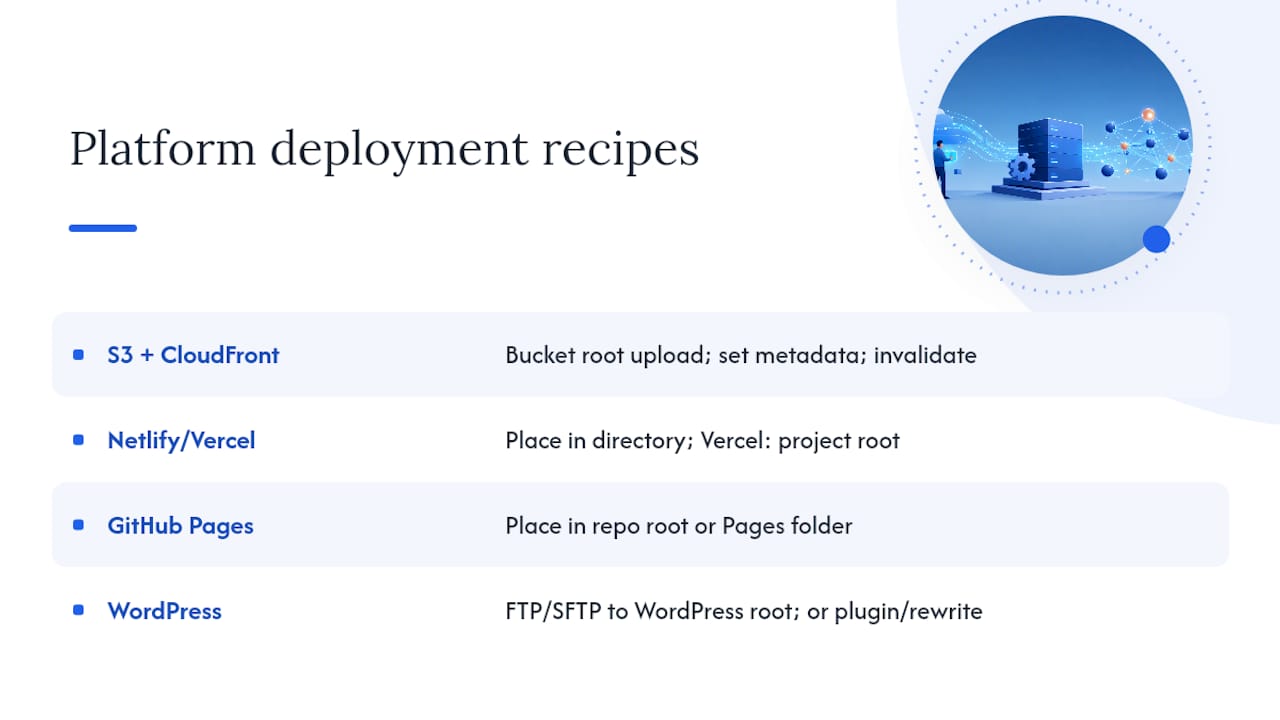
Amazon S3 + CloudFront: Upload to the bucket root and set the object's Content-Type metadata explicitly before uploading.
aws s3 cp llms.txt s3://your-bucket-name/llms.txt \
  --content-type "text/plain" \
  --acl public-read
Then create a CloudFront invalidation: aws cloudfront create-invalidation --distribution-id YOUR_ID --paths "/llms.txt"
Google Cloud Storage: The Cloud Storage static hosting docs walk through bucket configuration and HTTPS via load balancer. Upload with explicit content type:
gcloud storage cp llms.txt gs://your-bucket-name/llms.txt \
  --content-type="text/plain"
Serving from a custom domain over HTTPS requires a load balancer or CDN in front of the bucket, as the docs explain.
Netlify / Vercel: Place llms.txt in the public/ directory (or the project root for Vercel). Both platforms serve files from that directory at the domain root automatically. No additional configuration needed for MIME type on plain .txt files.
GitHub Pages: Place llms.txt in the repository root (or the /docs folder if that is your Pages source). GitHub Pages serves it at https://yourusername.github.io/llms.txt or your custom domain root.
WordPress: Upload via FTP/SFTP directly to the WordPress root directory (same level as wp-config.php). Alternatively, use a plugin that serves static files, or add a rewrite rule in .htaccess to point /llms.txt to a static file location.
Pro Tip: Set Cache-Control: max-age=3600 on the file so CDNs cache it for one hour but not indefinitely. When you update your site structure, run a CDN purge immediately rather than waiting for the TTL to expire. For sites that update content frequently, a build-time generation script that rewrites llms.txt on every deploy is far more reliable than manual updates. The llmstxt.studio step-by-step guide covers platform-specific deployment in detail.
For storage operators evaluating whether to use a static host or a dynamic CMS, this practical guide to small-business website types is a useful reference for the hosting decision itself.
Best practices and common mistakes to avoid
Most llms.txt failures come down to three things: wrong path, wrong MIME type, or stale content. Here is what to do and what to skip.
Do:
- Serve the file as
text/plainortext/markdown, never astext/html - Use absolute HTTPS URLs for every link in the file
- Include one clear H1 heading at the top
- Keep the file short; aim for a concise summary in most cases
- Update the file whenever you add, remove, or significantly change a linked page
- Align
llms.txtwith yoursitemap.xmlso the pages you highlight are also indexed
Don't:
- Place the file in a subdirectory (
/docs/llms.txtwill not be found by default) - List URLs that require authentication or return a redirect
- Include every page on your site; curation is the point
- Let the file go stale; a link that returns 404 actively misleads AI systems
- Block
/llms.txtinrobots.txt(this happens accidentally when wildcard disallow rules are too broad)
The most common mistake on WordPress and template-based sites is that the CMS intercepts the request and returns an HTML 404 page with a 200 status code. The Content-Type header will read text/html instead of text/plain. A quick curl -I check catches this immediately.
Pro Tip: For documentation sites or storage sites with frequent content updates, generate llms.txt automatically at build time using a script that reads your sitemap or content manifest. Add a CI check that fetches /llms.txt after every deploy and fails the build if the status code is not 200 or the content-type is wrong. This prevents silent regressions.
How to test and verify your llms.txt deployment
Verification takes about two minutes and should happen immediately after deployment and after any significant site change.
Quick checks
- Fetch headers only:
curl -I https://yourdomain.com/llms.txtand confirmHTTP/2 200andcontent-type: text/plain - Fetch the file body:
curl https://yourdomain.com/llms.txtand confirm the Markdown content renders correctly with no HTML tags - Check each linked URL returns 200: run
curl -o /dev/null -s -w "%{http_code}" https://yourdomain.com/your-linked-pagefor each link in the file - Confirm
robots.txtdoes not block the path:curl https://yourdomain.com/robots.txtand check for anyDisallow: /llms.txtor overly broad disallow rules
Ongoing monitoring
- Add
/llms.txtto your uptime monitoring tool (UptimeRobot, Better Uptime, or similar) so you get alerted if it goes down - Run a link validator against the URLs listed in the file monthly, or after any site restructure
- After a CDN purge, re-run the
curl -Icheck to confirm the new version is being served - Cross-reference with your
sitemap.xml: every URL inllms.txtshould also appear in the sitemap
For a broader look at whether your storage facility is showing up correctly in AI-generated answers, this AI visibility diagnostic covers the full picture beyond just llms.txt.
Ready-to-copy llms.txt templates
General-purpose template
# [Your Site Name]

> [One to three sentences describing what your site covers, who it serves,
> and what the most important content is.]

## Docs
- Getting Started
- API Reference
- Pricing

## Support
- FAQ
- Contact
Self-storage facility template
# [Facility Name] Self Storage

> [Facility Name] offers [unit types] in [City, State].
> We provide [climate-controlled / drive-up / vehicle storage] units
> ranging from 5x5 to 10x30. Online reservations available 24/7.

## Facility Overview
- About Our Facility
- Location and Hours
- Contact Us

## Units and Pricing
- Unit Sizes and Types
- Current Pricing and Availability
- Climate-Controlled Units
- Vehicle and RV Storage

## Moving and Storage Resources
- Packing Tips
- FAQ
- Moving Checklist
Customization notes:
- Replace every bracketed placeholder with your facility's actual data
- Do not include pricing figures directly in the file if they change frequently; link to the pricing page instead
- Add an
## APIsection if your site exposes a real-time availability endpoint - Omit sections that have no corresponding published page; a broken link is worse than a missing section
When your facility has extensive documentation, a blog archive, or multiple location pages, consider publishing llms-full.txt as well. That file concatenates the full Markdown text of your key pages and gives AI systems a single large-context document to work from. The DEV Community guide covers the llms-full.txt pattern with real examples.
For content ideas on what to include in your storage-specific sections, this guide to storing business inventory shows the kind of page that performs well in AI-assisted searches.
Corvanesystems audit checklist for storage operators
Use this checklist to evaluate your current llms.txt readiness before or after implementation.
Presence and serving:
/llms.txtresolves at the domain root (not a subdirectory)- HTTP status is 200 (not 301, 302, or 404)
Content-Typeistext/plainortext/markdown- File is UTF-8 encoded with no BOM
Content quality:
- Exactly one H1 heading present
- Blockquote summary accurately describes the facility
- All URLs are absolute HTTPS links
- No URLs return 404 or require authentication
- Storage-specific sections present: unit types, pricing, location, FAQ
Ecosystem alignment:
/llms.txtis not blocked byrobots.txt- All linked pages appear in
sitemap.xml - CDN serves the latest version (no stale cache)
llms-full.txtpresent if the site has extensive documentation
Priority actions by impact:
- Fix hosting issues first (wrong path, 404, HTML response) — these prevent discovery entirely
- Correct MIME type if the server returns
text/html - Add storage-specific sections (unit types, pricing, location) if the file is too generic
- Generate
llms-full.txtif the site has more than 20 substantive pages worth surfacing - Add the file to your monthly SEO audit cadence
Pro Tip: Integrate an automated llms.txt check into your monthly SEO reporting. A one-line curl test in a scheduled script catches MIME regressions, 404s, and CDN cache issues before they affect AI-sourced traffic. Corvanesystems includes this check as part of its AI visibility audits for storage operators.
For a complete picture of how llms.txt fits into your GEO services strategy, the audit checklist above maps directly to the scoring framework Corvanesystems uses when evaluating a storage site's AI readiness.
Why most storage operators are getting this wrong
The adoption curve for llms.txt in the self-storage industry is still early, and the mistakes showing up in audits are almost always the same two: the file is either missing entirely, or it exists but returns text/html because a CMS intercepted the request.
What surprises me is how small the fix usually is. A single aws s3 cp command with the right --content-type flag, or dropping a file into the public/ folder on Netlify, and suddenly the facility's unit types, pricing, and location data are cleanly accessible to every AI system that processes the site. The operators who have made that fix are showing up in AI-generated local answers with noticeably more accuracy than those who have not.
The hand-edit-versus-auto-generate question comes up often. For a single-location storage facility with a stable page structure, hand-editing llms.txt quarterly is perfectly reasonable. For a multi-location operator or a documentation-heavy site, build-time generation is worth the one-time setup cost. A stale llms.txt with dead links is actively worse than no file at all, because it sends AI systems toward 404s and erodes the trust signal the file is supposed to build.
The broader point: llms.txt is not a silver bullet for AI visibility, but it is one of the cheapest, highest-leverage technical changes a storage site can make right now. The local SEO tactics that drive "storage near me" rankings and the structured content that feeds AI answers are complementary, not competing, efforts.
Corvanesystems handles llms.txt and AI visibility for storage operators
Storage operators who want their facility surfaced accurately in ChatGPT, Claude, Perplexity, and Google's AI Overviews need more than a correctly placed file. They need the full content structure, local signals, and technical health that AI systems use to decide which facilities to recommend.

Corvanesystems is purpose-built for exactly this. Our flat-rate service covers llms.txt implementation and verification, AI visibility audits across every major AI platform, 30 keyword-optimized articles per month, and the local SEO work that puts your facility in front of customers searching "storage near me." No tiers, no contracts, no guessing at what the monthly bill will be. The first audit shows you exactly where your facility stands across search and AI, and what to fix first. Request your AI visibility audit and see where your storage site stands today.
Sources
These are the authoritative references behind this guide:
- llms-txt: The /llms.txt file
- Agentic browsing: llms.txt (Chrome Lighthouse docs)
- What is llms.txt? Why it's important and how to create it for ...
- Hosting static website - Cloud Storage
- llms.txt: The Complete Implementation Guide for 2026 (With Real Examples) - DEV Community