
The fastest way to lift PPC conversions is to send paid traffic to a focused, message-matched landing page with a single conversion goal and a Largest Contentful Paint under 2.5 seconds. Layer in a 3 to 4 field form and repeat one benefit-driven CTA throughout the page, and most storage advertisers see a measurable jump in Google Ads landing page experience within a few weeks.
TL;DR:
- Message match between ad copy and landing page headline is the most critical factor for conversion lift, with mismatches causing rapid ad spend waste.
- Landing pages should have a single, clear conversion goal and load within 2.5 seconds to maximize ad relevance and user engagement.
- Building dedicated, unit-specific pages that show real availability and local landmarks significantly improves lead quality and campaign performance.
- Limiting form fields to three or four increases completion rates, with click-to-call options on mobile boosting immediate conversions.
- Proper tracking, fast page speed, and organized campaign variants are essential to extract meaningful insights and maintain scalable, high-performing PPC strategies.
Table of Contents
- PPC Landing Pages Storage: Core Best Practices Come First
- What Makes a Storage Landing Page Hero Work?
- Design and Copy That Move Visitors Toward the CTA
- How Many Form Fields Should a PPC Landing Page Have?
- Why Page Speed Determines Whether Your Ads Spend Pays Off
- Getting Mobile Right on PPC Landing Pages
- Which Trust Signals Actually Move Storage Landing Page Conversions?
- Building a Testing Roadmap for PPC Landing Pages
- A Storage-Specific Checklist for PPC Landing Pages
- What Happens After Someone Converts?
- Does Your Landing Page Copy Affect Quality Score?
- Keeping Landing Page Versions Organized as Campaigns Scale
- Archiving Landing Page Data and Analytics the Right Way
- Connecting Landing Pages to Your Tracking Stack
- Get Landing Pages and AI Visibility Built for Storage Operators
- The Storage-Specific Take on PPC Landing Pages
- Sources
PPC Landing Pages Storage: Core Best Practices Come First
Before you touch fonts or button colors, get three things right: message match, a single conversion goal, and a clear decision on whether this ad group needs its own page. Skip these and no amount of design polish saves the page.
Message match means the headline on your landing page should almost restate the ad the visitor just clicked. If your search ad promises "Climate-Controlled Storage in Midtown, Starting at $89," your headline needs to say roughly that, not "Welcome to Our Facility." Visitors decide whether they are in the right place within seconds, and a mismatch between ad copy and headline is one of the fastest ways to burn ad spend. Message match is the single biggest predictor of conversion lift across landing page studies. That is why it sits at the top of every serious optimization checklist.
A single conversion goal means the page asks for one thing: reserve a unit, get a quote, or call now. Every other link is a distraction. Test removing your site navigation entirely on dedicated PPC pages. It sounds risky, but eliminating navigation and competing links can increase conversion rates dramatically because visitors no longer have an easy exit ramp to your blog or careers page.
That leads to the dedicated-page question. Not every ad group needs its own custom build, but high-intent, high-spend groups almost always benefit:
-
Build a dedicated page when the ad targets a specific unit size, neighborhood, or promotion — a strategy detailed by Optimize Your PPC Campaigns with Golden Path Digital to improve campaign-to-page mapping and diagnostics.
-
Share a page across ad groups only when the offers are functionally identical.
-
Never send paid traffic to your homepage. Doing so can cut conversions by 40 to 70% compared to a matched landing page.
-
Use ad-to-landing-page templates to keep mapping consistent as campaigns scale.
Pro Tip: Read your ad headline out loud, then read your landing page headline out loud. If a stranger wouldn't immediately know they're the same offer, rewrite one of them.
What Makes a Storage Landing Page Hero Work?
You have about three seconds before a visitor decides to keep reading or bounce. The hero section (headline, subhead, and first visual) carries almost all of that weight, so it needs to answer three questions instantly: what is this, is it for me, and what do I do next.
Strong headline patterns for storage ads tend to fall into a few buckets:
- Benefit-first: "Move In Today, No Deposit Required"
- Numeric proof: "Units Starting at $59/Month, 200+ Sizes Available"
- Location snippet: "Storage Near Riverside Park, 5-Minute Drive"
Numeric and location-based headlines outperform vague ones because they match the specificity of the search query that triggered the ad. Someone searching "storage units near Riverside Park" wants confirmation they landed in the right place, not a generic tagline about "your storage solution."
The visual next to that headline should do real work, not just look nice. Real photos of actual units, a screenshot of your live availability calendar, or an embedded map showing distance from a recognizable landmark all reinforce message match visually. Stock photos of generic warehouses do the opposite. They tell visitors nothing and can make a facility feel interchangeable with every competitor's ad. If your ad group targets climate-controlled units, show the climate-controlled hallway, not a stock shot of a padlock.
Design and Copy That Move Visitors Toward the CTA
Layout is a funnel. Every section on the page should either build confidence or remove a doubt, in an order that mirrors how a visitor actually thinks through the decision.
- Headline and hero visual confirm the offer matches the ad.
- Price or availability snippet answers "can I actually get this."
- Benefit bullets address the practical concerns (security, access hours, size guidance).
- Trust signals reduce hesitation right before the ask.
- CTA repeated at the top and bottom of the page, worded identically both times.
Copy mechanics matter more than most marketers assume. Lead every paragraph and bullet with the benefit, not the feature: "Drive right up to your unit" beats "Drive-up access available." Keep paragraphs to two or three sentences max, bold the facts a skimmer needs (price, unit size, distance), and never use a vague CTA like "Submit" or "Learn More." "Reserve My Unit" or "Check Availability" tells the visitor exactly what happens next.
Page length should match the complexity of the decision. A $59/month standard unit ad can convert on a short page with a single form. A specialty offer, like vehicle or business storage with a multi-month contract, usually needs a longer page that answers objections before asking for a commitment.
How Many Form Fields Should a PPC Landing Page Have?
Three or four. That's the number the data keeps pointing to, and it's not a small effect: cutting a form from around seven fields to three commonly increases completion rates by roughly 30%. Every additional field is a small tax on visitor patience, and mobile users pay that tax fastest.

For a storage lead form, name, phone, unit size needed, and move-in date usually covers what your team needs to follow up effectively. Save unit-size specifics and payment details for a follow-up call or a second step. If you genuinely need more information upfront, use a multi-step form that asks one or two questions per screen. Visitors tolerate a short sequence of small steps far better than one long form, because progressive profiling makes the request feel lighter even when the total field count is similar.
CTA wording deserves its own testing cycle. "Reserve Your Unit" tends to outperform "Submit" because it states the outcome rather than the action. On longer pages, place the CTA above the fold and again after your trust signals or pricing section. That's the two-CTA rule: never make a convinced visitor scroll back up to convert.
For storage specifically, click-to-call matters more than most industries realize. Many searches for "storage near me" come from people who want an answer right now, not a form to fill out later.
- Make phone numbers tappable on every mobile page, not just in the footer.
- Add a "Call Now" button near the primary CTA, not buried below it.
- Confirm every submission with a clear thank-you message stating next steps and expected response time.
Pro Tip: If your form has a field for "how did you hear about us," cut it. Your ad platform already tells you that. Every field you remove is one less reason to abandon the form.
Why Page Speed Determines Whether Your Ads Spend Pays Off
Google Ads increasingly ties landing page experience to load speed, and speed alone can swing conversion rates before a visitor reads a single word of copy. The target is a Largest Contentful Paint under 2.5 seconds, and it is worth treating as a hard line, not a nice-to-have.
The 2.5-Second Line: Pages that hit an LCP under 2.5 seconds see measurably lower bounce and higher conversion probability, and landing page experience changes after speed fixes are often visible within 2 to 4 weeks in Google Ads reporting.
The fastest wins are rarely glamorous:
- Convert hero images to WebP format; this alone can shave a full second off load time on image-heavy storage pages.
- Preload the hero image and any font files the headline depends on.
- Defer noncritical JavaScript, especially chat widgets and tracking pixels that load before the visible content.
- Audit every tag in your tag manager and remove anything not actively used. Bloated tag stacks are a common, invisible drag on LCP.
Small technical fixes like these often produce outsized conversion gains precisely because they attack the delay between click and usable page, which is the single moment most PPC clicks get lost.
Set a realistic measurement window. Run your speed audit, ship the fixes, then give it two to four weeks before judging the result in your landing page experience column. Judging too early against normal traffic noise leads teams to abandon fixes that were actually working.
Getting Mobile Right on PPC Landing Pages
More than half of paid clicks arrive on a phone, and a page designed desktop-first almost always breaks somewhere on that vertical scroll. Mobile isn't a secondary view of your landing page. For most storage campaigns, it's the primary one.
A few rules cover most of the failure points:
- Build single-column layouts by default; multi-column desktop grids collapse into confusing stacks on mobile.
- Keep tap targets at least 48 pixels tall, especially the CTA button and phone number link.
- Set body text no smaller than 16 pixels so visitors aren't pinching to zoom just to read pricing.
- Pin a sticky CTA bar to the bottom of the screen with "Call Now" and "Check Availability" as the two options.
- Order content so the price or availability answer appears before the visitor has to scroll past a long intro paragraph.
Sticky bottom bars deserve special attention for storage advertisers because so many mobile searches happen close to a decision point, someone standing in a garage full of boxes, wanting an answer now. A tappable phone number that's always one thumb tap away converts that urgency instead of losing it to scroll fatigue.
Which Trust Signals Actually Move Storage Landing Page Conversions?
Not all social proof carries equal weight, and cramming a page with logos and testimonials rarely helps. What works is specific: a star rating with a real review count, a testimonial that states a concrete outcome, or a one-line guarantee that removes a specific fear.
- Show a star rating and review count near the headline, not buried in the footer.
- Use short, outcome-focused proof lines ("Rented out in one call") over long paragraph testimonials.
- Place your strongest proof point above the fold and a second one directly beside the CTA.
- Save detailed case studies or long-form reviews for the bottom of the page or a separate page entirely.
- Answer the top three objections in microcopy near the form: security features, month-to-month flexibility, and what happens right after signup.
The placement rule matters as much as the content. A five-star badge above the fold reassures a skeptical visitor before they've invested any reading time. The same badge at the bottom of a long page does almost nothing because most visitors who were going to bounce already have.
Building a Testing Roadmap for PPC Landing Pages
Random testing wastes traffic. A prioritized, one-variable-at-a-time approach gets you to statistically meaningful answers faster and tells you which changes actually caused the lift.
- Headline and subhead first. This is where message match lives, and it's the highest-leverage element on the page.
- CTA copy and placement second. Small wording changes here are cheap to test and often produce quick wins.
- Hero image or video third. Swap stock visuals for real facility photos and measure the difference.
- Form length and field order fourth. This tends to matter most on pages that already convert reasonably well.
That sequence follows standard testing priority guidance: change the highest-impact elements first, and don't touch two variables in the same test, or you won't know which one moved the number.
Track four KPIs consistently: conversion rate broken out by device, LCP, form completion rate, and the Landing Page Experience column inside Google Ads. That last metric is worth checking weekly, since Google Ads scores landing pages directly on speed, mobile friendliness, and relevance, and a low score quietly raises your cost per click even when conversion rate looks fine.
Cadence depends on traffic volume. High-traffic pages can support weekly micro-tests. Lower-traffic pages should wait for larger, more confident sample sizes before declaring a winner, or you'll chase noise instead of signal.
Pro Tip: Don't stop a test the moment one version pulls ahead. A lead spike over a weekend can look like a winner and evaporate by Wednesday. Give every test enough time to catch a full weekly cycle.
A Storage-Specific Checklist for PPC Landing Pages
Everything above applies to any local-service business, but storage campaigns have their own wrinkles worth building into every page.
- Map each ad group to a specific unit size or feature (climate-controlled, drive-up, vehicle storage) instead of one generic "storage" page.
- Show a neighborhood or landmark reference in the headline; "5 Minutes from Riverside Park" reads as more relevant than "Conveniently Located."
- Display a live or recently updated availability snapshot above the fold. Visible unit availability reduces friction and tends to improve lead quality, not just lead volume.
- Put a price range near the top of the page, even if it's a starting-at figure.
- Keep click-to-call visible on every scroll position on mobile.
Corvane Systems builds this exact structure into the custom landing pages it designs for storage operators, pairing message-matched pages with the AI visibility work that gets facilities found in the first place. Ad group mapping done this way scales cleanly as a facility adds locations or promotions, instead of forcing every campaign onto one overstretched page.
What Happens After Someone Converts?
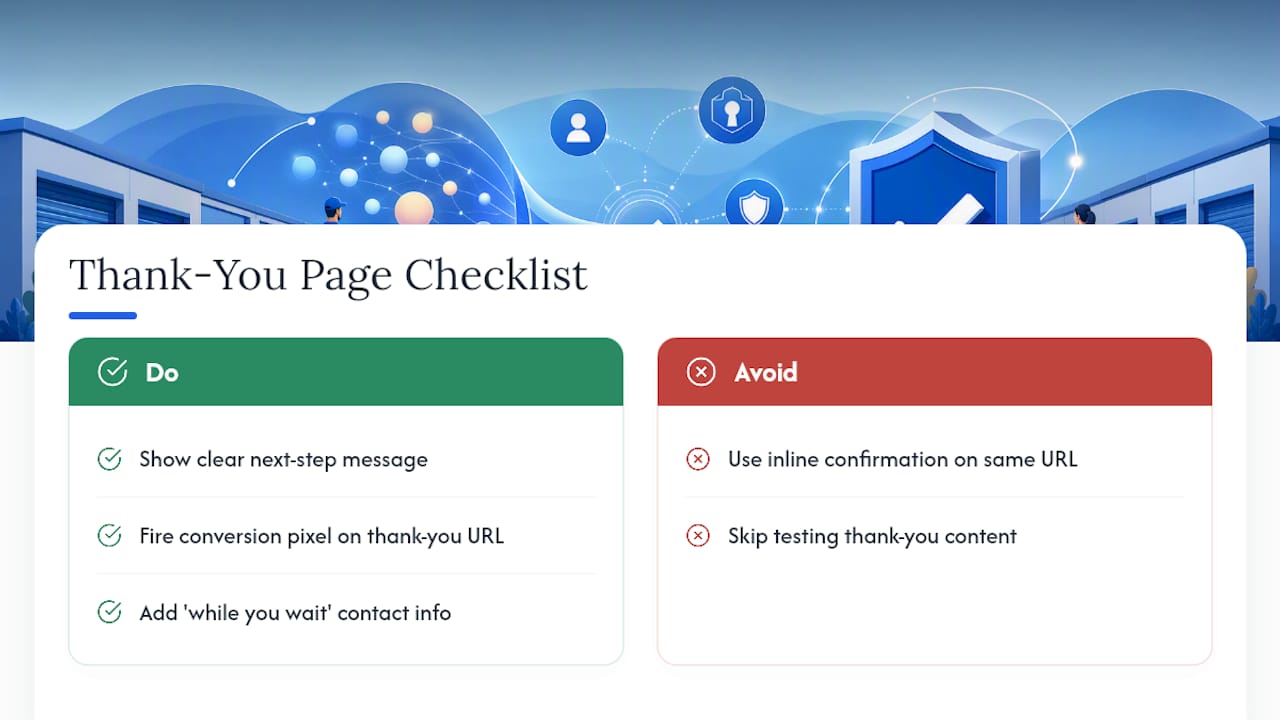
The thank-you page is the most neglected page in most PPC campaigns, and it's doing more work than advertisers realize. It confirms the conversion fired correctly in your tracking, sets expectations for the visitor, and quietly protects your data for future optimization.
Every thank-you page needs three things. First, a clear confirmation message stating what happens next: "We'll call you within one business hour" beats a generic "Thank you for your submission." Second, your conversion tracking pixel needs to fire from this exact page, not from a form submission event alone, since that's the cleanest signal Google Ads uses to optimize bidding toward more conversions like this one. Third, use the moment productively. A short "while you wait" section with a phone number for immediate questions captures visitors who convert but still want to talk to someone right away.
Skipping a dedicated thank-you page and just showing an inline confirmation message on the same URL is a common mistake. It might look cleaner, but it makes conversion tracking noisier and removes a clean event Google Ads can optimize against. A distinct thank-you URL gives you a hard, unambiguous signal: this visitor converted, full stop.
Test what you put on that page too. A follow-up phone number, a link to frequently asked questions, or a simple "check your inbox" note all change how visitors feel about a decision they just made, and that feeling affects whether they show up for the appointment or call back later.
Does Your Landing Page Copy Affect Quality Score?
Yes, and it's one of the more underused levers in a PPC account. Google Ads Quality Score weighs landing page relevance alongside expected click-through rate and ad relevance, meaning a page stuffed with generic copy can quietly raise your cost per click even when your ad copy is sharp.
Relevance here means keyword alignment, not keyword stuffing. If your ad group targets "climate controlled storage [city]," that phrase, or a close natural variant, should appear in your headline, a subhead, or the page's visible body copy. Google's crawlers and its ad quality systems both read the page content to judge whether it genuinely matches the search intent behind the click, and a page that talks broadly about "storage solutions" without ever mentioning climate control sends a weak relevance signal.
The practical fix is straightforward: audit each ad group's top keywords and confirm the landing page it points to actually contains that language somewhere a visitor and a crawler would both see it, not hidden in alt text or a footer. Pages built for one specific offer naturally score better here than shared, generic pages trying to serve five different ad groups at once.
Better Quality Scores lower your cost per click and improve ad position, so relevance work on the landing page pays for itself twice: once in conversion rate, once in what you pay per click to get there.
Keeping Landing Page Versions Organized as Campaigns Scale
A storage advertiser running ad groups across multiple unit sizes, locations, and seasonal promotions can easily end up with dozens of landing page variants within a year. Without a system, that growth turns into chaos fast: nobody remembers which version is live, which one was the A/B test loser, and which page a specific ad group actually points to.
Set up a naming convention before you need one. Something like location_unitsize_promo_version (for example, riverside_10x10_movein_v2) makes it possible to scan a list of URLs or file names and immediately know what each page is for, without opening it.
Keep a simple, shared log, even a spreadsheet works, that tracks every live landing page, which ad group it serves, when it was last updated, and its current conversion rate. This single source of truth prevents the common scaling problem where two team members build competing pages for the same ad group because neither one knew the other existed.
Archive retired variants rather than deleting them outright. A losing A/B test version from six months ago can become useful again if a seasonal promotion returns or if a new hire asks why a particular headline was abandoned. Platforms like HubSpot, Unbounce, Instapage, and Leadpages all include built-in version history and duplication tools that make this far easier than managing static HTML files by hand, and choosing the right builder often comes down to how much your team needs rapid variant testing versus full custom control.
Archiving Landing Page Data and Analytics the Right Way
Landing page performance data has a shelf life problem: most teams keep last month's numbers close at hand and lose track of everything older, right around the time a seasonal comparison would be genuinely useful.
Build a simple archiving rhythm instead of relying on memory. At minimum, export monthly conversion data, LCP scores, and form completion rates for every active landing page into a dated record, whether that's a shared spreadsheet, a data warehouse, or your analytics platform's own historical reporting. The goal is being able to answer "how did this page perform last October" in under a minute, not an afternoon of digging through old dashboards.
Tag every test result with its date range, the single variable changed, and the outcome, win, loss, or inconclusive, right in your archive. This turns your testing history into a reference library rather than a pile of forgotten experiments. A year from now, when someone proposes testing a CTA change you already tried and abandoned, that record saves the team from repeating a test that already has an answer.
Retire old landing pages properly rather than letting them sit live and forgotten. An outdated page still indexed and still receiving occasional traffic from an old ad group can quietly drag down account-level Quality Score if its content no longer matches current offers or pricing. Redirect or unpublish anything tied to a promotion that ended months ago.
Connecting Landing Pages to Your Tracking Stack
A landing page that converts beautifully but reports badly is nearly as costly as one that doesn't convert at all, because Google Ads can't optimize bidding toward outcomes it can't see clearly.
Start with conversion tracking fired correctly at the thank-you page, not just on form submission, so Google Ads gets a clean, verifiable signal for its automated bidding strategies. Layer Google Analytics or a similar platform on top to see the fuller behavioral picture, scroll depth, time on page, where visitors drop off in a multi-step form, that raw conversion counts alone can't show.
Call tracking deserves particular attention for storage advertisers, since a meaningful share of conversions happen by phone rather than form. A dynamic number insertion tool that swaps in a trackable phone number per traffic source lets you attribute calls back to the specific ad group and keyword that generated them, closing a gap that otherwise leaves phone leads invisible in your reporting.
Cross-check your tag manager setup periodically. Duplicate tags, outdated pixels, and conflicting analytics scripts are a common, quiet cause of both inflated page load times and inaccurate conversion counts, undermining both the speed metrics and the data quality your testing program depends on. A quarterly tag audit catches this before it skews a month of optimization decisions.
Get Landing Pages and AI Visibility Built for Storage Operators
Everything in this guide works best when the landing page isn't fighting an uphill battle to get found in the first place. Corvane Systems builds custom, conversion-focused landing pages for storage facilities and pairs them with the technical SEO and AI visibility work that gets a facility surfacing in Google, ChatGPT, Claude, and Perplexity when someone asks where to rent a unit nearby. If your current pages are fast and message-matched but still not generating enough qualified traffic to test against, the gap is often visibility, not page design. See how Corvane Systems approaches AI visibility for self-storage and where your facility currently stands.
The Storage-Specific Take on PPC Landing Pages
Most PPC advice treats landing pages as a universal template: match the headline, cut the form, speed up the load. All true, and all incomplete for storage advertisers, because the category has a shopping behavior most generic playbooks ignore.
That changes the priority order. A generic ecommerce page might lean hardest on testimonials and urgency. A storage page earns more from a visible price range and a neighborhood reference than from a five-star badge, because the visitor's real question is "is this close enough and cheap enough," not "is this brand trustworthy."
The mistake I see most often isn't bad copy or slow pages. It's ad groups mapped to one generic landing page instead of pages built around unit size and feature. That single fix, mapping pages to what the ad actually promises, does more for conversion rate than another round of button color tests ever will.
— Mike
Sources
- How website speed affects conversions — Lucky Orange
- Form conversion tips — Formstack
- PPC landing page optimization best practices (2025 guide) — Unbounce