
A rent-first page has one job: let a first-time renter pick a unit and reserve it without leaving the screen. That's the outcome. Most operator websites fail at this because they treat the site like a brochure instead of a checkout system.
Three features separate pages that book units from pages that just sit there:
- Concise size guidance that maps real belongings to real unit dimensions, not vague "small, medium, large" labels
- Live unit availability with price shown next to the unit, not buried behind a "call for pricing" wall
- A one-page checkout that gets someone from "interested" to "reserved" in under two minutes
Get those three right and operators typically see measurable booking gains within 90 to 120 days, once the content clusters and local signals below have time to index and the checkout data starts feeding your optimization loop.
Key Takeaways
A rent-first page converts first-time renters when it combines clear size guidance, real-time priced availability, and a one-page checkout, backed by content clusters and accurate local listings.
| Point | Details |
|---|---|
| Three non-negotiables | Concise size guidance, live priced availability, and one-page checkout drive most bookings. |
| Build supporting content | Publish at least six unit-size pages plus life-event and neighborhood pages that link to checkout. |
| Fix hidden friction | List required ID, payment terms, and lease vocabulary on the page before checkout, not after. |
| Track the right numbers | Monitor booking rate, funnel drop-offs, and time-to-book, then test one variable at a time. |
| Keep local listings accurate | Audit Google Business Profile and aggregator sites regularly since AI tools cite them directly. |
Table of Contents
- Rent First Storage Unit Guide: Conversion-Focused Page Elements
- What Content Clusters Feed the Rent-First Page?
- Size Calculator, AI Chat, and Live Inventory: What to Build
- How Do You Make Your Facility Discoverable Locally and to AI?
- What Should You Measure After the Page Goes Live?
- How Corvane Systems Builds and Maintains This System
- What ID and Paperwork Does a First-Time Renter Need?
- What Payment Methods and Billing Cycles Should You Explain?
- What Do Common Lease Terms Actually Mean?
- How Should Renters Choose a Storage Location?
- An Editorial Take on the Conversion-First Playbook
- Sources
Rent First Storage Unit Guide: Conversion-Focused Page Elements
The page structure matters as much as the words on it. A visitor who lands on your rent-first page is already shopping. Your job is to remove every reason they'd bounce to a competitor's tab.
Start with a single, unmistakable call to action: "Reserve This Unit" or "Check Availability," placed above the fold and sticky on mobile so it never scrolls out of reach. Trust signals need to sit right at the decision point, not on a separate "About Us" page nobody visits. That means 40 or more photos covering the exterior, hallways, and actual unit interiors, plus visible security features, star ratings, and a couple of short testimonials near the CTA.

Unit-size labels should describe contents, not just dimensions. "5x10, fits the contents of a one-bedroom apartment" tells a first-time renter something a number alone never will. Pricing needs to be visible per unit, with a short line explaining what drives the price, whether that's drive-up access, climate control, or a spot near the front gate.
The checkout itself should be one page. Skip forced account creation, and ask for only the fields you actually need to hold the reservation. High-converting storage sites treat real-time availability and a short checkout path as the two biggest levers for turning browsers into renters, and pages that show price directly next to each unit consistently outperform ones that scatter CTAs or hide pricing behind a form.
Pro Tip: Put your cheapest unit's price on the page, even if it's a small one. Hiding all pricing to "generate leads" filters out exactly the price-sensitive renters who convert fastest once they see a number they can afford.
What Content Clusters Feed the Rent-First Page?
A rent-first page rarely converts cold traffic on its own. It converts traffic that arrives already educated, and that education happens on supporting pages built specifically to funnel intent toward the reservation button.
- Unit-size pages. Publish at least six: 5x5, 5x10, 10x10, 10x20, garage or RV, and climate-controlled. Each should list typical item counts (a 10x10 holds a two-bedroom apartment's furniture) and end with a direct "Reserve" link back to the rent-first page.
- Life-event pages. Moving, downsizing, college storage, and home renovation each carry different anxieties and different size needs. Build one page per event, recommend a specific unit size, and link straight through.
- Specialty pages. Boat, RV, car, and business document storage draw narrower but higher-intent traffic. Someone searching "RV storage near me" already knows what they need; specialty landing pages convert that traffic at a noticeably higher rate than generic homepage visits.
- Neighborhood pages. Dedicated pages for the two or three biggest neighborhoods in your service area capture "near me" searches directly, since storage tenants overwhelmingly rent within a few miles of home.
- Operational policy pages. Insurance requirements, access hours, deposits, and fee breakdowns answer the last-minute questions that stall a booking in its final 48 hours.
Size Calculator, AI Chat, and Live Inventory: What to Build
The tools on your site either move a visitor toward checkout or give them an excuse to leave. There's rarely a middle ground.
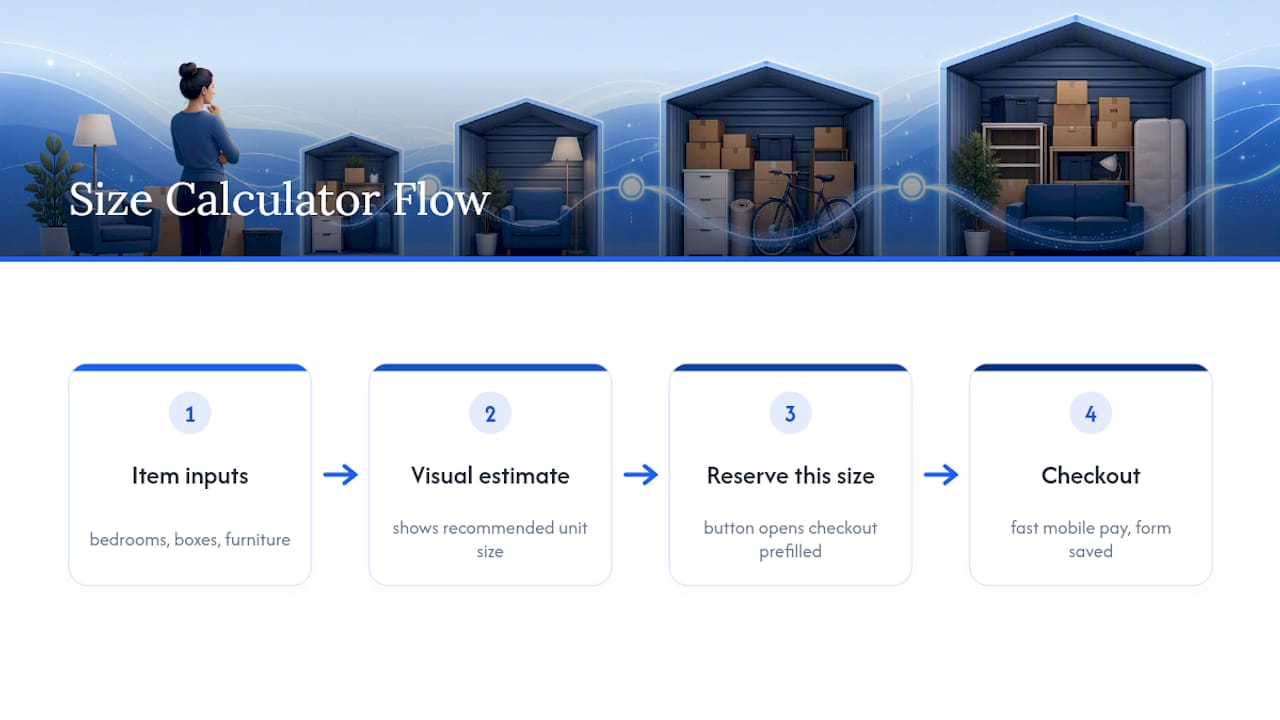
A size calculator earns its space only when it's visual and item-based, asking "how many bedrooms" or "boxes plus a couch" rather than making someone guess square footage cold. Every calculator result should end in a "Reserve This Size" button that opens checkout with the unit already selected, not a dead end that sends the visitor hunting for the unit list themselves.
AI chat widgets work the same way: capture intent, prefill the reservation form with whatever the visitor told the bot, and save the transcripts. Those conversations are a free source of content ideas, since the same three or four questions show up over and over.
Live inventory has to be real. Nothing kills trust faster than reserving a unit online and then getting a call saying it's actually rented. Sync your inventory feed or flag units as low stock the moment they drop below a threshold. Real-time availability paired with a fast, mobile-first checkout is the difference between a site that generates leads and one that closes them, and treating the website as an actual revenue system rather than a digital brochure is what separates operators who scale from ones who plateau.
Pro Tip: Add Apple Pay and Google Pay to checkout. A first-time renter filling out a card form on their phone is exactly the moment you lose them to a "call for pricing" competitor down the road.
How Do You Make Your Facility Discoverable Locally and to AI?
Search behavior for storage is hyper-local, and it's shifting toward AI assistants that summarize answers instead of listing ten blue links. Both channels reward the same underlying hygiene.
- Keep your Google Business Profile complete: full NAP, 40-plus photos, current unit inventory, and a weekly post that links back to whichever content cluster page is newest
- Build "near me" relevance the honest way, through neighborhood pages and consistent address formatting across every citation, not keyword stuffing
- Add structured data, including FAQ markup and Product or Offer schema where it applies, so both classic search and AI overviews can parse your pricing and availability correctly
- Audit your listings on SpareFoot, StorageCafe, and Neighbor regularly, since AI assistants frequently pull from those aggregators when answering local storage questions
Neighborhood-level SEO combined with AI-focused optimization is quickly becoming table stakes rather than a differentiator. Most tenants live within a 3 to 5 mile radius of the facility they choose, which means a wrong address on even one directory listing can quietly cost bookings for months before anyone notices. Our own local SEO breakdown for storage operators covers the citation cleanup process in more detail.
What Should You Measure After the Page Goes Live?
A rent-first page you never measure is a guess dressed up as a strategy. Track a small set of numbers monthly and let them tell you what to fix next.
- Booking rate — bookings divided by unique visits to the rent-first page, your single most important number
- Funnel drop-offs — where visitors abandon between landing, size selection, and checkout
- Time-to-book — how long it takes an average visitor to go from arrival to confirmed reservation
- Event tracking — size calculator opens, Reserve clicks, chat starts, and completed checkouts, logged separately so you know which tool is actually pulling weight
| Test | What to compare |
|---|---|
| CTA wording | "Reserve Now" vs. "Check Availability" |
| Price visibility | Showing the discount vs. hiding it behind a click |
| Page layout | Size guide positioned above vs. below the unit list |
Run one test at a time, for at least two to four weeks, before calling a winner. Feed your front-desk staff's most repeated questions into next month's content calendar, then update your Google Business Profile and rerun the experiment.
How Corvane Systems Builds and Maintains This System
Everything above takes ongoing execution, not a one-time redesign. That's the part most operators underestimate.
Corvanesystems builds this out piece by piece for self-storage clients:
- AI-optimized content published on a monthly cadence to fill out the unit-size, life-event, and neighborhood clusters described above
- Google Business Profile optimization and aggregator audits to keep your local signals accurate and current
- AI visibility audits across ChatGPT, Claude, Perplexity, and Google's AI Overviews, so you know exactly where your facility is invisible before you fix it
- Technical and on-page SEO plus monthly performance tracking, delivered on a flat rate with no contracts or tiers
The typical starting sequence is an audit, a prioritized fix list (usually the size guide, checkout flow, and Google Business Profile first), then a 90-day publishing and testing plan built around the KPIs above. If your current site can't support live availability or a one-page checkout, Corvanesystems also builds custom, conversion-focused websites for operators who need that foundation before the content and SEO work can pay off.
What ID and Paperwork Does a First-Time Renter Need?
First-time renters almost always ask this before they'll commit online, so answer it on the page itself instead of making them call.
Standard requirements are a government-issued photo ID (driver's license, passport, or state ID) and a working phone number and email for account setup. Most facilities also ask for a secondary contact, someone who isn't on the lease but can be reached if the renter becomes unreachable. Business renters typically need to show a business license or tax ID in place of, or alongside, personal identification.
Some facilities require proof of address if the ID doesn't match the applicant's current location, though this varies by operator and isn't universal. None of this should come as a surprise at checkout. List the required documents plainly on your rent-first page and on the operational policy pages that feed into it, since a renter who hits an unexpected ID requirement mid-checkout is a renter who closes the tab.
Insurance or a protection plan is typically required, either through the renter's own homeowner's or renter's policy, or through a plan the facility offers directly. State this cost clearly rather than letting it surface as a surprise line item at signing. First-time renters who feel ambushed by fees at the last step are far more likely to abandon the reservation entirely, which is exactly why this information belongs on the page well before checkout begins.
What Payment Methods and Billing Cycles Should You Explain?
Billing confusion is one of the most common reasons first-time renters hesitate before completing a reservation, so spell it out in plain language on the rent-first page.
Most self-storage facilities bill monthly, with the first payment (and often a small administrative or setup fee) collected at move-in and rent due on the same date every month after that. Accepted payment methods typically include major credit and debit cards, ACH bank transfers, and increasingly, digital wallets like Apple Pay and Google Pay at checkout. Autopay should be presented as the default, not an afterthought, since it reduces late payments for the facility and removes a recurring task for the renter.
Explain your late fee structure and grace period explicitly. A renter who doesn't know when a late fee kicks in is a renter who churns after one billing surprise. If you offer month-to-month terms with no long-term commitment, say so directly. That flexibility is one of the biggest reasons people choose self-storage over other options, and burying it in fine print wastes a genuine selling point.
If your facility offers move-in specials such as a discounted first month or a free lock, state the terms plainly, including when the standard rate takes effect. Vague promotional pricing erodes trust faster than no promotion at all, particularly with renters who are comparing three facilities in three open browser tabs.
What Do Common Lease Terms Actually Mean?
A self-storage lease is shorter and simpler than an apartment lease, but the terminology still trips up first-time renters, and that confusion is exactly what stalls a checkout.
A month-to-month agreement means the lease automatically renews each month until either side gives notice, typically 30 days, rather than locking the renter into a fixed term. A gate code or access code is the renter's personal code for entering the facility during posted access hours. Overlock refers to the facility placing a second lock on a unit, usually for nonpayment, which blocks the renter's own key or code from working until the balance is resolved.
Default describes what happens after a renter misses payments past the grace period, which can eventually lead to a lien sale of the unit's contents under state law. Tenant insurance or a protection plan covers the renter's stored belongings, since most facilities explicitly do not insure the contents of a unit themselves. Spell out each term the first time it appears on your policy pages rather than assuming familiarity. A renter who doesn't understand "overlock" until it happens to them is a renter who leaves a one-star review instead of quietly paying a late fee.
How Should Renters Choose a Storage Location?
Location advice deserves its own space on your content clusters, not just a line in the FAQ, because proximity is the single biggest driver of who actually books.
Distance from home or work matters more than almost any other factor. Most renters choose a facility within a few miles of where they live, which is exactly why neighborhood-specific content pages matter as much as the rent-first page itself. Beyond distance, encourage prospective renters to weigh drive-up access versus elevator access for upper floors, whether the unit needs climate control for sensitive items like electronics or documents, and how visible and well-lit the facility is after dark.
Security features deserve a direct callout: gated access, individual unit alarms, and on-site cameras all address the same underlying anxiety, that stored belongings are actually safe when nobody's watching them. Access hours matter too. A renter who works nights needs 24-hour access, while someone storing seasonal items rarely cares. Guide renters to match the facility's hours to their own schedule rather than assuming wider access is always better; facilities with 24-hour access often charge a premium that a nine-to-five renter doesn't need to pay.
An Editorial Take on the Conversion-First Playbook
Most storage operators treat their website like a digital brochure and their content like a chore. That's backward. The research points the same direction every time: the sites that book units are the ones that treat the homepage as a checkout funnel and treat content clusters as bait that feeds it, not as separate projects run by whoever has spare time.
The conventional advice, "write more blog posts" or "get more backlinks," misses the actual lever. A neighborhood page that never links to a priced, reservable unit is wasted effort. A size calculator that dead-ends instead of opening checkout is wasted engineering. The order of operations matters more than the volume of tactics.
If you're starting from zero, fix the checkout and the size guide first. Everything else, the neighborhood pages, the AI chat, the schema markup, only pays off once a visitor who arrives ready to rent has somewhere to actually complete that action.
— Mike
Sources
- An SEO survival guide for self-storage operators
- Content marketing for self-storage (Unit-Fill Playbook) | IP
- Self Storage Web Design: 7 key features that boost conversions - Trident
- Self Storage Website Design: 5 Ways to Improve Conversions | Stora