
Duplicate content locations are URLs on a multi-location website that show Google appreciably similar content, usually location or service-area pages built from the same template with only a city name swapped. Google groups these URLs and picks one canonical version to rank, which means the others typically drop out of search results. The immediate fix is a crawl of the whole site paired with a check of Google Search Console's duplicate grouping data to see exactly which pages Google has already lumped together.
TL;DR:
- Duplicate location pages often create Google clusters where only one page ranks, typically the one with stronger backlinks or signals, causing others to vanish from search results.
- Exact duplicates often result from URL parameters or session IDs, while near-duplicates mainly differ only in city name or contact details, requiring different fixing approaches.
- Tools like Google Search Console and Screaming Frog help identify which pages Google groups together, enabling targeted consolidation with redirects or canonical tags.
- Properly building unique content with local facts, photos, and specific details prevents pages from cannibalizing each other and enhances their chances of ranking independently.
- Prioritize fixing duplicates on high-traffic locations first, using simple redirects or canonical tags, while low-traffic duplicates can be addressed later as resources permit.
Table of Contents
- What Counts as Duplicate Content on Location and Service-Area Pages
- How to Find Duplicate Content Across Your Locations
- Technical Fixes and Which Ones Actually Move the Needle
- How to Make Every Location Page Genuinely Unique
- Your Prioritized Duplicate Content Audit Checklist
- How a Storage-Focused Audit Handles Duplicate Location Pages
- When to Fix Duplicate Content and When to Let It Sit
- Corvane Systems: Managed Audits for Storage Operators
- Where the Facts in This Guide Come From
- Sources
- FAQ
What Counts as Duplicate Content on Location and Service-Area Pages
Duplicate content splits into two categories that behave differently in search results. Exact duplicates are byte-for-byte or near-identical pages, often created by URL parameters, printer-friendly versions, mobile subdomains, or session IDs tacked onto the end of an address. Near-duplicates are trickier: two pages that use the same paragraph structure, the same three bullet points, and swap out only a city name and phone number.
Multi-location businesses generate both types constantly, usually by accident. Google's own documentation on duplicate URLs describes this exact scenario: when the system finds multiple URLs with essentially the same page contents, it treats them as one cluster and selects a single representative URL to show in results.
That last part matters more than most site owners realize. You do not get to decide which of your ten location pages wins. Google does, based on signals like internal linking, backlinks, and content depth. If your Boston page has more incoming links than your Providence page, and both use identical copy, Boston might get selected as canonical, and Providence quietly disappears from search even though it is a completely legitimate business location.
The dividing line between "fine" and "a problem" is intent. A service-area page meant to rank for a broad region is not duplicate content just because it overlaps geographically with a nearby city page. It becomes a problem when two pages are trying to rank for the same query with the same substance, forcing Google to choose one and bury the other. Understanding that distinction is the difference between a location page that earns its own ranking and one that cannibalizes a sibling page down the street.
How to Find Duplicate Content Across Your Locations
Start inside Google Search Console before you touch any third-party tool. The Index Coverage report and duplicate URL groupings show you which pages Google has already clustered together and which URL it picked as canonical for each group. This is the fastest way to see where your site is losing pages to internal cannibalization, because it reflects what Google actually did, not just what you suspect.
From there, run a full site crawl. Screaming Frog remains the standard here, and its near-duplicate detection feature lets you set a similarity threshold and exclude shared template elements like navigation and footer content before comparing pages. Skip that exclusion step and you will get false positives on nearly every page, since every location page shares the same header and footer by design.
A practical detection workflow looks like this:
- Crawl the entire site with Screaming Frog or a comparable crawler, then sort by near-duplicate similarity score.
- Cross-check the crawl output against your Google Search Console duplicate groupings to confirm which pages Google itself flagged.
- Run cross-domain checks with a tool like Copyscape or Siteliner to catch cases where an aggregator or franchise partner has scraped your location copy.
- Search
site:yourdomain.com "unique phrase from a location page"to spot indexed duplicates you might have missed in the crawl. - Export everything into one spreadsheet with columns for URL, similarity score, canonical status, and organic traffic, so you can triage by business impact instead of by gut feeling.
Pro Tip: Sort your export by organic traffic before you sort by similarity score. A near-duplicate pair where one page gets zero visits and the other drives half your leads doesn't need a redirect and a rewrite. It needs a redirect, full stop.
Technical Fixes and Which Ones Actually Move the Needle
Not every fix carries the same weight with Google, and using the wrong one on a location page can do real damage; for example, previewing changes with a SERP snippet preview tool helps ensure your metadata updates are effective. Google ranks canonicalization signals by strength, with redirects at the top, rel="canonical" annotations next, and sitemap inclusion trailing as the weakest signal of the three.
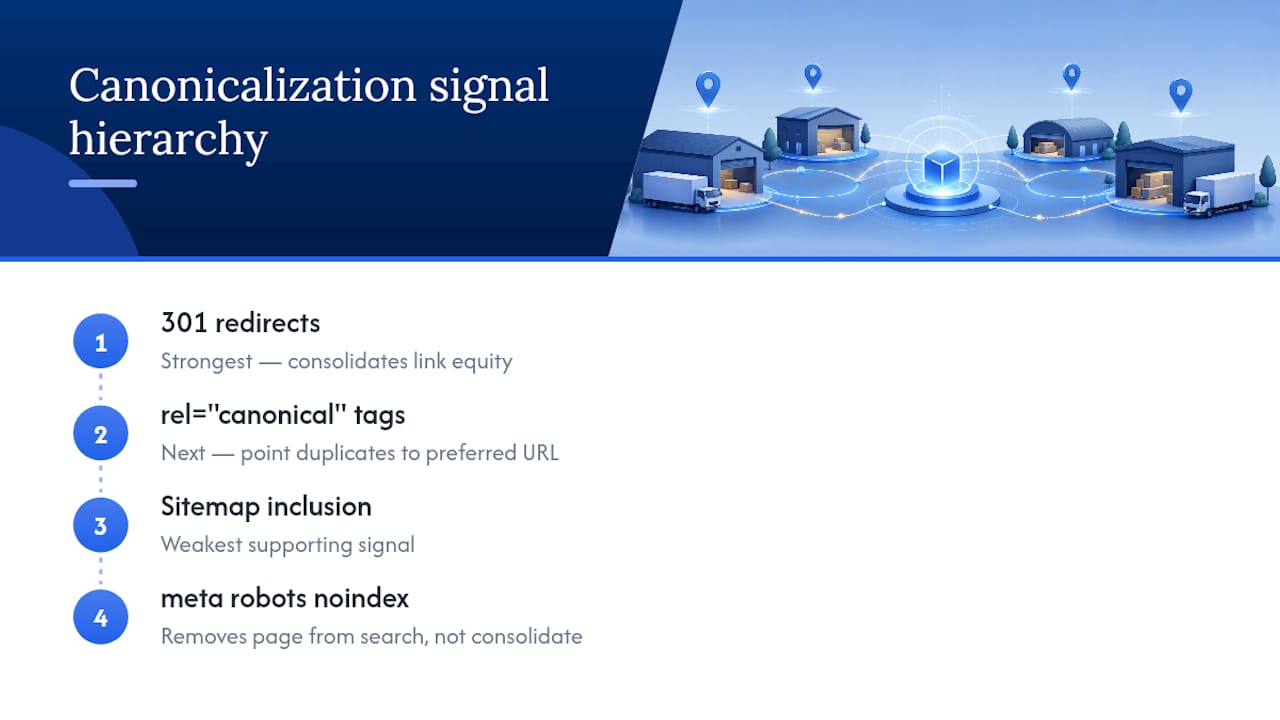
301 redirects are the strongest tool you have, and the right call when you are permanently closing or merging a location. If a franchise location shuts down and a new one opens six blocks away serving the same customers, redirecting the old URL to the new one consolidates the link equity instead of losing it.
Rel="canonical" tags work well for genuine duplicate variants, like a URL with tracking parameters pointing back to the clean version of the same page. They should never be used to suppress a location page that is supposed to rank on its own. This is the single most common multi-location mistake: an SEO consultant, trying to fix "duplicate content," canonicalizes the Providence page to the Boston page because the copy looks similar. Providence vanishes from search entirely, not because it was a bad page, but because someone told Google it was a duplicate of Boston. UC Davis's guidance on canonical tags flags exactly this failure mode.
Meta robots noindex,follow has a narrower use case: pages that need to exist for users, like a print-friendly version, but that add no ranking value. Use it sparingly on location pages, since noindexing a page removes it from search entirely rather than consolidating its signals elsewhere.
Sitemaps and consistent internal linking round out the toolkit as supporting signals. They will not override a bad canonical decision, but consistent internal links pointing to the preferred URL reinforce which version you actually want ranking.
How to Make Every Location Page Genuinely Unique
Templates are the root cause of most location-page duplication, and the fix is not abandoning templates. It is building enough unique fields into the template that no two pages end up saying the same thing.
- Inject facts no other page has. Manager or staff names, exact hours including holiday exceptions, on-site policies (parking rules, gate codes, loading dock access), and driving directions from major landmarks all give a page substance that cannot be copy-pasted across ten cities.
- Add local-first assets. Original photos of the actual building and neighborhood, not stock images, plus location-specific customer testimonials and a short FAQ addressing questions unique to that neighborhood (flood zones, seasonal traffic, nearby competitors closing).
- Choose the right page type for the right intent. A service-area page fits a business that travels to the customer across a region with no fixed storefront. A dedicated location page fits any address customers actually visit. Mixing these up, building 15 service-area pages for 15 ZIP codes around one office, is a common source of accidental duplication. Corvane Systems' guide on building service-area pages breaks down exactly when to consolidate and when to keep pages separate.
- Design the template around modular, structured blocks rather than a single wall of text. Separate fields for hours, unique amenities, staff bios, and neighborhood notes make it far easier to guarantee every page hits a uniqueness threshold, even when 40 pages ship in the same afternoon.
Your Prioritized Duplicate Content Audit Checklist
Fixing duplicate content across dozens of locations is not a one-afternoon task, and treating it that way is how audits stall halfway through. Work it in four ordered stages.
- Discovery. Crawl the full site, export every duplicate and near-duplicate cluster from Google Search Console, and run a separate check for externally scraped copies through a cross-domain tool or targeted
site:searches. - Decision matrix. For each duplicate set, decide: keep both pages and differentiate the content, consolidate with a 301 redirect, apply a self-referencing canonical to the page that should rank, or noindex a genuinely low-value variant. The deciding factor is almost always whether the page is meant to rank independently, not how similar the text currently looks.
- Implementation. Ship the quick wins first: redirects for dead locations, canonical corrections for parameter-based duplicates, sitemap cleanup. Save the labor-intensive work, rewriting near-duplicate location copy with unique local facts, for a second pass once the technical layer is stable.
- Monitoring. Recheck Google Search Console's canonical selection for each affected URL every few weeks. A shift toward the page you actually want ranking is the clearest sign the fix worked.
Assign severity honestly. A duplicate pair on your two highest-traffic locations deserves a same-week fix. A duplicate pair on two locations that combined drove eleven organic visits last quarter can wait for the next content sprint.
Pro Tip: Keep one running spreadsheet tab labeled "canonical before/after." Log which URL Google selected as canonical on day one of the audit, then check it again 30 and 60 days after each fix. That single column tells you more about whether your work is landing than any ranking report will.
How a Storage-Focused Audit Handles Duplicate Location Pages
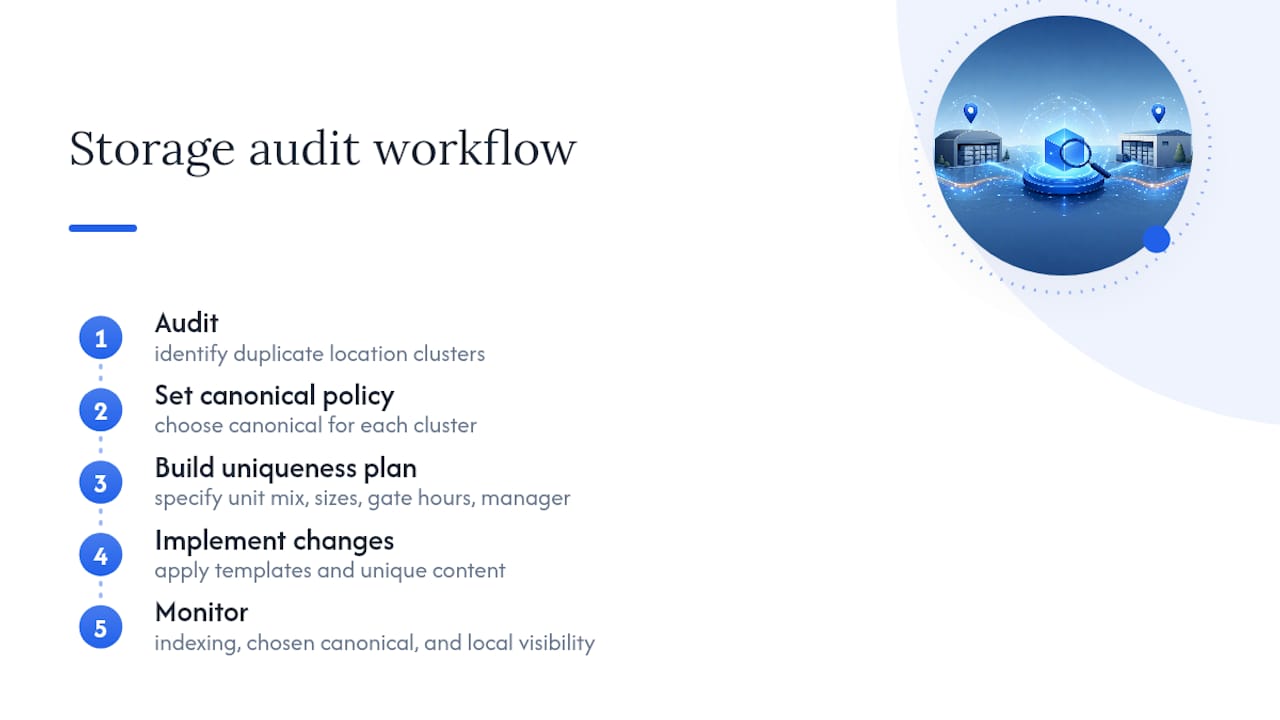
A version of this same workflow is used specifically for self-storage operators, where duplicate location content often arises due to similar templates used across properties. The sequence stays consistent: audit first, set a canonical policy second, build a content uniqueness plan third, implement, then monitor.
For storage operators specifically, the unique fields that separate one facility page from the next are different from a typical retail location. Unit mix and available sizes, gate access hours, on-site manager availability, and gate code or keypad entry policies all give a facility page substance a generic template cannot fake. A multi-location playbook built for storage leans heavily on these fields because they map directly to what a renter actually needs to know before booking.
Monitoring after the fix tracks three signals: whether pages return to full indexing in Search Console, which URL Google settles on as canonical for each cluster, and whether local visibility (map pack appearances, "storage near me" rankings) recovers for the locations that had been suppressed by a sibling page.
When to Fix Duplicate Content and When to Let It Sit
Duplicate content rarely triggers anything resembling a penalty. Google has said as much directly: the real cost is signal dilution and wasted crawl budget, not a punitive ranking drop. That distinction should change how you allocate time.
Fix the duplicates sitting on pages that actually drive bookings or leads first. A duplicate pair between your two busiest metro locations deserves a rewrite and a canonical review this month. A duplicate pair between two locations that barely register in your analytics does not need the same six hours of custom copywriting.
Sometimes the right call is a quiet 301 redirect and moving on, not a full content overhaul. Chasing uniqueness on every single low-traffic page is a fine use of time if you have unlimited hours. Most operators do not, so spend the effort where the search visibility actually pays for itself.
Corvane Systems: Managed Audits for Storage Operators
If you run a self-storage facility and the idea of crawling forty location pages and cross-referencing Search Console data sounds like a project you will never actually finish, that reaction is normal. Corvane Systems is built specifically for storage operators who want this handled rather than DIY'd.

The service covers the full workflow this article just walked through: detecting duplicate and near-duplicate location pages, deciding which canonical policy fits each one, building out unique local content at scale, and monitoring whether Google's canonical selection actually shifts after the fix. It runs alongside a flat-rate package, which includes technical and on-page SEO, local business profile optimization, and AI-optimized content designed to improve visibility on search engines and AI tools.
Pricing is one flat rate: the full Corvane system runs $299 per month with a one-time $50 onboarding fee, no contracts and no tiers to sort through. If you want a starting point before committing to anything, request the free AI visibility audit through Corvanesystems and see exactly where your duplicate location pages stand today.
Where the Facts in This Guide Come From
- Google Search Central's duplicate URL documentation explains how duplicate clusters and canonical selection work.
- Google Developers' guide to consolidating duplicate URLs ranks redirects, canonical tags, and sitemaps by signal strength.
- Screaming Frog's duplicate content tutorial covers crawl setup and near-duplicate thresholds.
- Moz's duplicate content explainer breaks down causes and remediation paths in plain terms.
Sources
- Duplicate URL - Search Console Help
- How to consolidate duplicate URLs | Google Developers
- How to check for duplicate content (Screaming Frog)
- Duplicate Content: Why does it happen and how to fix issues
FAQ
What is it called when data is duplicated in multiple places?
In SEO, this is called duplicate content, or more specifically a duplicate URL cluster when Google groups several pages showing the same or nearly the same information. Google's duplicate URL documentation describes this grouping process and how a single canonical page gets chosen to represent the set.
Is duplicate content bad for SEO?
Duplicate content is not an automatic penalty, but it does cause real problems: it splits ranking signals across multiple URLs and can waste crawl budget that Google could otherwise spend on pages you actually want indexed. For multi-location businesses, the practical damage is usually a suppressed location page losing its own ranking to a sibling page.
How do I find duplicate content on my site?
Start with Google Search Console's Index Coverage report to see which URLs Google has already grouped as duplicates, then run a full crawl with a tool like Screaming Frog using its near-duplicate detection settings. Cross-check any suspected external scraping with a cross-domain comparison tool or a targeted site search.
How do you fix duplicate content?
The fix depends on why the duplicate exists: use a 301 redirect when consolidating or removing a location, a self-referencing canonical tag when the page should rank independently, and a rel="canonical" pointer only for genuine parameter-based duplicates. Google's guidance on consolidating duplicate URLs ranks these methods by how strongly they influence which page gets indexed.
Can duplicate location pages hurt my local search rankings?
Yes, if two pages targeting different locations are similar enough that Google treats them as one cluster, only one will typically surface in local search results. Adding unique local details, staff names, hours, directions, and testimonials, is the most reliable way to keep each location page eligible to rank on its own.