
If you control both profiles, request an official merge to protect your reviews. If you only control one, claim the other or use "Suggest an edit" and escalate to Google Business Profile Support. Never mark your real, active location as permanently closed. The main risk is losing review replies, so grab both Maps URLs and listing IDs before you touch anything, then work through the checklist below.
TL;DR:
- Merging duplicate profiles requires verifying control over each listing, with proof like URLs, listing IDs, or documentation, to speed up the process.
- Claiming unverified duplicates before merging helps avoid stalls, as Google needs proof of ownership for both listings.
- Support requests should include exact URLs, listing IDs, and clear instructions to consolidate reviews and replies, minimizing delays.
- Merging consolidates review counts but may cause loss of review replies, making explicit review review requests essential during the process.
- Prevent future duplicates by assigning a single owner per physical location, verifying new listings' details before publishing, and conducting quarterly audits.
Table of Contents
- How to Find and Confirm Duplicate Google Listings
- Merge, Claim, Remove, or Suggest an Edit: Choosing the Right Fix
- Step-by-Step: Requesting a Merge or Removal
- What to Expect: Timeline and Risk
- Preventing Duplicates Before They Start
- Why Fixing Duplicates Matters Beyond Google Maps
- Get Managed Cleanup and Ongoing Listing Protection
- Sources
How to Find and Confirm Duplicate Google Listings
Duplicates hide in plain sight, and most owners find them by accident when a customer calls the wrong number. A faster method: run three searches yourself before assuming there's only one entry for your business.
Google defines a duplicate as a profile sharing an address with an existing verified listing, representing the same business twice, or existing as a second verified copy of one location. Under Google's own policy, any of those conditions violates the rules and can keep both listings out of Search and Maps entirely.
Here's how to confirm what you're dealing with:
- Search your exact business name in Google Maps and look for more than one pin or profile card.
- Search your phone number by itself. Ghost listings and old citations often surface here even when the business name is slightly different.
- Search your street address the same way, since address-based duplicates sometimes use a variant name.
- Open your Google Business Profile dashboard and check for listings you manage that you didn't expect, or ones flagged as managed by an unknown user.
- For every duplicate candidate, copy its Maps URL and note the listing ID from the profile's info panel. You'll need both for any support request.
Merge, Claim, Remove, or Suggest an Edit: Choosing the Right Fix
The correct fix depends entirely on who controls each listing, not on which one looks better.
- You manage both listings. Request an official merge. This is the cleanest path because it's built to preserve review authority under one profile. If a true merge isn't available for some reason, pick the listing with more reviews and history as your authoritative one, then plan to migrate customers and links toward it.
- You own one listing and the other is unclaimed. Claim the unclaimed duplicate first, then either merge it into your primary profile or delete it once ownership is verified. Skipping the claim step and going straight to deletion often stalls because Google needs proof you have standing over both entries.
- You don't control the duplicate at all. Use "Suggest an edit" to flag it, or open a support case describing the conflict. Only attempt to claim it yourself if verification looks straightforward, such as a phone or postcard code you can actually receive.
- Marking a listing "permanently closed." This is appropriate only for a location that genuinely no longer operates. Using it to make a duplicate disappear is risky, and marking your only verified, active listing closed by mistake wipes out your Maps presence along with it.
Step-by-Step: Requesting a Merge or Removal
Support requests move faster when you hand Google everything it needs on the first try. Vague tickets get vague responses.
Start by gathering documentation before you open anything:
- Maps URLs and listing IDs for both the profile you want to keep and the duplicate you want gone.
- A utility bill, lease, or clear photo of your signage if Google needs proof both listings represent the same physical location.
- A written request stating exactly what should happen: "Merge listing B into listing A and consolidate reviews," not just "please fix this."
From your verified profile, open a Business Profile Support case and attach both URLs, both IDs, and that clear statement of intent. Google's own community guidance notes that merges generally require proof both profiles represent the same business, and that reviews can consolidate while replies to those reviews sometimes don't carry over. Ask explicitly for review consolidation in your request rather than assuming it happens automatically.
If the duplicate isn't yours to claim, use "Suggest an edit," select "Close or remove this place," and describe the specific reason (duplicate address, duplicate business, secondary verified profile).
Pro Tip: If the automated route stalls after a couple of weeks, escalate with your original support ticket number attached and resend the same documentation. Keep a simple log of dates and case numbers. Some mislabeled "shadow listings" mimic real signals well enough that they need a second, manually escalated report before anyone acts on them.
What to Expect: Timeline and Risk
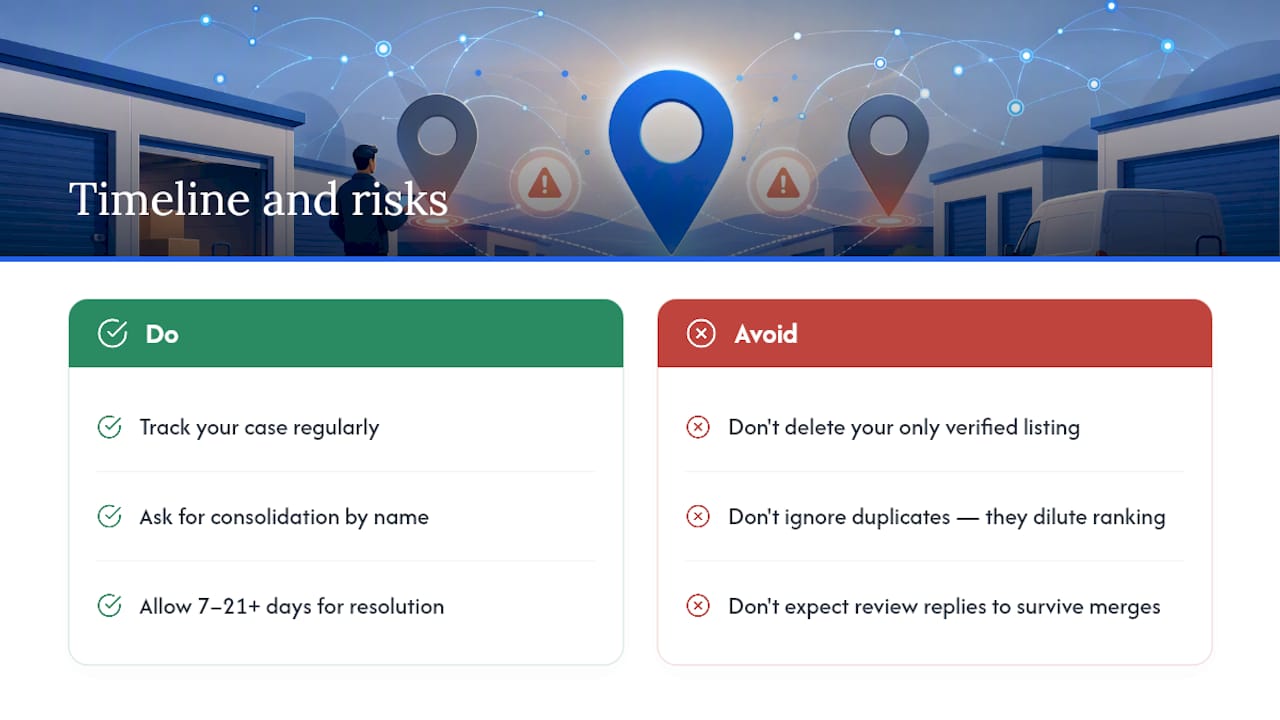
Patience matters here, but so does tracking your case. "Suggest an edit" closures typically resolve in about 7 to 14 days, while support-based merges and escalations commonly run 7 to 21 days or longer when verification is involved.
Merges often consolidate review counts onto the surviving profile, but replies you wrote to those reviews can disappear in the process, so ask for consolidation by name in your request. Deleting or closing the only verified listing you have removes your Maps presence entirely and can tank your local ranking overnight. Left alone, duplicates split review authority and customer attention between two entries, which dilutes ranking signals and can raise the odds of a suspension review if Google's system flags the account as inconsistent.
Preventing Duplicates Before They Start
Fixing duplicates once is manageable. Fixing them every quarter because nobody owns the process is a sign your workflow needs a rebuild.
Claim and verify every listing you're entitled to, and treat one profile per physical location as the canonical record with documented proof of ownership on file. Before publishing any new listing, run three quick checks: does the address geocode to the right point on the map, does the phone number match your existing domain and citations, and does the new listing read as suspiciously similar to one you already have. A short internal rule also helps: only designated managers can create or edit listings, and any new listing needs a second person's sign off before it goes live.
- Assign one owner per physical location, documented in writing.
- Require geocode and phone verification before any new listing is approved.
- Run a quarterly audit against your analytics to catch split traffic or a sudden divergence in review volume between two entries.
Pro Tip: A quick semantic similarity check, comparing a new listing's name and category against your existing ones, catches most accidental or cloned duplicates before they ever go public.
Why Fixing Duplicates Matters Beyond Google Maps
Duplicate listings don't just confuse customers. They split the trust signals search engines and AI tools use to decide who to recommend, which lowers your odds of showing up in a map pack or an AI Overview when someone searches "storage near me." At Corvane Systems, cleaning up split Google Business Profile data has been part of how we've helped storage operators regain map-pack visibility and stronger Google Posts engagement. Run the detection checklist above this week. A messy listing history is one of the easiest things to fix once you know exactly where it's broken.
— Mike
Get Managed Cleanup and Ongoing Listing Protection
There are specialized agencies that handle storage listing cleanup and know the specific merge, claim, and verification paths that matter for storage facilities, often without requiring long contracts. These agencies often handle Google Business Profile cleanup, verification support, and photo and address documentation, along with ongoing map-pack strategies to prevent new duplicates from reappearing.

If your listings are split across two or three entries right now, that's occupancy walking past your facility toward a competitor's cleaner profile. Visit the Corvane Systems landing page to request an audit of your current Google Business Profile setup and get a clear plan for merging what's duplicated and protecting what's left.
Sources
Start with Google's duplicate profile policy and the merge community thread for official guidance. For address corrections tied to a duplicate, see Corvane's guide on changing your Business Profile address and the storage map pack plan for ongoing protection.
- Resolve duplicate profiles & ownership issues — Google Business Profile Help
- Duplicate Google Business Profile: How to Find and Remove Them (2026) | Flento