
Yes, seasonal SEO moves occupancy for storage businesses. Spring moves, college turnover, and holiday overflow all spike search demand at predictable times, and facilities that publish or update pages ahead of those windows capture bookings the ones scrambling in the moment miss. Start today with a quick audit of your top-performing pages, then map a months-long content calendar around your busiest seasons.
TL;DR:
- Publishing or updating seasonal storage pages three to six months before demand peaks ensures Google can crawl, rank, and generate backlinks before competition takes the top spots.
- Consistently using evergreen URLs and refreshing content annually maintains backlinks and authority, rather than creating new pages each season.
- Analyzing Google Search Console, GA4, and Trends data reveals predictable demand spikes in spring, summer, and holidays, enabling precise keyword targeting.
- Local SEO efforts, including updating Google Business Profile and local landing pages with seasonal, geo-specific language, significantly improve visibility during peak times.
- Tracking year-over-year organic sessions, conversions, and booking requests during seasonal windows confirms the effectiveness of SEO efforts and guides continuous improvements.
Table of Contents
- What Seasonal SEO Storage Patterns Look Like
- How to Find Seasonal Keywords Before Your Competitors Do
- When Should You Publish Seasonal Storage Content?
- Technical Setup That Keeps Seasonal Pages Ranking
- Local SEO Moves for Seasonal Demand
- Making Seasonal Content Work for AI Search
- How to Measure Whether Seasonal SEO Is Working
- Should You Delete Old Seasonal Pages or Refresh Them?
- What I'd Actually Prioritize in the Next 30 Days
- Get a Seasonal SEO Audit Built for Storage Operators
- Sources
What Seasonal SEO Storage Patterns Look Like
Search demand for storage does not move evenly across the year. It clusters around a handful of predictable triggers, and if you know where to look in your own analytics, you'll see the same rhythm every year. That recurring rise and fall in search behavior is what the industry calls SEO seasonality, and for storage operators it shows up in a few distinct windows.
- Spring moving season (March through June): searches for "storage units near me" and "monthly storage rental" climb as leases turn over.
- College move-in and move-out (May and August): short-term storage queries spike near campuses, often phrased as "summer storage for students."
- Holiday overflow (November through January): searches shift toward "seasonal decoration storage" and "temporary storage for holidays."
- Storm and disaster prep (regional, but often June through November): "emergency storage" and "storage for flood damage" spike after weather events.
Your Google Search Console data will show this before your calendar does. Watch for impressions climbing on specific queries weeks before you'd expect, a shift in the query mix toward shorter-term or more urgent phrasing, and click-through rate changes on pages that otherwise stay flat. Booking request volume is the confirming signal. If your spring page gets more clicks but the same conversion rate, demand rose. If it gets fewer clicks but more requests, your positioning improved. Both matter, but they point to different fixes.
How to Find Seasonal Keywords Before Your Competitors Do
You don't need expensive software to find seasonal keyword windows. You need a repeatable process and about an hour a month. Combining Google Trends, Search Console, and GA4 gives you a clear read on when demand actually peaks in your market, not when you assume it does.
- Pull year-over-year query data from Search Console. Compare the same three-month window across two years to spot queries that rise consistently rather than randomly.
- Layer in GA4 time-series data. Look at sessions and conversions by landing page over the trailing 12 months to confirm which pages actually drove bookings during past peaks.
- Cross-check with Google Trends. Trends won't give you volume, but it will confirm whether a keyword's rise is a real seasonal pattern or a one-time spike tied to local news.
- Validate with a keyword tool for intent and difficulty. This is where you catch conversational long-tail phrases like "short-term storage near college campus" that carry high intent but low competition.
- Prioritize by conversion relevance, not just volume. A keyword with modest search volume but a clear rental intent beats a high-volume, browse-only term.
A solid keyword strategy treats local intent and seasonal intent as two variables you're solving for at once, not two separate projects. For storage specifically, that means checking whether "near me" language pairs with seasonal terms in your own data before you build a page around it.
When Should You Publish Seasonal Storage Content?
The single biggest timing mistake storage marketers make is publishing seasonal content the week demand starts. By then, competitors who planned ahead already own page one. Guidance across the industry is consistent: publish or refresh seasonal pages three to six months before peak demand to give Google time to crawl, rank, and let the page earn links.
For spring moving season, that means your content push should start in December or January, not March. For holiday overflow storage, start building well before the holiday season. Getting into the top three results before the ramp-up begins is the real goal, not just having a page live somewhere on the internet by the time demand hits.
A sample calendar looks like this:
- January: Publish or refresh the spring moving storage page months ahead; add unit availability messaging.
- February: Push internal links from your homepage and blog toward the spring page; start Google Business Profile posts in advance.
- June: Refresh the holiday storage page; update seasonal promotions.
- September: Ramp email and SMS reminders for holiday decoration storage as searches begin climbing.
Your promotion runway matters as much as the page itself. Internal links from high-traffic evergreen pages, regular GBP posts, and a simple email or SMS reminder to past customers all compound the effect of a well-timed page. None of that works if the page goes live after the search volume has already peaked.
Technical Setup That Keeps Seasonal Pages Ranking
The pages that win seasonal traffic year after year share a technical foundation, not just good timing. Get the on-page and technical basics right once, and you stop rebuilding from scratch every cycle.
The most important decision is using a stable, evergreen URL for each seasonal topic instead of creating a new page every year. A URL like /spring-moving-storage that gets refreshed annually keeps the backlinks and authority it earned; a new /spring-moving-storage-2026 page starts from zero every time.
- Write metadata (title tag, meta description) that names the season and the specific storage need, not generic phrasing.
- Use FAQ schema and clear header structure to increase eligibility for SERP features and AI overviews.
- Run a speed and Core Web Vitals check before your ramp-up window. Technical readiness, like crawlability and indexing, should get fixed months ahead of peak demand, not during it.
- Confirm your sitemap includes the refreshed page and resubmit it in Search Console after major updates.
- Link from evergreen, high-authority pages, like your homepage or main services page, into each seasonal landing page to pass along ranking strength.
Pro Tip: Set a calendar reminder to run a Core Web Vitals check 90 days before each seasonal peak. A slow page in March costs you more in lost spring bookings than almost any other fix you could make that month.
Local SEO Moves for Seasonal Demand
Seasonal searchers overwhelmingly use "near me" language, and your Google Business Profile is often the first thing they see before your website. Treat it as a living asset that changes with demand, not a static listing you set up once.
- Update your GBP hours and attributes seasonally. Climate control availability, extended spring hours, and holiday scheduling all belong there.
- Post GBP updates tied to specific windows: "Units available for summer student storage" reads very differently than a generic listing.
- Rewrite local landing page copy to match seasonal "near me" phrasing rather than generic city plus "storage units" text.
- Time review requests around move-in and peak season. A cluster of fresh reviews during your busiest month does more for local prominence than the same number spread evenly across the year.
- Keep your citations consistent across directories, especially during periods when you're actively updating hours or promotions.
Facilities managing more than one location face an added layer here, since seasonal demand can peak at different times across markets; a multi-location approach keeps that complexity from turning into inconsistent listings.
Making Seasonal Content Work for AI Search
AI tools like ChatGPT, Perplexity, and Google's AI Overviews are increasingly where storage searchers land before they ever hit a search engine results page. Formatting seasonal content for AI extraction is no longer optional; it's a distinct skill from writing for traditional rankings.
- Write short, direct Q&As that answer common conversational queries: "Do you have climate-controlled units available in the summer?"
- Use FAQ schema and LocalBusiness schema so machines can parse your facility's core facts without guessing.
- Build structured fact rows for unit types, availability, and rates, so an AI system can lift the exact detail a searcher asked about.
For storage specifically, conversational queries often ask about availability, climate control, and short-term rentals, which makes those three facts the highest-priority items to structure clearly. Consistent NAP data across your site and directories also helps AI systems match your facility to the right query with confidence, rather than surfacing an outdated listing.
How to Measure Whether Seasonal SEO Is Working
Seasonal SEO only earns its keep if you're tracking the right numbers at the right time, and comparing this year against last year rather than last month against this month.
- Year-over-year organic sessions on each seasonal landing page, not month-over-month, since seasonal traffic naturally dips outside its window.
- Conversion rate on seasonal pages specifically. A page with rising traffic but flat conversions needs a copy or offer fix, not more content.
- Local-pack impressions during peak windows, visible in your Business Profile insights.
- Booking requests or leads tied directly to seasonal landing pages, not blended into your overall lead count.
Set up GA4 segments that isolate each seasonal window and run the comparison against the same window last year. After each season ends, review which pages actually converted, note any SERP feature changes (new FAQ boxes, AI Overview appearances), and check whether competitors launched new seasonal pages you didn't anticipate.
Should You Delete Old Seasonal Pages or Refresh Them?
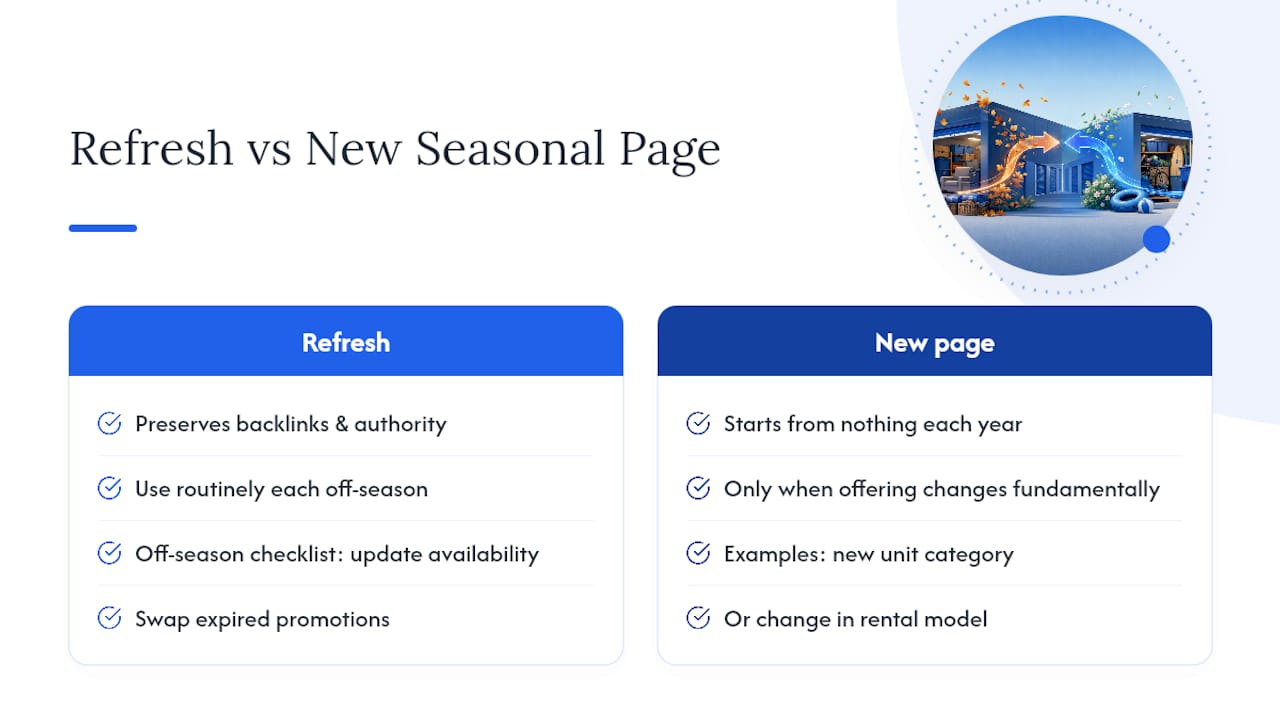
Never delete a seasonal storage page once it starts ranking. Refreshing an existing page preserves the backlinks and authority it built over previous cycles, while a brand-new dated URL starts from nothing every year.
Your off-season checklist should include updating availability language, swapping out expired promotions, refreshing any statistics or pricing mentioned on the page, and double-checking that internal links still point to it. Treat this as routine maintenance, the same way you'd check a unit lock before renting it out again.
The only real exception is when your offering changes fundamentally, like adding a new unit category or shifting from month-to-month to a different rental model. In that case, a new page makes sense because the content itself no longer describes the same product. Short of that, refresh beats rebuild every time.
What I'd Actually Prioritize in the Next 30 Days
Skip the twelve-point audit. Pull your top three pages' year-over-year data, pick two seasonal pages to refresh this month, update your GBP hours and attributes, and publish one sharp FAQ answering the availability question your phone rings about most. None of this is dramatic on its own. It compounds. A facility that refreshes two pages every quarter for a year outranks one that writes ten pages once and forgets them. Track your AI visibility alongside your organic rankings; the two are starting to diverge, and ignoring one leaves bookings on the table.
— Mike
Get a Seasonal SEO Audit Built for Storage Operators
Corvanesystems is the alternative to piecing this together yourself every quarter: one flat monthly rate covers your seasonal content calendar, Google Business Profile management, and an AI visibility audit across ChatGPT, Claude, Perplexity, and Google's AI Overviews, so you're not juggling five tools to track what this article just walked through.

Instead of guessing when to refresh your spring or holiday pages, Corvanesystems builds and maintains that calendar for you, publishing keyword-optimized content on schedule and flagging technical issues before they cost you a peak season. The AI visibility audit shows you exactly where your facility stands when someone asks an AI assistant where to rent a unit nearby, and gives you a roadmap to close the gap. If you want a clear picture of where your seasonal pages and AI presence stand right now, request a seasonal SEO audit and see what a flat-rate, no-contract engagement looks like for your facility.
Sources
- ’Tis the Season… for Holiday SEO Planning
- Why Seasonality Matters for SEO & How to Identify Trends
- Seasonal SEO: a guide to mastering the fluctuations
- Holiday SEO Strategy to Capture Seasonal Demand - WITHIN