
Capture UTM values and a session ID the moment a visitor lands on your site, then persist that data through to the exact instant they hit submit on a contact or reservation form. That submit event is the "magic moment" of attribution: it's when an anonymous visitor becomes a named lead tied to a channel, a campaign, and a dollar amount. Tools like GA4, Google Tag Manager (GTM), and a specialist like Corvane Systems handle the mechanics. The payoff is knowing which ad, which keyword, and which unit size actually filled your vacant space.
TL;DR:
- Tracking UTM parameters and session IDs accurately from the moment visitors land ensures reliable attribution of leads to specific campaigns and channels.
- Proper setup requires consistent naming conventions for UTMs, storing parameters before navigation, and using the most reliable trigger method, such as native form-submit events.
- Mapping collected data into management software with custom fields and a persistent session ID prevents duplicate records and improves lead tracking accuracy.
- Call and message attribution depend on session ID passing through call tracking platforms, with caution needed for forwarded calls to maintain source integrity.
- Regular testing and auditing confirm tracking remains effective, especially after platform updates, ensuring marketing data remains trustworthy for smarter budget decisions.
Table of Contents
- Building a Checklist for Tracking Form Submissions Storage Sites Generate
- Setting Up UTMs, GA4, GTM, and Form-Submit Triggers
- Mapping Tracked Data Into Your Lead-to-Lease Software
- Tracking Calls and Messages Back to the Same Lead Record
- Turning Tracked Leads Into Signed Leases Through Routing
- Confirming Your Tracking Actually Works Before You Trust It
- What Storage Operators Get Wrong About Attribution
- Getting Your Tracking Built Instead of Building It Yourself
- Sources
- FAQ
Building a Checklist for Tracking Form Submissions Storage Sites Generate
Tracking form submissions storage-style, where every lead needs to trace back to an ad dollar, comes down to sequence. Skip a step and you get analytics that look busy but tell you nothing about which channel actually rents units. Work through this order:
- Tag every external link (ads, email, social, directory listings) with consistent UTM parameters and store them the moment a visitor arrives.
- Install GA4 and GTM, then build a
form_submitevent that fires on completion, not on page load. - Pick one trigger method (covered in detail below) and generate a persistent session ID for every visitor.
- Map captured fields into your management software using hidden form fields or a direct API call.
- Turn on call tracking and connect logged calls to the same session ID used for web visits.
- Build routing rules and follow-up automation so a hot lead doesn't sit in an inbox overnight.
- Write QA test cases and put a recurring monthly audit on the calendar.
Do these seven things in order, and you have a system. Do them out of order, or skip the session ID step, and you'll spend next quarter arguing with your ad rep about numbers neither of you can verify.
Setting Up UTMs, GA4, GTM, and Form-Submit Triggers
Start with naming conventions, because messy UTMs are the number one reason storage operators can't trust their own reports six months later. Use lowercase, hyphenated values, and keep the same structure across every campaign:
utm_source(google, meta, yelp, nextdoor)utm_medium(cpc, organic, email, referral)utm_campaign(spring2026promo, unit10x10, move-in-special)utm_content(for A/B testing ad copy or creative variants)
Once a visitor lands with those parameters attached, store them in a first-party cookie or sessionStorage immediately, before they can navigate away or refresh the page. That data needs to survive until the exact moment of form submission, which is the entire mechanism behind form submission tracking done right, according to self-storage marketing guidance on UTM persistence.
In GA4, configure the form_submit event with parameters for session_id, utm_source, utm_campaign, and page_path. In GTM, this usually means a custom JavaScript variable that reads your stored UTM values, a dataLayer push on form completion, and a trigger tied to that push rather than a generic "click" trigger, which fires too early and too often.
You have three practical trigger options, and they are not interchangeable:
- Thank-you page view: easiest to set up, but breaks if a visitor closes the tab before the page loads.
- Button click: fast to implement, but fires even on failed submissions with validation errors.
- Native form-submit event: the most reliable, since it fires only after the form actually processes, though it takes more developer time to wire correctly.
Pro Tip: Never put a phone number, email address, or unit number in a URL parameter. Keep personally identifiable information out of the query string entirely, and use a server-to-server handoff (form backend to management software API) instead of relying on client-side redirects to pass sensitive fields.
Mapping Tracked Data Into Your Lead-to-Lease Software
The tracking data you capture is worthless if it dies in your analytics dashboard instead of showing up next to the lead's name in your management platform. Add a handful of custom fields to every lead or tenant record so campaign data survives the handoff:
utm_source,utm_medium,utm_campaignsession_idlanding_pageform_submitted_at(timestamp)referral_note(free text, for the human "how did you hear about us" fallback)
There are three ways to get data from your website into that record: hidden form fields that pass along stored UTM values, a direct POST to your backend that writes straight to the database, or an API call into your management software the instant the form submits. The middle and third options are more reliable than hidden fields alone, since hidden fields can be stripped by ad blockers or aggressive privacy extensions.
Session ID design matters more than most operators assume. A unique session ID generated on first visit and stored in both the browser and the software database prevents the same lead from creating three duplicate records after visiting your site three times before converting, and it lets you recover abandoned reservation flows instead of losing them entirely. Confirm with your vendor that custom fields and API endpoints actually exist before you build around assumptions, and check what happens to a partial submission. That data should still land in a record you can follow up on, not vanish because the visitor never finished.
Tracking Calls and Messages Back to the Same Lead Record
Phone calls still convert storage leads at a high rate, and a form-only tracking setup misses every one of them. Dynamic number insertion swaps your displayed number based on the visitor's session, so the call itself carries the same source data as a web form would.
Here's the workflow that keeps calls attributable:
- Store the session ID on click of any phone number displayed on the page.
- Pass that session ID into your call tracking platform so the logged call carries campaign metadata, not just a caller ID.
- Log completed calls directly into your management software, preserving the referral source field.
- For SMS-initiated leads, use short URLs with embedded UTMs so a text-message click behaves like any other tracked visit.
Pro Tip: Forwarded calls are where attribution quietly breaks. If your front desk forwards calls to a cell phone, confirm the tracking number logs the call before forwarding, or you'll lose the source data on every transferred lead.
Turning Tracked Leads Into Signed Leases Through Routing
Capturing data is step one. Routing it fast enough to beat the competitor lead form is what actually fills units. Build rules in this order:
- Route by geography and unit availability first. A lead near a facility with no vacancy in their needed size should route somewhere else immediately, not sit in a generic queue.
- Score leads by source and intent, not just source. A phone call asking about a specific unit size ranks higher than a form fill from a blog comment box.
- Automate the first touch. Send an immediate confirmation, then a human follow-up within one hour for anything scored as hot.
- Decide centralized versus local handling for multi-facility operators. Centralized call centers move faster on volume; local managers close better on relationship and availability nuance.
- Close the loop. Connect the lease-signed event in your management software back to the original lead record so you can calculate true cost-per-lease by channel, not just cost-per-lead.
Confirming Your Tracking Actually Works Before You Trust It
Run a test UTM through a real form submission on desktop and mobile, then confirm it shows up in GA4 real-time reporting and in your management software within minutes. Check whether the session ID persists correctly and whether a repeat test submission gets flagged as a duplicate instead of a new lead.
- Use GTM Preview mode to confirm your trigger fires at the right moment, not too early or too late.
- Use GA4 DebugView to see event parameters arriving in real time.
- Check API logs on the management software side to confirm the payload actually landed.
- Set an alert for any week where attributed leads drop sharply against total form volume, since that gap usually means a tracking break, not a marketing problem.
Schedule this full test monthly. Analytics event tracking for conversions tends to drift quietly after platform updates, and nobody notices until a budget review turns up numbers that don't add up.
What Storage Operators Get Wrong About Attribution
Most operators treat their website like a brochure and their tracking setup like a one-time project. Neither view survives contact with reality. A facility's site is infrastructure, the same as your gate access system or your unit locks, and infrastructure that isn't maintained fails quietly.
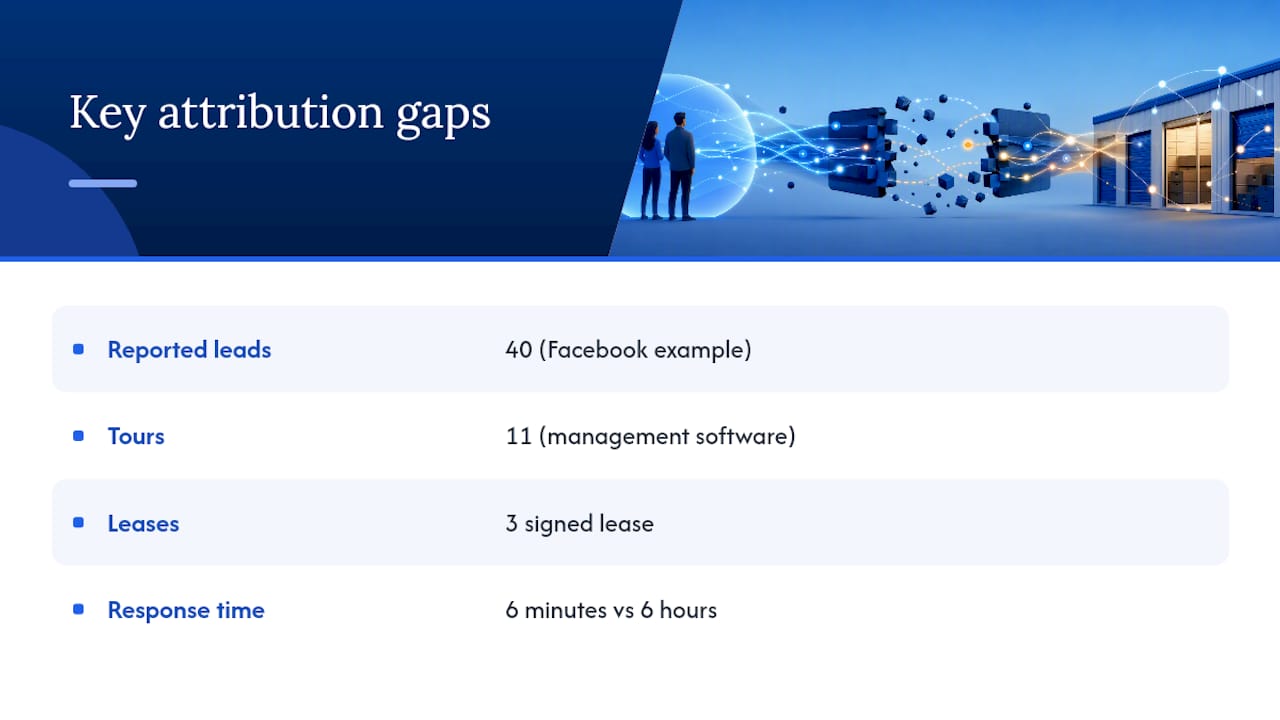
The operators who recover the most wasted ad spend are the ones who stop trusting platform-reported conversions and start trusting their own lead-to-lease data instead. Facebook will tell you a campaign drove forty leads. Your management software, fed correctly, will tell you eleven of those actually toured a unit and three signed a lease. That gap is where budget decisions should live.
Multi-facility operators are increasingly using AI to segment inbound leads and route marketplace inquiries into faster follow-up cadences, because the facility that calls back in six minutes beats the one that calls back in six hours almost every time. If you're running more than two or three locations, or juggling multiple ad platforms feeding one management system, this is usually the point where doing it yourself starts costing more in missed leads than hiring it out would cost in fees.
— Mike
Getting Your Tracking Built Instead of Building It Yourself
If everything above sounds like a lot of tag configuration for a facility team already stretched thin managing move-ins, that's the honest reality of doing this correctly. The service is designed to support self-storage operators with SEO and AI visibility work that includes GA4 and GTM setup, field mapping into lead-to-lease software, and ongoing monitoring to maintain tracking functionality.

The full Corvane system runs $299 per month with a one-time $50 onboarding fee, no contracts and no tiered pricing to decode. A free AI visibility audit shows you exactly where your current tracking and search presence stand before you commit to anything. If your forms are generating leads that never trace back to a channel, start with that audit and see what's actually reaching your management software.
Sources
For deeper implementation detail, review GA4 event mapping built for rental funnels, call tracking setup steps for storage operators, and minimal-field landing page design that reduces form abandonment before tracking even matters. Each addresses a piece of the pipeline covered above, from campaign click to lease signature.
- Marketing Attribution: What It Is and How It Can Improve Your Online Self-Storage Advertising
- The Lead-to-Lease Gap: How Multi-Facility Operators Lose Revenue at Scale - Monument
- How To Set Up Google Ads Conversion Tracking For Your Self-Storage Business
FAQ
What Is the "Magic Moment" in Form Tracking?
It's the instant a visitor submits a form and their stored UTM and session data get joined to a new lead record, turning an anonymous click into an attributable prospect. Miss this handoff and every campaign report upstream becomes a guess.
Which Form Trigger Should I Use: Thank-You Page or Submit Event?
The native form-submit event is the most reliable of the three trigger methods, since it only fires after a successful submission rather than on a page load or a button click. Use a thank-you page trigger only as a backup for forms you can't modify directly.
How Do I Stop Duplicate Leads From Skewing My Data?
Generate a persistent session ID on first visit and store it in both the browser and your management software database, which is how modern lead-to-lease systems prevent the same visitor from creating multiple records. Check this behavior during your monthly QA audit.
Does Corvane Systems Set Up This Tracking for Storage Operators?
Yes. Corvane Systems configures GA4, GTM, and field mapping into management software as part of its flat-rate service for self-storage facilities, alongside local search and AI visibility work. Current pricing and a free audit are available directly on Corvanesystems.
What Privacy Rules Apply to Tracking Form Submissions?
Regulations like GDPR and CCPA require clear disclosure when you collect personal data through forms, along with a lawful basis and, in many cases, a consent mechanism before tracking cookies load. Keep personally identifiable information out of URL parameters and confirm your cookie consent tool covers the tracking scripts you're running.