
Track Map Pack position for your top 5 to 10 keywords, layer in a geo-grid heatmap to catch neighborhood gaps, and pull Google Business Profile Insights plus Search Console for lead signals. Run quick keyword checks weekly and a full geo-grid baseline monthly. That combination catches what a single "check my ranking" search never will — where you're invisible three blocks from your own front door.
TL;DR:
- Tracking geo-grid heatmaps reveals how your Map Pack visibility drops significantly just a few neighborhoods away from your location.
- A business's ranking position often correlates more with call volume than with top placement, making call and direction requests critical metrics.
- Comparing your local rankings with competitors' geo-grid coverage uncovers gaps and helps target areas where your visibility lags.
- Mobile search results vary more by neighborhood than desktop results, requiring device-specific checks for accurate local visibility insights.
- Free tools like GBP Insights and Search Console provide essential data, but paid options are recommended for detailed neighborhood-level tracking.
Table of Contents
- Key Local Ranking Metrics to Track
- How to Measure Local Rankings: Methods and Tools
- Set Up a Geo-Grid Baseline and Tracking Locations
- Interpret Results and Set KPIs and Cadence
- Free vs. Paid Tools: An Entry-Level Implementation Plan
- Create Reports That Prove Value
- Impact of User Reviews and Ratings on Local Rankings
- Role of Citations and Local Backlinks in Local Rankings
- Effect of Local SEO on Mobile vs. Desktop Ranking Measurement
- Using Competitor Analysis to Benchmark Performance
- Author Perspective: What Actually Moves the Needle
- How Corvane Systems Helps You Measure and Improve Local Visibility
- Sources
- FAQ
Key Local Ranking Metrics to Track
Map Pack position matters more than almost any other local signal. When someone searches "plumber near me" or "storage units [city]," the three businesses in the Local Pack capture the overwhelming share of clicks before anyone scrolls to organic results. If you're not in that box, you're fighting for scraps further down the page.
The problem is that a single rank check from your office address tells you almost nothing about how you look to a customer standing two neighborhoods away. That's why geo-grid tracking matters. It simulates searches from dozens of points across your service area and shows Map Pack position as a color-coded heatmap, and a business ranking No. 1 downtown might vanish entirely five miles north.
Beyond rankings, Google Business Profile gives you direct behavioral proxies: profile views, phone calls, and requests for directions. These numbers tell you whether visibility is actually converting into interest, not just theoretical placement.
Round out the picture with organic local rankings and Search Console impressions, since Map Pack and organic web results behave differently and need separate fixes.
Metrics worth tracking weekly or monthly:
- Map Pack position for your top 5 to 10 keywords
- Geo-grid visibility percentage across your service area
- GBP views, calls, and direction requests
- Organic ranking position and Search Console impressions
- Click-through rate on impressions (a diagnostic for weak listings)
Pro Tip: A keyword ranking No. 3 in the Map Pack with high call volume often outperforms a No. 1 spot with zero calls. Rank is a proxy. Calls and directions are the real signal.
One complete tracking setup, according to Flento's local SEO guide, should combine Local Pack position, geo-grid ranking, GBP metrics, and search impression share as the baseline four.
How to Measure Local Rankings: Methods and Tools
The minimum viable setup costs nothing. Google Business Profile Insights and Google Search Console together give you impressions, clicks, calls, and direction requests, and Semrush's local metrics guide recommends starting exactly there before spending on anything else. The catch: neither tool tells you how you rank at a specific address that isn't yours. They show what happened, not where you stand relative to competitors block by block.
That's the gap geo-grid tools close. Instead of one ranking check, they query the Map Pack from a grid of points, zip codes, or GPS coordinates and separate Map Pack results from organic web results, since the two run on different algorithms and need different fixes.
A few tool categories worth knowing:
- Free-tier geo-grid checkers like the tool from localseotool.io return grid checks up to 169 points and render results as a heatmap, useful for a quick monthly snapshot without a subscription.
- Zip-code and GPS-precision trackers such as Nightwatch use large networks of verified local access points to deliver daily local SERP accuracy at a resolution single-point tools miss.
- Neighborhood and device-comparison trackers like GeoRankTracker specialize in showing how rankings shift between mobile and desktop and between adjacent neighborhoods.
When comparing options, weigh four things: geographic precision (city versus zip versus GPS grid), how often data refreshes, whether historical trend charts are included, and whether the tool integrates directly with your GBP dashboard. Budget matters too. Most owners don't need agency-grade tools on day one.
Set Up a Geo-Grid Baseline and Tracking Locations
Start with keyword selection. Pick the phrases that actually generate calls and bookings, not vanity terms. Combine your core service with city or neighborhood modifiers ("storage units [city]," "climate controlled storage near [neighborhood]") rather than broad, unmodified terms.
- Choose 5 to 10 lead-driving keywords based on past call and booking data.
- Design your grid: a 3x3 grid works for a single neighborhood; a 7x7 grid suits businesses covering multiple zip codes or a whole metro area.
- Decide between zip-code centroids and GPS points. GPS points give sharper precision for dense urban markets.
- Run checks for both mobile and desktop, since results frequently differ by device.
- Save your first full grid run as your baseline, alongside that week's GBP and Search Console numbers.
Notes to log alongside every baseline:
- Active promotions or seasonal offers
- Hours changes or temporary closures
- New locations, service areas, or GBP category changes
- Recent review volume spikes or drops
Run quick checks on your top keywords weekly. Reserve the full geo-grid refresh for monthly, which balances catching real movement against chasing daily algorithm noise.
Interpret Results and Set KPIs and Cadence
Local rankings fluctuate daily even when nothing changed on your end. A single-position slip on one keyword is noise. A pattern across multiple keywords, or a drop that holds for two or three consecutive weekly checks, is signal worth investigating.
Use GBP views, calls, and direction requests as your conversion proxy layer. If Map Pack position holds steady but calls drop, look at your profile photos, hours accuracy, or recent reviews before touching anything technical.
Common patterns and what they call for:
- Low Map Pack position, strong organic impressions: GBP category, proximity, or review signals likely need work.
- Good impressions, weak click-through: your listing snippet, photos, or Google Posts probably need a refresh.
- Solid rankings, flat call volume: check phone tracking setup and profile call-button visibility.
KPIs worth reporting monthly: Map Pack share of top keywords, percentage of grid points showing top-3 visibility, review velocity, and call/direction volume tied back to actual bookings.
Free vs. Paid Tools: An Entry-Level Implementation Plan
Free tools cover the essentials: GBP Insights and Search Console show impressions, calls, and clicks with zero cost. Where they fall short is neighborhood-level detail. Neither tells you how you rank three miles from your listed address.
Consider a paid tracker once you serve multiple zip codes, run a franchise with several locations, or need daily accuracy instead of a monthly manual check. Pricing tends to fall into general tiers: free options for basic single-grid checks, mid-range monthly plans for multi-location zip precision, and more advanced platforms for frequent tracking across multiple markets.
No-cost wins to run before spending anything:
- Claim and fully complete your GBP listing (hours, categories, photos, services)
- Run one free geo-grid check to establish a rough baseline
- Connect Search Console and review impression data monthly
- Respond to every review, since velocity and response rate both feed visibility
Create Reports That Prove Value
Dashboard fields worth including: Map Pack position by keyword, geo-grid heatmap image, GBP views/calls/directions, organic impressions, and review trend line.
| Field | What it shows |
|---|---|
| Map Pack position | Rank per keyword, per location |
| Geo-grid heatmap | Visibility by neighborhood |
| GBP metrics | Views, calls, direction requests |
| Review trend | Volume and average rating over time |
Export a short PDF summary monthly with a data appendix attached. Backfilled historical data and trend lines typically show visible progress within 6 to 8 weeks, which gives owners a realistic window before expecting movement.
Impact of User Reviews and Ratings on Local Rankings
Reviews influence local rankings through two separate channels: relevance signals Google's algorithm weighs, and click behavior once a customer actually sees your listing. A facility with 200 reviews at 4.7 stars typically outperforms a competitor with 15 reviews and no recent activity, even if the competitor sits marginally closer to the searcher.
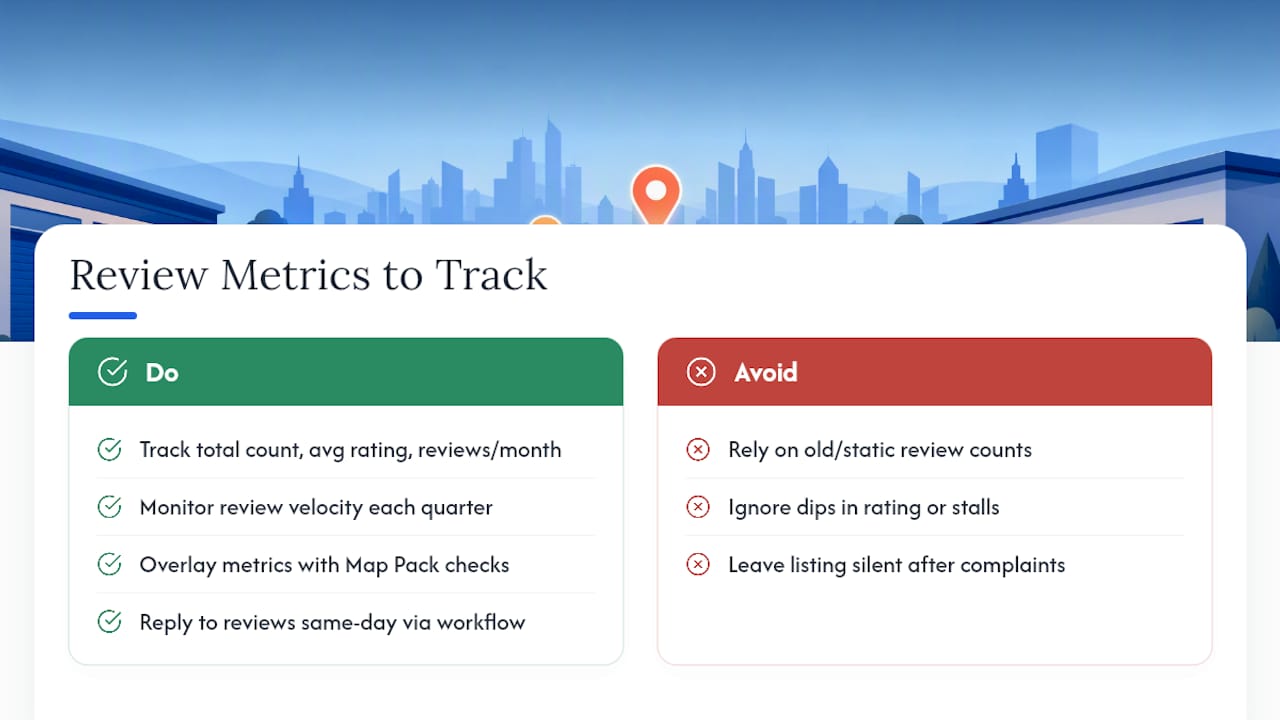
Review velocity, meaning how consistently new reviews arrive, tends to matter as much as the total count. A business earning three or four reviews a month signals ongoing customer activity in a way a static count from two years ago doesn't.
Track review impact with three numbers: total review count, average rating, and reviews per month over the past quarter. Overlay those against your Map Pack position checks. If your grid heatmap shows a stall right after a rating dip, that's rarely a coincidence.
Responding to reviews, especially negative ones, factors into the picture too. Setting up a review reply workflow keeps response time low and shows both Google and prospective customers that someone is actually managing the listing. Track your average response time monthly alongside review volume, since a listing that goes silent for weeks after a complaint sends a weaker signal than one with a same-day reply.
Role of Citations and Local Backlinks in Local Rankings
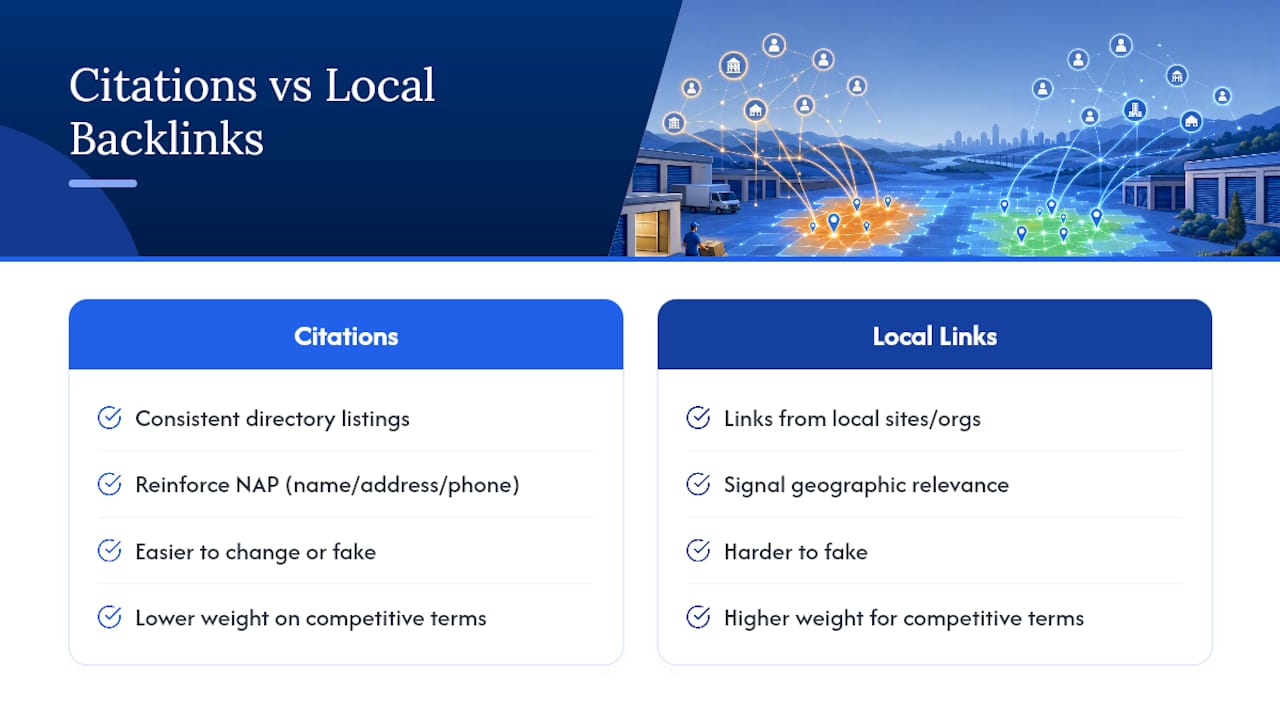
Citations, meaning consistent business listings across directories like Yelp, Apple Maps, and industry-specific sites, function as trust signals that reinforce your name, address, and phone number match what's on your GBP listing. Inconsistent citations (an old address, a dropped suite number, a phone number that changed three years ago) create confusion that can quietly suppress Map Pack eligibility.
Local backlinks work differently but toward the same goal. A link from a local chamber of commerce, a community news site, or a neighborhood business association tells Google your business has genuine roots in a specific geographic area. That geographic relevance signal is harder to fake than a citation and tends to carry more weight for competitive keywords.
Neither citations nor backlinks show up directly in your rank tracker's dashboard, which is exactly why they get ignored. Measure them separately: run a quarterly citation audit checking your top 10 to 15 directory listings for accuracy, and track new local backlinks through Search Console's links report. If your geo-grid heatmap shows persistent weak zones despite a strong GBP profile, a citation or backlink gap is often the missing piece rather than anything on-page.
Effect of Local SEO on Mobile vs. Desktop Ranking Measurement
Mobile and desktop searches don't always return the same Map Pack results, and the gap is bigger than most owners assume. Google weighs a searcher's actual GPS location more heavily on mobile, where location services are usually on, than on desktop, where it often falls back to a broader IP-based location or a typed city name.
That means a business can rank well on desktop searches from across town while barely appearing on mobile for someone standing four blocks away, or the reverse. Since mobile and desktop rankings frequently diverge by neighborhood, checking only one device gives an incomplete picture of real-world visibility.
Run every geo-grid check across both device types rather than defaulting to desktop because it's easier to screenshot. Given that most "near me" searches happen on a phone, mobile Map Pack position deserves at least equal weight in your reporting, and arguably more for service businesses where customers search on the go.
Using Competitor Analysis to Benchmark Performance
Your own ranking numbers mean little in isolation. A geo-grid showing 60% top-3 visibility sounds solid until you discover your closest competitor holds 85% across the same grid points.
Run the same geo-grid check against your top three local competitors, using identical keywords and grid points, so the comparison isn't skewed by different search terms. Look specifically at where their coverage beats yours: is it concentrated in one neighborhood, tied to a specific keyword, or spread evenly across the whole area?
Review count and velocity are worth benchmarking too. If a competitor is adding reviews twice as fast as you, that gap will eventually show up in Map Pack position even if your on-page work is stronger. Pair competitor grid data with a look at their location pages to see whether they're winning through GBP strength, on-site content, or both.
Author Perspective: What Actually Moves the Needle
Most owners obsess over one keyword's exact rank number. That's the wrong fight. Map Pack visibility and GBP signals drive leads; geo-grid checks find blind spots vanity rankings hide. Keep it simple: weekly spot checks, one real monthly baseline.
— Mike
How Corvane Systems Helps You Measure and Improve Local Visibility
Corvane Systems is the alternative to hiring a traditional local SEO agency for self-storage operators: one flat monthly rate instead of tiered retainers or long contracts, built specifically around the metrics that fill units.

That means local search positioning, Google Business Profile optimization, geo-grid tracking, and competitor benchmarking bundled with AI visibility audits covering how ChatGPT, Claude, Perplexity, and Google's AI Overviews represent your facility, plus a monthly performance report you can actually read without a marketing degree. It's built for operators who'd rather hand off the geo-grid checks, GBP monitoring, and reporting than run them personally every week. Because search increasingly runs through AI assistants as well as Google, visibility inside those tools matters as much as Map Pack position now.
Start with the free AI visibility audit to see exactly where your facility stands across both traditional search and AI platforms before committing to anything.
Sources
- Localseotool
- Local Rank Checker — ZIP Code Precision | Nightwatch
- Metrics for Local SEO: How to Measure for Better Results
FAQ
What Is the Best Local Rank Tracker?
There's no single best tracker; the right choice depends on precision needs and budget. Free geo-grid tools work for single-location checks, while zip-code or GPS-precision platforms like Nightwatch suit multi-location or franchise operators who need daily accuracy.
How Do I Check My Local Ranking?
Run a geo-grid check that queries the Map Pack from multiple points across your service area, then pair it with Google Business Profile Insights for calls and views. A single search from your own device only shows your personal result, which rarely matches what customers elsewhere actually see.
How Do I Rank Locally on Google?
Ranking locally comes down to three factors Google weighs together: how relevant your GBP category and content are, how close you are to the searcher, and how prominent your business is based on reviews, citations, and links. Consistent citations and steady review growth tend to move the needle fastest for most local businesses.
Is There a Free Local SEO Rank Checker Available?
Yes. Tools like localseotool.io offer free geo-grid checks with heatmap output, and Google Business Profile Insights plus Search Console cost nothing to use. These cover the basics well; paid tools add daily tracking and finer geographic precision for businesses that need it.
How Often Should I Check My Local Rankings?
Check your top 5 to 10 keywords weekly and run a full geo-grid baseline monthly, a cadence several local SEO guides recommend to balance catching real trends against chasing daily algorithm noise. Log any promotions, hours changes, or closures alongside each check so you can explain unusual swings later.