
The single biggest lever for online booking SEO storage improvement is exposing your starting price, unit availability, and reservation path in crawlable HTML on your site and Google Business Profile at the same time. Search engines and AI assistants can only recommend what they can read. If that information hides behind a login screen or a JavaScript widget that never finishes loading, Google treats your facility as if the units don't exist, and the booking never happens.
TL;DR:
- Ensuring your availability, starting prices, and reservation path are visible in crawlable HTML is critical for Google to recommend your storage facility in search results.
- Complete and regularly updated Google Business Profiles with unit prices, photos, and messaging improve local map pack visibility and booking conversion rates.
- Booking engines that load availability via JavaScript or iframe often become invisible to Googlebot; server-side rendering with JavaScript enhancement is the most reliable solution.
- Implementing structured data with accurate, live availability, prices, and hours boost your chances of appearing in rich snippets and AI recommendations.
- Continuous weekly testing of your booking pages with URL Inspection tools is essential to identify and fix invisible or broken availability data.
Table of Contents
- Why Online Booking SEO for Storage Depends on Visibility, Not Just Rankings
- What Belongs in Your Google Business Profile to Win Maps and Bookings
- Is Your Booking Widget Invisible to Google?
- Structured Data That Makes AI and Google Recommend Your Facility
- Which Pages Actually Turn Searchers Into Renters?
- How Do Reviews Affect Booking Conversion, Not Just Rankings?
- Where Do Bookings Get Lost Between Click and Signed Lease?
- What Should You Fix First, Second, and Third?
- How Corvane Systems Approaches AI Visibility for Storage Operators
- What the Data Actually Tells Storage Operators to Fix First
- Get Your Facility's Booking Path Actually Seen
- Sources
- FAQ
Why Online Booking SEO for Storage Depends on Visibility, Not Just Rankings
Ranking on page one means nothing if the searcher can't finish the reservation once they land. Storage operators tend to treat SEO and booking conversion as two separate problems: one team chases keywords, another fixes the checkout flow. They're the same problem. A booking system built on unauthenticated API calls or client-side rendering can rank fine for "storage near me" and still lose the sale because Google, Bing, and increasingly ChatGPT or Perplexity can't confirm a unit is actually available.
This is the standard industry term worth knowing: local pack visibility, the three-listing map block that shows up above organic results for "storage units near me" style searches. Winning that block, and keeping the booking funnel that follows it intact, requires three things working together: a complete Google Business Profile, a technically crawlable booking engine, and structured data that tells machines exactly what you're offering and for how much. Skip any one of the three and the other two underperform.
What Belongs in Your Google Business Profile to Win Maps and Bookings
Your Google Business Profile (GBP) is often the first, and sometimes only, touchpoint a searcher has with your facility before they decide to book. GBP completeness and review signals correlate directly with local pack placement for storage searches, which means an incomplete profile is costing you visibility before a single blog post gets written.
Here's the setup that actually moves the needle:
- Set the primary category to Self-Storage Facility. Add secondary categories like Moving and Storage Service or RV Storage Facility only if you genuinely offer them.
- List every unit size and starting price under Services. Don't write "various sizes available." Write a specific starting price for each unit size, e.g., a "5x10 unit starting at a competitive monthly rate."
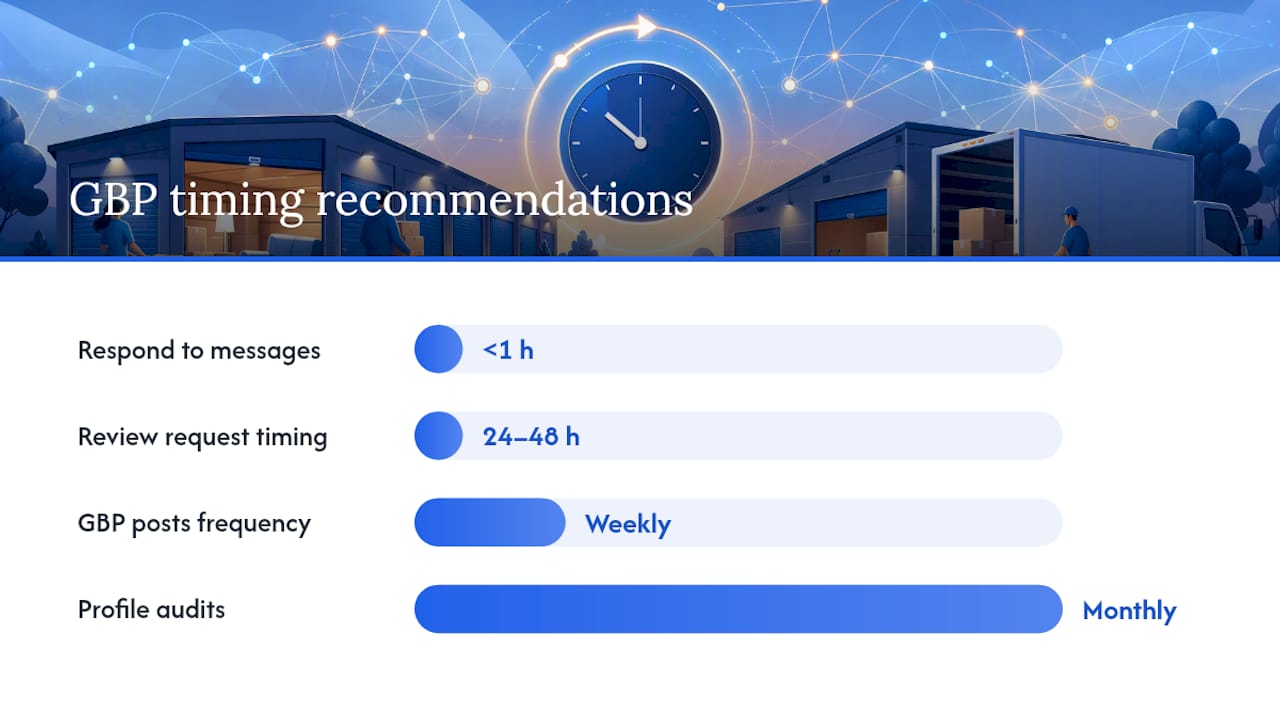
- Place your booking link in the website field, the Book/Reserve button, and at least one GBP Post per week. Redundancy here is deliberate. Different users tap different elements.
- Upload real photos of units, hallways, gate access, and office hours signage. Stock photos get flagged and buried by Google's algorithm faster than an empty profile.
- Turn on messaging and respond within an hour during business hours. Slow response times quietly suppress how often GBP surfaces your listing for booking-intent queries.
- Post a Q&A entry answering "Can I reserve a unit online?" and answer it yourself before a customer does it with wrong information.
For reviews, automate a request 24 to 48 hours after move-in via text or email, not a generic "leave us a review" blast a month later when the experience has faded from memory.
Pro Tip: Set regular reminders to audit your GBP for outdated hours, expired promotions, and stale photos. Facilities that update their profile frequently tend to see steadier local pack placement.
Run through a checklist over a month: complete every GBP field and upload multiple photos; launch review request automation; publish GBP posts tied to unit availability; audit calls and booking clicks in GBP Insights to monitor conversions. Each of these changes feeds the same outcome: more calls, more "Book Online" clicks, and more completed reservations without a human ever touching the phone.
For a deeper local playbook specific to storage facilities, see local tactics for facility operators.
Is Your Booking Widget Invisible to Google?
Most storage booking engines are built by third-party vendors optimized for the renter's experience, not for search visibility. That's a problem because Google's rendering process has practical time and resource limits, and booking widgets that load availability only after a user clicks, scrolls, or authenticates often show Googlebot nothing but an empty container.
The failure pattern is consistent across the industry:
- Availability and pricing load via a JavaScript call triggered by user interaction, so Googlebot never fires the event that reveals the data.
- Widgets embedded in an iframe pointing to a subdomain the crawler treats as a separate, low-authority site.
- API-authenticated endpoints that require a session token, meaning the "in stock" data never appears in the raw HTML at all.
- Booking scripts loaded after every other asset on the page, delaying Largest Contentful Paint and hurting Core Web Vitals scores.
The fix is a pattern called progressive enhancement: render a booking shell server-side with real starting prices and availability flags baked into the HTML, then layer live pricing and real-time slot data on top with JavaScript for the human visitor. This server-first, JavaScript-second pattern is the most reliable way to keep booking engines both real-time and indexable. If a widget genuinely requires authentication to show unit-specific pricing, expose a public summary version instead, something as simple as "3 units available, starting at $79" in plain HTML, while the sessioned, personalized quote stays behind the login.
Modern booking-layer platforms can help here. Tools like StorageFlo let operators add a customer-facing reservation flow that syncs with existing management software, but the SEO payoff only holds if that layer publishes base availability and starting prices in crawlable HTML rather than gating everything behind an authenticated call.
Here's how the two rendering approaches actually compare in practice:
| Rendering approach | Googlebot visibility | Typical load speed | Booking data crawlable? |
|---|---|---|---|
| Client-side JS only, interaction-triggered | Poor to none | Fast initial load, slow data reveal | No |
| Server-side render (SSR) with JS enhancement | Strong | Fast, data present immediately | Yes |
| iframe embed to third-party subdomain | Weak, often orphaned | Varies by vendor | Rarely |
| Static HTML shell + live API overlay | Strong | Fast | Yes, for the static portion |
Test all of this directly: use Google Search Console's URL Inspection tool to compare the rendered HTML against what a visitor actually sees. Run this check weekly on your top five unit-size pages, not once a year during an audit.
Pro Tip: Open your booking page in an incognito window, disable JavaScript in DevTools, and reload. If the price and availability disappear, Google likely can't see them either.
Structured Data That Makes AI and Google Recommend Your Facility
Schema markup is how you hand search engines and AI assistants a structured answer instead of making them guess from paragraph text. Implementing SelfStorage and LocalBusiness schema on unit and booking pages increases the odds of rich result displays for price and availability, the kind of result that shows a price directly in the search snippet before a click even happens.
Build out these fields on every unit-size page:
- SelfStorage type (a LocalBusiness subtype) with your facility name, address, and phone number matching your GBP exactly.
- Offer schema with starting price, currency, and unit size, so Google can pull "$89/mo" straight into the result.
- openingHoursSpecification for both office hours and gate access hours, since these differ and both get searched.
- AggregateRating pulling your live review count and average, refreshed automatically rather than hardcoded.
- Availability flag (InStock or SoldOut equivalent) tied to your actual inventory feed, not a static "call for availability."
One caution: keep dynamic, session-specific pricing logic server-side. Publish the starting price and general availability status in schema, but don't expose your full rate-adjustment algorithm or promotional codes in markup anyone can scrape. The goal is transparency on what a searcher needs to decide, not a leak of your pricing engine.
A properly tagged unit page can turn a plain blue link into a listing showing price, star rating, and hours directly in the results, the exact combination that gets a click over a competitor's untagged listing.
Which Pages Actually Turn Searchers Into Renters?
Not every page on a storage website deserves equal SEO investment. Three page types do almost all the conversion work, and building them in the wrong order wastes months.
- Unit-size pages first. Each page needs the size and starting price in the headline, a bulleted list of features (drive-up access, climate control, lock type), a short FAQ, trust signals like review counts, and a reserve button above the fold, not buried after 800 words of copy.
- "What fits" size guides second. Unit-size guides are among the highest-searched storage keywords because renters don't know if their studio apartment needs a 5x10 or a 10x10, and a guide that answers this in plain language captures that uncertainty right before the booking decision.
- Neighborhood and city landing pages third. These pull in local intent searches ("storage in [neighborhood]") and should link directly into your unit-size pages, not sit as orphaned content with no path to a reservation.
Internal linking ties these together into a funnel: a neighborhood page links to relevant unit-size pages, which link to the size guide when a visitor seems unsure, and the size guide links back to the specific unit page once it answers the question. For operators running more than one location, a structured location page playbook keeps this consistent across facilities instead of reinventing the format every time.
Seasonal content matters more in storage than most industries. Moving season (May through September) deserves a content push six to eight weeks ahead, covering packing tips, student storage, and military PCS moves. A seasonal SEO playbook built around this calendar keeps your content pipeline tied to actual demand spikes rather than publishing at random.
How Do Reviews Affect Booking Conversion, Not Just Rankings?
Reviews do two jobs at once: they're a ranking signal, and they're the last piece of social proof a renter checks before hitting "reserve." Review count and recency correlate directly with local pack visibility for storage searches, but the conversion effect on your own site matters just as much.
- Ask at the 7-day mark, not on move-in day when the experience is still unfamiliar and not months later when it's forgotten. An automated text or email sent shortly after move-in works better than a verbal ask at the counter.
- Put a QR code at the gate keypad and on the move-in receipt. Physical prompts convert at higher rates than a follow-up email alone.
- Track four numbers monthly: total review count, average rating, review recency (reviews in the last 90 days), and response rate to negative reviews.
- Display live review snippets on unit pages, not just on a generic testimonials page nobody visits before checkout.
- Respond to every negative review within 48 hours, acknowledging the specific complaint and offering an offline resolution path rather than a generic apology template.
A facility with a substantial number of recent reviews and a high average rating reads as active and trustworthy. Conversely, few or old reviews may signal risk to renters irrespective of service quality.
Pro Tip: Include one line in your booking confirmation email: "We'd love your feedback in a week." Setting the expectation early raises the response rate on the actual request later.
Where Do Bookings Get Lost Between Click and Signed Lease?
The gap between "found you on Google" and "signed a lease" is where most storage operators lose revenue silently, because nobody's watching the middle of the funnel.
- Show availability and starting price without a login wall. A searcher shouldn't have to create an account to see if a 10x10 is open.
- Keep the reserve flow to one screen where possible. Every additional step between "select unit" and "confirm" costs a percentage of conversions.
- Make the mobile experience the default design, not an afterthought. A majority of storage searches happen on mobile devices, so click-to-call buttons and mobile-optimized forms aren't optional extras.
- Fix attribution before optimizing anything else. If you can't tell which channel drove a booking, you're optimizing blind.
A common technical failure: booking engines hosted on a separate subdomain break session attribution, so a visitor who arrives from an organic search gets recorded as "direct" once they hit the booking subdomain. That single gap can make your best-performing content look worthless in analytics.
| Attribution issue | Symptom | Fix |
|---|---|---|
| Subdomain booking engine | Organic traffic shows as "direct" in GA4 | Pass UTM parameters through the redirect and configure cross-domain tracking |
| Missing GTM booking event | No conversion data on completed reservations | Fire a dataLayer event on booking confirmation, not just page load |
| Slow redirect chains | High bounce before booking page loads | Reduce redirect hops between ad/search click and booking form |
| GBP clicks not reconciled | Calls from Maps don't match booking system logs | Cross-reference GBP Insights call data against booking system call logs weekly |
Booking-layer tools that add e-sign leases and automated confirmations, like StorageFlo, can reduce this friction by handling checkout and notifications in one flow, but the SEO and attribution setup around them still needs to be built correctly or the tracking gap just moves downstream. If your site isn't converting despite decent traffic, the reasons are usually technical, not creative.
What Should You Fix First, Second, and Third?
Prioritization prevents the common mistake of chasing content while the booking widget is still invisible to Google.
- Days 1 to 30: Complete GBP fields, launch review request automation, and run the URL Inspection test on your top five unit pages.
- Days 31 to 90: Fix any rendering gaps found in testing, implement SelfStorage schema across unit pages, and publish your first size guides.
- Days 91 to 180: Build out neighborhood landing pages, run A/B tests on reserve button placement and CTA copy, and expand the content pillar with seasonal pages.
Track five KPIs weekly: map-pack impressions and clicks (from GBP Insights), unit-page organic traffic, booking conversion rate, GBP call volume, and any rendered-HTML discrepancies flagged by URL Inspection. Facilities that check rendered HTML against user view regularly catch silent failures before they cost a month of bookings, not after.
For A/B tests on CTAs or page layout, don't call a winner until you've got enough bookings per variant to trust the difference isn't noise, typically a few weeks of steady traffic rather than a few days. And build in a standing weekly check: is the booking widget actually up? Is Core Web Vitals still green on mobile? Small failures compound fast when nobody's watching for them.
How Corvane Systems Approaches AI Visibility for Storage Operators
Corvanesystems specializes in one narrow problem: making self-storage facilities visible to both Google and the AI tools renters now use to decide where to book. That means running AI visibility audits across ChatGPT, Claude, Perplexity, and Google's AI Overviews, then tying the fixes directly back to the technical and schema work covered above. A facility that's invisible to an AI assistant answering "where should I rent storage near me" loses that booking before it ever reaches a search results page. Full case studies and audit scoring details are available on request.
What the Data Actually Tells Storage Operators to Fix First
Most storage SEO advice treats Google Business Profile, technical fixes, and content as three separate projects with three separate deadlines. That's backwards. A perfectly optimized GBP profile pointing to a booking page Google can't render is just a well-decorated dead end. The technical fix has to come before, or at minimum alongside, the local and content work, not after it.

The overrated tactic in this space is chasing blog volume before confirming the booking engine even shows availability in crawlable HTML. Content drives traffic to a page; it does nothing if that page's reserve button leads to a widget Google has never indexed. Test the render first.
What the reader should prioritize: run the URL Inspection test on your booking page this week, not next quarter. If price and availability vanish with JavaScript disabled, every other tactic in this roadmap is secondary until that's fixed. Everything else, the GBP polish, the review cadence, the size guides, compounds only once the foundation is actually visible to the machines making the recommendation.
*— Mike
Get Your Facility's Booking Path Actually Seen
Corvanesystems is the alternative to piecing together a technical audit, a GBP overhaul, and a content calendar from three different vendors: one flat monthly rate covers the audit, the roadmap, and the execution, with no contract locking you in if priorities shift.

The work maps directly onto everything above: a technical audit that checks whether your booking engine renders correctly, schema implementation for unit pages, ongoing Google Business Profile management, and a monthly content program of optimized articles built for both search engines and the AI assistants renters increasingly ask first. The process starts with an AI visibility audit scoring how your facility currently appears across Google, ChatGPT, Claude, and Perplexity, then builds a prioritized roadmap from there, quick GBP and review wins first, technical rendering fixes next, content pillars after. If your booking widget has been quietly invisible to search engines while you've been paying for traffic that never converts, request a visibility audit from Corvane Systems and see exactly where the gaps are.
Sources
Testing and building the fixes above takes the right tools, not guesswork.
- Local business schema: how to use structured data to improve your visibility
- JavaScript SEO for Booking Engines: What Google Can Crawl?
- Modern booking software for self-storage
- Storage facility SEO: Rank on Google and Fill More Units
FAQ
Can I Book a Storage Unit Online?
Yes, most modern storage facilities offer online reservation, but the booking path only works for search visibility if the facility exposes starting price and availability in crawlable HTML rather than hiding it behind a login or JavaScript-only widget.
What Are the Best SEO Strategies for Boosting Storage Facility Bookings?
The highest-impact strategies are a complete Google Business Profile with unit sizes and pricing listed, a crawlable and fast booking engine, SelfStorage schema on unit pages, and a steady flow of recent reviews.
Is SEO for Storage Facilities Free or Paid?
Core tactics like optimizing your GBP, requesting reviews, and fixing technical rendering issues cost time rather than money, while ongoing content production, AI visibility audits, and technical monitoring are typically handled through a paid service like Corvanesystems for operators who want it managed consistently.
How Often Should I Check if Google Can See My Booking Widget?
Run a URL Inspection and rendered HTML check weekly on your top unit-size and booking pages, since a widget update or vendor change can silently break crawlability without any visible error on the front end.