
Start with mobile image compression, browser caching, and a content delivery network. Those three fixes move the needle fastest because 53% of mobile visitors abandon a page that takes longer than three seconds to load. Run your homepage through PageSpeed Insights today, then decide whether to fix it yourself or hand it to a managed team.
TL;DR:
- Mobile users abandon sites that take longer than three seconds to load, so optimizing images and caching can recover lost reservations.
- Speed issues often stem from unresized hero images, bloated third-party scripts, and homepage sliders, which should be prioritized for quick improvements.
- Core Web Vitals scores for LCP, INP, and CLS directly impact search rankings, with most storage sites struggling with large hero images and layout shifts.
- Regular testing with PageSpeed Insights, WebPageTest, and GTmetrix, along with ongoing monitoring, is essential to maintain and improve site speed over time.
- Upgrading hosting and deploying a CDN are necessary if TTFB exceeds 600 milliseconds or traffic spikes consistently outpace current infrastructure capabilities.
Table of Contents
- Why Page Speed Costs Them Bookings in Self Storage Sites
- Core Web Vitals: The Metrics Google Actually Measures
- How to Test Your Storage Site's Speed the Right Way
- Quick Wins That Move Your Score Fast
- Hosting, TTFB, and When You Actually Need a CDN
- Prioritizing Fixes: A Two-Week Sprint That Actually Works
- Making Mobile Booking Instant, Not Just Faster
- Keeping Your Speed Gains From Slipping Backward
- How Corvane Systems Handles Speed for Storage Operators
- What Actually Deserves Your Attention First
- Get Your Storage Site's Speed Fixed Without the Guesswork
- Tools Worth Bookmarking
- Sources
Why Page Speed Costs Them Bookings in Self Storage Sites
A slow storage website doesn't just annoy visitors. It quietly kills reservations before a renter ever sees your unit sizes or prices. Someone searching "storage near me" on their phone, standing in a parking lot with a truck full of furniture, isn't going to wait around for your hero image to load. They'll hit the back button and call the next facility on the map.
That three-second threshold isn't arbitrary. More than half of mobile visitors leave a page that crosses it, and self-storage searches are overwhelmingly mobile, last-minute, and comparison-driven. If your competitor's site loads in 1.8 seconds and yours takes 5, you're losing that customer regardless of who has better rates or cleaner units.
Speed also shapes whether people find you in the first place. Google factors page experience into ranking, which means a sluggish site can quietly sink below faster competitors in both organic results and the local map pack. That's traffic you never see, on top of the traffic you lose once visitors arrive and leave. Facilities that invest in local SEO tactics alongside speed fixes tend to see both problems solved together, since Google treats them as connected signals.
Every conversion action on a storage site (checking prices, reserving a unit, tapping to call) depends on pages rendering fast enough that the visitor doesn't lose patience mid-click. A reserve button buried under a slow-loading gallery of unit photos is a button nobody presses. If your facility runs seasonal move-in promotions, the cost of a slow site multiplies. A campaign timed around peak moving season only works if the traffic it drives can actually convert once it lands.
That's half your ad spend evaporating before anyone sees your unit availability.
Core Web Vitals: The Metrics Google Actually Measures
Google grades every website on three specific signals, and self-storage sites tend to fail at least one of them without realizing it. These are Core Web Vitals, and they map directly to real friction points in a booking flow.
Largest Contentful Paint (LCP) measures how long it takes the biggest visible element (usually your hero image or a headline banner) to fully render. Google considers 2.5 seconds or faster to be a good loading speed. On storage sites, LCP problems almost always trace back to one culprit: an unoptimized hero photo of the facility, shot on a phone at full resolution and uploaded straight into a page builder without resizing.
INP (Interaction to Next Paint), which replaced First Input Delay as Google's responsiveness metric, measures how quickly your site reacts when someone taps something, like your "Reserve Now" button or a unit-size filter. A target under 200 milliseconds keeps the site feeling instant. If a visitor taps "Check Availability" and the page freezes for a second while a booking widget script loads, that's an INP failure, and it happens constantly on sites using bloated third-party reservation iframes.
Cumulative Layout Shift (CLS) tracks visual stability, whether elements jump around as the page loads. A target under 0.1 is considered a good score. This shows up on storage sites when a promotional banner or a "Now Leasing" badge loads late and shoves the reserve button down just as someone goes to tap it. That's not just annoying, it's a direct hit to conversions.
A few things worth knowing about how these numbers get measured:
- Lab data (from tools like PageSpeed Insights) shows a controlled snapshot; field data reflects real visitors on real connections, and Google's ranking systems lean on field data.
- LCP blockers usually show up as a single oversized image request near the top of a waterfall chart.
- Layout shift culprits are almost always late-loading ads, embedded videos, or web fonts that swap in after initial render.
- INP issues concentrate around any element wired to JavaScript, especially chat widgets and booking forms.
Storage sites often miss the 'good' LCP threshold of around 2.5 seconds because hero images and gallery photos are uploaded without resizing. Google's own field data is what search systems actually use to judge your site, not the lab score you see in a single test run, so a good PageSpeed number today doesn't guarantee good rankings if real visitors on slower connections are having a rougher experience.
How to Test Your Storage Site's Speed the Right Way
Testing once and calling it done is how most facilities end up guessing at fixes that don't matter. A reproducible routine catches the real problems.
- Start with PageSpeed Insights. Run your homepage first, then your booking or "reserve a unit" page, then your top facility location pages if you manage more than one site. PageSpeed Insights gives you both a lab score and, when available, field data pulled from real Chrome users, which is the version Google actually weighs for rankings.
- Cross-check with WebPageTest. This tool lets you pick specific device and connection combinations, like a mid-range Android phone on a 4G connection, which tends to expose problems a desktop test hides completely.
- Run a waterfall in GTmetrix. GTmetrix lays out every file request in sequence, so you can see exactly which image, script, or font is holding up the rest of the page. Look for the widest bars near the top. Those are your blocking resources.
- Test on an actual phone. Load your site on your own phone over cellular data, not office WiFi. Time how long it takes before the reserve button is tappable.
- Record a baseline and repeat monthly. Write down your LCP, INP, and CLS numbers today. Retest after every major change and after any new plugin or widget gets added.
Pro Tip: Test your booking page separately from your homepage. Many storage sites optimize the homepage hero image and stop there, while the actual reservation page, loaded with a third-party unit-availability widget, remains the slowest page on the entire site.
Synthetic monitoring tools that poll from multiple global locations, like Pingdom, are useful for catching regressions between manual test sessions, especially if you're not checking speed weekly.
Quick Wins That Move Your Score Fast
Most storage sites can cut load time significantly without touching hosting or hiring a developer. These are the fixes with the best ratio of effort to payoff.
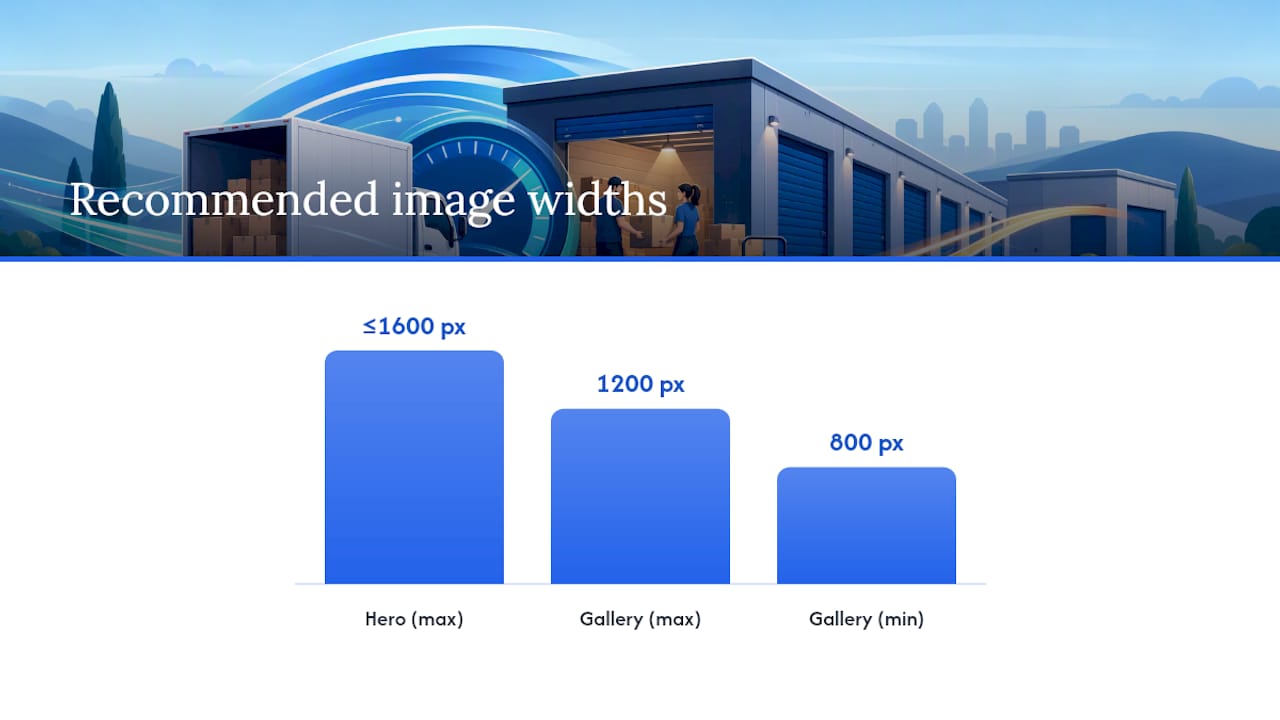
Fix your images first. This is where the majority of speed problems live. Storage operators routinely upload massive, uncompressed photos straight from a phone or a listing photographer, and that single habit accounts for more slow-loading pages than any other cause. A practical rule: keep hero images no wider than 1600 pixels and gallery or unit photos between 800 and 1200 pixels. Run everything through a compressor like TinyPNG or Squoosh before upload, and switch to modern formats.
Lazy-load anything below the fold. Your hero image needs to load immediately, but the twelve gallery photos of unit interiors further down the page do not. Lazy loading defers those images until a visitor actually scrolls near them, which shrinks your initial page weight dramatically. Most modern page builders and content management systems support this natively; if yours doesn't, a lightweight plugin will.
Audit every script running on your site. Storage sites accumulate plugins over the years: a chat widget from one vendor, a review pop-up from another, a review carousel a former marketing hire installed and forgot about. Each one adds a script that has to load, parse, and execute before the page feels responsive. Open your browser's developer tools, check the network tab, and remove anything that isn't actively driving reservations or calls. If you can't remember installing it, you probably don't need it.
Most hosts enable this by default, but it's worth confirming. Pair that with caching headers that tell browsers to store static assets like your logo and stylesheets locally, so a repeat visitor doesn't redownload them on every page.
Add a CDN. A content delivery network serves images and static files from a server physically closer to the visitor instead of routing every request back to your origin host. This alone can cut load time noticeably for visitors far from your facility's home region, and it takes pressure off your server during traffic spikes tied to seasonal promotions.
Kill the homepage slider. Autoplay image carousels are one of the most common speed offenders on storage sites, and they rarely earn their keep. Each slide often loads a full-size image whether or not the visitor ever sees it, and the animation itself consumes processing power on lower-end phones. If leadership insists on a slider, limit it to two slides and make sure both images are compressed and properly sized.
- Resize hero images to 1600 pixels wide or less; gallery photos to 800–1200 pixels.
- Convert to WebP or AVIF using TinyPNG or Squoosh before uploading.
- Lazy-load every image below the first screen of content.
- Defer or remove JavaScript from unused plugins, widgets, and old marketing tools.
- Enable GZIP or Brotli compression at the server level.
- Set browser caching headers for static assets.
- Add a CDN for image and file delivery.
- Cap homepage sliders at two slides, or drop them entirely.
Pro Tip: Before deleting any plugin, check if it's tied to your booking or payment flow. It's common for facilities to accidentally break their reservation system while chasing a faster PageSpeed score. Test the full reserve-to-confirmation path after every change.
Hosting, TTFB, and When You Actually Need a CDN
Time to First Byte (TTFB) measures how long your server takes to respond before content starts downloading. High TTFB values usually indicate infrastructure issues rather than frontend optimizations.
Shared hosting is the most common bottleneck here. Storage websites often sit on the cheapest hosting tier available because nobody revisited the plan after the site launched five years ago. If your facility now runs a booking widget, a live availability feed, and several high-traffic location pages, that original hosting plan is likely straining under load it was never built to handle. Improving TTFB usually means upgrading your host or adding server-side caching rather than tweaking front-end code.
A CDN solves a different problem: distance. Even with a fast host, a visitor in another region still has to wait for data to travel across the country or further. CDNs cache your static files, images, CSS, JavaScript, on servers positioned close to visitors, cutting that travel time dramatically. Caching layers built for cloud storage, like Google's Rapid Cache, demonstrate how much throughput improves when static assets sit closer to where they're requested rather than pulled fresh from origin every time. Edge storage providers built around SSD-backed delivery, such as Bunny's storage network, work on the same principle: keep the asset near the visitor, reduce the number of trips back to your origin server.
A few signals tell you it's time to act:
- Your TTFB stays above 600 milliseconds across multiple tests and locations.
- You manage multiple facility locations on one site and traffic has grown since launch.
- You run seasonal promotions that spike traffic beyond what your host handles smoothly.
- Your host doesn't offer server-side caching or a built-in CDN option.
If your current platform can't support these changes at all, it may be time to consider a rebuilt site on stronger infrastructure rather than layering more fixes on top of an aging foundation.
Prioritizing Fixes: A Two-Week Sprint That Actually Works
Not every fix deserves equal attention right now. The smartest approach ranks each item by impact against effort, then works down the list.
- Pull your waterfall chart and find the three biggest bars. These are almost always an oversized hero image, an unoptimized font file, or a blocking third-party script. Fixing these three items typically unblocks LCP more than any other single action.
- Score every remaining fix on impact versus effort. Image compression is high impact, low effort. Migrating hosts is high impact, high effort. Removing an unused plugin is low impact, low effort but still worth doing since it's fast. Tackle high-impact, low-effort items first.
- Week one: images, lazy load, and script cleanup. Day one, run your baseline tests and audit every image on the site. Days two through four, resize, compress, and lazy-load everything. Days five through seven, defer non-critical JavaScript and turn on compression and caching.
- Week two: CDN rollout and retesting. Configure your CDN, push it live, then rerun PageSpeed Insights, WebPageTest, and GTmetrix against the same pages you tested on day one. Compare the numbers directly.
- Set up ongoing monitoring before you close the project out. A one-time fix decays as new plugins and content get added, so this sprint needs a follow-up system, not a finish line.
Pro Tip: Keep a simple spreadsheet with your baseline LCP, INP, and CLS scores from day one alongside your post-sprint numbers. Owners are far more likely to approve future speed budgets when they can see the actual before-and-after difference.
Making Mobile Booking Instant, Not Just Faster
Most storage searches happen on a phone, often from someone who needs a unit today. Every design decision on mobile should assume that visitor has limited patience and a spotty connection.
Your "Reserve Now" or "Check Availability" button needs to appear in the first screen of content, before any scrolling. Burying your primary call to action under a slider, a promotional banner, and three paragraphs of facility history guarantees some visitors never see it. Trim what loads above the fold to the essentials: your facility name, a compressed hero image, unit availability or pricing, and the reserve button.
Responsive images matter more on mobile than desktop, since a phone shouldn't be downloading the same full-resolution image a desktop monitor uses. Serve appropriately sized versions based on screen width. Touch targets, meaning buttons and links, need enough space around them that a thumb doesn't miss and tap the wrong element, which is a common source of accidental exits.
- Place the reserve or call button above the fold on every page, not just the homepage.
- Serve mobile-appropriate image sizes instead of scaling down a desktop-sized file.
- Size every tappable button at least 44 pixels tall to avoid mis-taps.
- Avoid mobile-only heavy assets like autoplaying background video.
- Test on an actual phone over cellular data, not just a browser's mobile simulator.
Testing on your own phone over real cellular data catches problems a desktop simulator never will, especially around how a booking widget behaves when the connection drops mid-load.
Keeping Your Speed Gains From Slipping Backward
A speed fix that isn't maintained decays within months. New plugins get added, marketing swaps in a new hero banner, and a well-meaning employee installs a chat widget without checking its impact. Ongoing monitoring is what keeps the gains from disappearing quietly.
A workable cadence: check PageSpeed Insights scores monthly, and set up an alert or scheduled synthetic test so you catch regressions between manual checks rather than discovering them three months later when bookings drop.
Before uploading anything or adding a new tool, run it through a short checklist:
- Is every new image resized and compressed before it goes live?
- Does the new plugin or widget add a script, and is that script deferred?
- Has the reserve or call button's above-the-fold placement stayed intact?
- Did LCP, INP, or CLS shift after the change went live?
A simple monthly report tracking LCP, INP, CLS, and TTFB alongside your actual booking-flow completion times tells you whether speed work is translating into real conversions, not just better test scores. If you're also tracking how quickly review requests convert after a booking, you get a fuller picture of how site performance connects to actual revenue.
How Corvane Systems Handles Speed for Storage Operators
Fixing all of this while running a facility, or several, is a real time cost, which is why some operators hand the whole process to a managed team instead of chasing it themselves.
Technical audits specifically built around storage sites cover Core Web Vitals, image weight, hosting bottlenecks, and the local SEO signals that speed feeds into. That audit can be paired with a flat-rate service that handles Google Business Profile optimization, "storage near me" keyword targeting, and monthly performance reporting, so speed fixes aren't happening in isolation from other aspects of search visibility.
Managed work tends to make more sense than piecemeal DIY fixes in a few specific situations:
- You operate multiple facility locations and can't audit every location page manually every month.
- Nobody on staff has the technical background to interpret a waterfall chart or configure a CDN correctly.
- You need speed fixes and AI visibility (how your facility shows up in tools like ChatGPT and Perplexity) handled together rather than as separate projects.
- Your current site's foundation is old enough that a custom rebuild makes more sense than another round of patches.
Corvanesystems also runs AI visibility audits alongside the technical work, since a fast site that AI platforms can't parse correctly still leaves bookings on the table.
What Actually Deserves Your Attention First
Fix images, caching, and script bloat before you touch anything else. Those three items account for most of the slowness on storage sites, and none of them require a hosting migration or a developer retainer to start.
Be skeptical of heavy booking iframes and homepage sliders pushed by vendors who care more about a flashy demo than your actual load time. A reservation widget that takes four seconds to render defeats the purpose of every other fix you've made. Same goes for autoplay video backgrounds sold as "modern design." They rarely earn their keep on a phone screen.
Once your site is fast, the real test is whether bookings and calls actually go up. Track that number, not just your PageSpeed score. A facility that fixes speed but never checks whether reservations increased has done half the job.
Hosting upgrades and full rebuilds are worth the investment once you've squeezed what you can out of the free and low-cost fixes and you're still hitting a wall. Don't skip straight to a rebuild when a $20 compression tool would have solved most of it.
— Mike
Get Your Storage Site's Speed Fixed Without the Guesswork
The audit process is designed around storage sites, not general small business websites, so the fixes recommended align with common performance issues on such sites.

Instead of paying an hourly developer to chase image sizes one facility page at a time, or juggling separate SEO and speed consultants, a combined service can offer technical audits, fix recommendations, and ongoing local search and AI visibility work under one flat monthly rate with no contract lock-in. An audit typically surfaces the specific images, scripts, and hosting issues dragging down your Core Web Vitals, then maps those fixes against the same local SEO and AI visibility work already covered under the service. If you manage more than one location, that consistency across every facility page matters more than any single quick fix.
If you'd rather have someone else run the audit and handle the fixes, start with a visibility check at Corvanesystems and see exactly where your site is losing speed, ranking, and bookings.
Tools Worth Bookmarking
Run your own tests with PageSpeed Insights, WebPageTest, and GTmetrix, and compress images with TinyPNG or Squoosh before every upload. For teams that want to build speed and SEO skills in-house, GetVoucher's SEO training course covers the fundamentals behind most of the fixes in this guide. Google's own Core Web Vitals documentation is worth revisiting whenever thresholds or measurement methods change.
Sources
- 53% of mobile site visitors abandon if it takes more than 3 seconds to load a page
- PageSpeed Insights - Make your web pages fast on all devices
- What Google’s Core Web Vitals Mean for Your Self-Storage Operation